
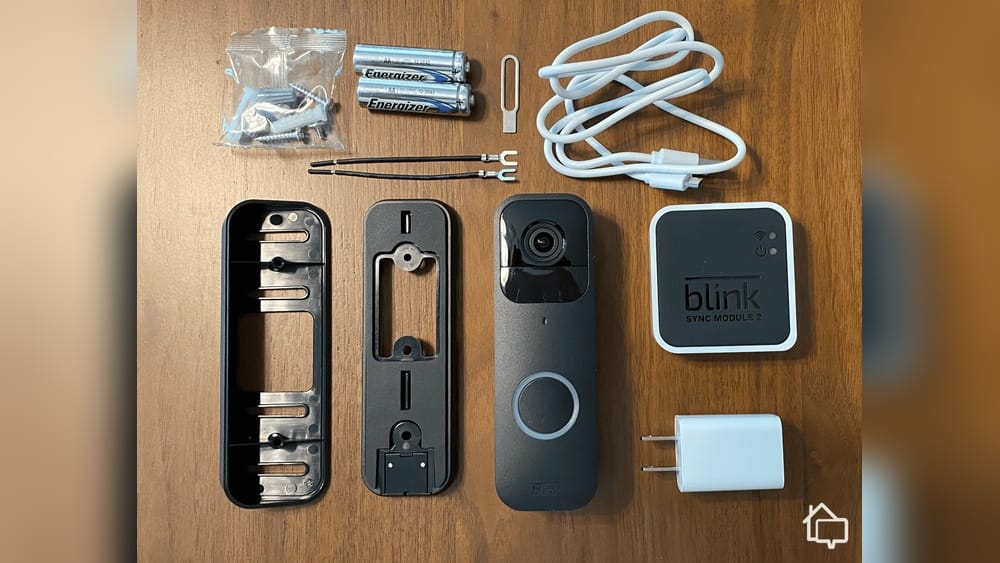
If you are thinking about adding a video doorbell to your home, the Blink Video Doorbell is probably on your list. This device is affordable and comes from a well-known brand, but does it really deliver what most homeowners need? Is Blink Video Doorbell good compared to the competition? Many people want a simple, reliable way to see and talk to visitors, watch for packages, and keep their home secure. But with so many options available, it can be hard to decide if Blink is the right choice.
In this article, you will get a complete, easy-to-understand review of the Blink Video Doorbell. We will cover how it works, what it offers, how it compares to other brands, and what real users say. You will see detailed comparisons, real examples, practical tips, and answers to common questions.
By the end, you will know if the Blink Video Doorbell is good for your home and your needs.
What Is The Blink Video Doorbell?
The Blink Video Doorbell is a smart device made by Blink, which is owned by Amazon. It lets you see, hear, and talk to people at your door using your smartphone. The device connects to your Wi-Fi and sends alerts when someone rings the bell or when it detects motion. You can watch live video, talk through two-way audio, and get notifications wherever you are.
Some key features include:
- 1080p HD video for clear images
- Two-way audio so you can speak to visitors
- Motion detection with customizable zones
- Night vision for low-light situations
- Works with Alexa for voice control
- Can be set up wired or wire-free (battery powered)
You can use the Blink app to manage settings, view video clips, and get alerts. The doorbell works with other Blink cameras, so you can create a full security system if you want.
Design And Build Quality
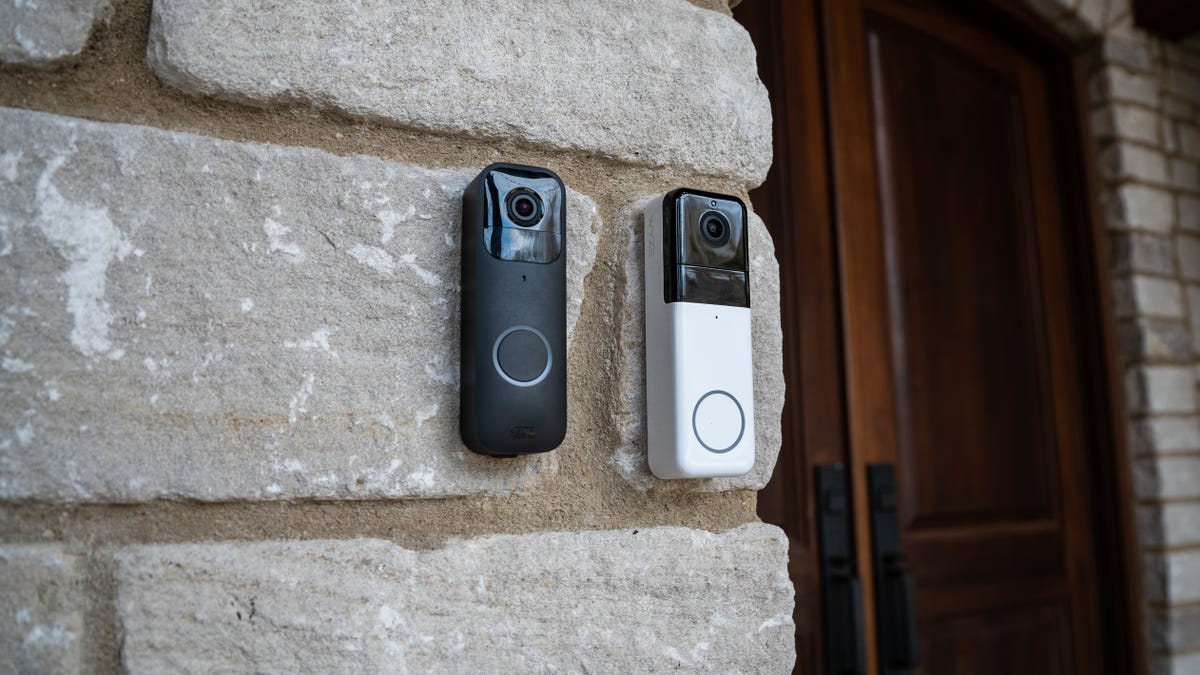
The Blink Video Doorbell has a simple, minimalist look. It is rectangular and slim, with a large button and a built-in camera above it. You can choose between black and white finishes to match your home.
The build is mostly plastic, but it feels solid and durable. It is IP54 rated, which means it is protected against dust and water splashes. This is enough for most outdoor use, but it is not as waterproof as some more expensive models.
The device is lightweight and can be mounted easily on most door frames or walls. All mounting hardware is included in the box, along with a tool to help you open the battery compartment.
Dimensions And Specs
Here are the main physical details of the Blink Video Doorbell:
| Feature | Specification |
|---|---|
| Size | 5.1 x 1.65 x 1.06 inches |
| Weight | 3.9 ounces (110 grams) |
| Colors | Black, White |
| Weather Resistance | IP54 |
| Power | 2 AA lithium batteries or wired (16-24V AC) |
The design is not flashy, but it blends in well with most homes. The button is large and easy for visitors to press, even in the dark.
Video And Audio Performance
One of the most important things about any video doorbell is the quality of its video and audio. The Blink Video Doorbell has a 1080p HD camera. This means you get clear images in daylight. You can recognize faces, see packages, and check the area around your door.
The camera has a 135° horizontal field of view. This is wide enough to cover most porches and entryways, but some more expensive doorbells have a wider view.
Night vision is included, using infrared LEDs. At night, the video turns black and white, but you can still see people and objects clearly within about 15 feet. The transition between day and night vision is automatic.
Two-way audio is a key feature. When someone rings the bell, you get a notification and can talk to them through your phone. The audio is clear enough for short conversations, but there is a slight delay, especially if your Wi-Fi signal is weak.
Video Quality Comparison
How does Blink compare to other popular brands? Here’s a quick look:
| Brand | Video Resolution | Field of View | Night Vision |
|---|---|---|---|
| Blink Video Doorbell | 1080p | 135° | Yes (infrared) |
| Ring Video Doorbell (2nd Gen) | 1080p | 155° | Yes (infrared) |
| Arlo Essential Video Doorbell | 1536p | 180° | Yes (infrared) |
| Google Nest Doorbell (Battery) | 960 x 1280 | 145° | Yes (infrared) |
As you can see, Blink is competitive on video quality, but some brands offer a wider field of view or a slightly sharper image.
Installation And Setup
Installing the Blink Video Doorbell is simple, even if you are not a tech expert. You can choose between battery-powered (wire-free) or wired installation.
Battery-powered (wire-free) Setup
This is the easiest option. You just need to:
- Download the Blink app on your phone.
- Insert two AA lithium batteries into the doorbell.
- Scan the QR code in the app to add the device.
- Mount the doorbell using the included screws and bracket.
The batteries can last up to two years with average use, according to Blink. However, frequent motion alerts or live viewing will drain them faster. If you live in a high-traffic area, expect to change batteries more often.
Wired Setup
If you want the doorbell to ring your existing chime, or if you want unlimited power, you can connect it to your current doorbell wiring (16-24V AC).
The steps are similar, but you need to:
- Turn off the power to your doorbell circuit.
- Remove your old doorbell.
- Connect the two wires to the Blink Video Doorbell’s terminals.
- Secure the device to the wall or door frame.
- Restore power.
Wired setup is still quick, but you may need a screwdriver and a little patience.
Setup Tips And Common Mistakes
- Make sure your Wi-Fi signal is strong at your front door. Weak Wi-Fi is a common cause of video lag or missed notifications.
- Use the included wedge mount if your entryway is at an angle. This helps you get a better view of visitors.
- If using batteries, always use lithium AA batteries for the best performance. Regular alkaline batteries will die quickly.
- Be careful with the battery cover. It can be tricky to open if you do not use the included tool.
Features And Functionality
The Blink Video Doorbell offers many features that most people need from a smart doorbell. However, some features require extra accessories or a paid subscription.
Motion Detection And Alerts
The doorbell uses a PIR sensor to detect motion. You can adjust the motion sensitivity and set activity zones in the app, so you only get alerts for important areas. When motion is detected, you get a notification on your phone.
There is a short delay (about 2–3 seconds) between motion and notification, which is normal for budget video doorbells. However, some users notice that very fast-moving people or cars may not always trigger an alert.
Two-way Audio
You can talk to visitors using your phone’s microphone and speaker. This is great for telling delivery drivers where to leave packages or for talking to guests when you are not home.
Live View
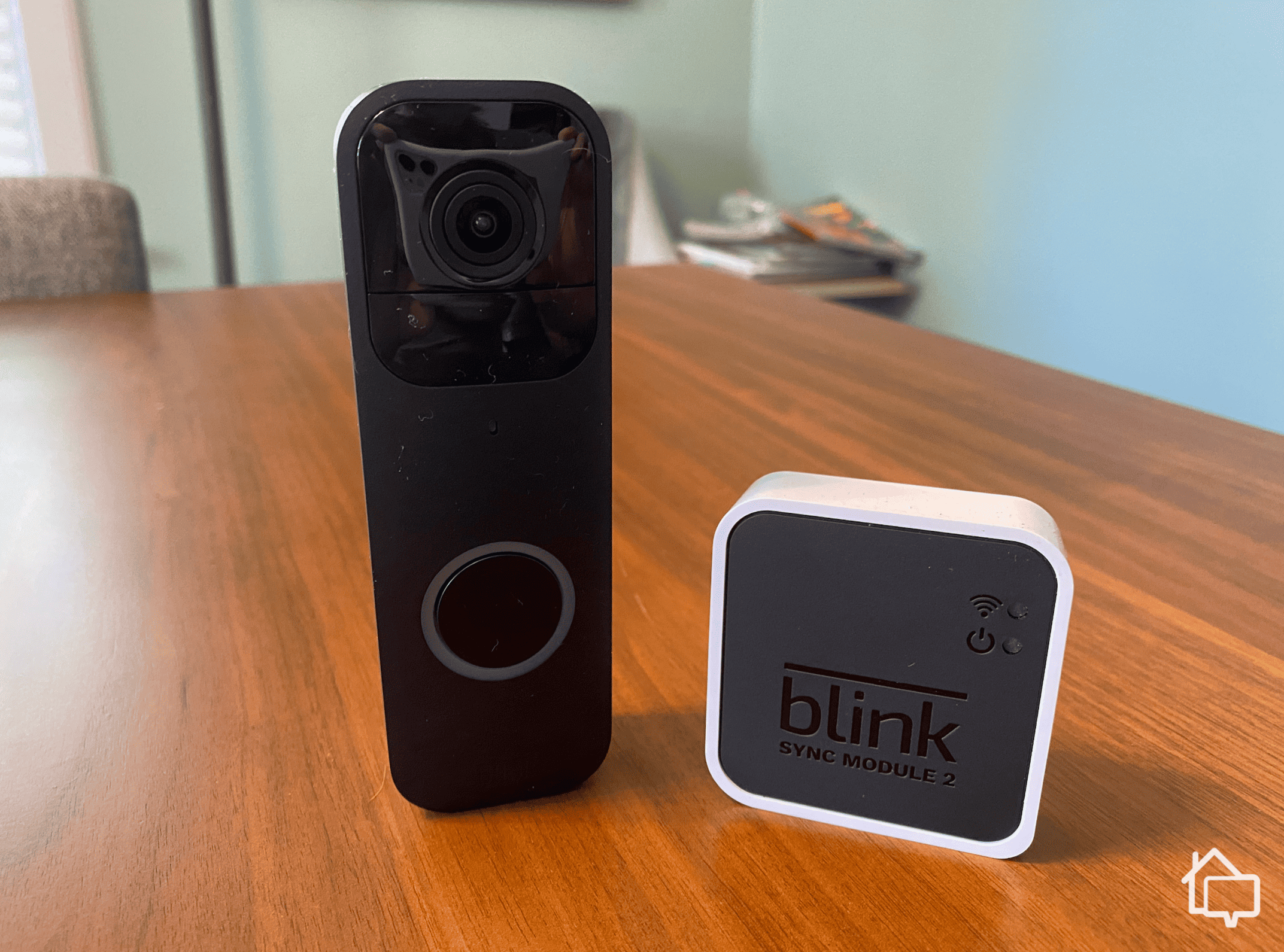
You can watch a live video stream from your doorbell at any time. However, if you use the battery-powered mode and do not have the Blink Sync Module 2, you only get live view when someone presses the doorbell. With the Sync Module 2, you can access live view at any time, even on battery power.
Alexa Integration
If you have an Amazon Echo Show or another Alexa device with a screen, you can view the Blink Video Doorbell feed by asking Alexa. You can also get alerts and talk to visitors through your Echo devices.
Local And Cloud Storage
The Blink Video Doorbell gives you two ways to save video clips:
- Cloud storage: With a Blink Subscription Plan (about $3/month per device or $10/month for unlimited devices), your videos are saved in the cloud for up to 60 days. You can watch, download, and share clips from anywhere.
- Local storage: If you buy the Blink Sync Module 2 (sold separately) and plug in a USB drive, you can save videos locally with no monthly fee. However, you need to be on the same Wi-Fi network to view these clips.
Without a subscription or Sync Module 2, you can only get live alerts and view live video, but you cannot save or review recordings.
Customization
In the Blink app, you can:
- Set motion detection zones
- Adjust sensitivity
- Turn alerts on or off
- Change notification settings
- Add other Blink cameras to your system
This makes it easy to set up the doorbell for your home’s unique needs.
Price And Value For Money
The Blink Video Doorbell is one of the most affordable major-brand video doorbells on the market. As of early 2024, the price is around $49.99 for the doorbell alone. The Sync Module 2 adds about $35-$40.
When you compare this price to other brands with similar features, Blink is a clear winner for budget-conscious buyers. There are no required monthly fees unless you want cloud storage.
Value Breakdown
What Do You Get For Your Money?
- Low upfront cost: Ideal for renters or people trying smart home devices for the first time.
- Flexible installation: Works with or without existing doorbell wiring.
- No required subscription: You can use it for free if you do not need to save video clips.
- Add-on options: Expand with other Blink cameras or the Sync Module for more features.
However, you may need to buy extra accessories to get the full experience (Sync Module 2, USB drive, or a subscription).
Real Savings Example
If you use only local storage, you pay about $90–$100 once for the doorbell and Sync Module 2, with no monthly costs. For families who want to save money but still get basic security, this is a strong choice.
Credit: www.cnet.com
Pros And Cons
To help you decide if the Blink Video Doorbell is good for your needs, here are the main strengths and weaknesses:
Pros
- Affordable price compared to most competitors
- Easy setup for both battery and wired use
- Clear 1080p video and good night vision
- Works with Alexa for smart home integration
- Flexible storage options (cloud or local)
- Long battery life with lithium AAs
- Customizable motion zones
Cons
- Limited field of view (not as wide as some models)
- Delay in motion alerts (typical for budget devices)
- No free video storage unless you buy the Sync Module 2
- Plastic build feels less premium
- No pre-buffering (misses a few seconds before motion starts)
- Local storage access requires being on the same network
How Blink Compares To The Competition
Let’s see how the Blink Video Doorbell stands up against other popular options in the market.
| Feature | Blink Video Doorbell | Ring Video Doorbell (2nd Gen) | Google Nest Doorbell (Battery) | Arlo Essential Doorbell |
|---|---|---|---|---|
| Price | $49.99 | $99.99 | $179.99 | $129.99 |
| Video Quality | 1080p | 1080p | 960×1280 | 1536p |
| Field of View | 135° | 155° | 145° | 180° |
| Power | Battery/Wired | Battery/Wired | Battery/Wired | Battery/Wired |
| Cloud Storage | Optional | Subscription | Subscription | Subscription |
| Local Storage | With Sync Module 2 | No | No | No |
| Smart Home Integration | Alexa | Alexa | Google Assistant | Alexa, Google Assistant |
Blink stands out for its low price and local storage option. It is a great entry-level choice. However, if you want a wider field of view, faster notifications, or deeper smart home integration, you may prefer a more expensive model.
Real-world User Experiences
What do real users say about the Blink Video Doorbell? Here are some common themes from thousands of reviews:
- Simple installation: Most users report setup takes less than 15 minutes, even without tech skills.
- Reliable notifications: Many find the alerts timely and helpful, though some mention short delays.
- Good battery life: With average use, batteries often last close to the promised two years.
- Picture quality: Daytime video is sharp; night vision is good for seeing faces up to about 10-15 feet.
- App is easy to use: The Blink app is simple and rarely crashes.
However, some users highlight issues:
- Wi-Fi sensitivity: The device needs a strong, stable Wi-Fi signal. Weak connections cause lag or missed alerts.
- Limited free features: Without the Sync Module or a subscription, there is no video recording.
- Plastic feel: Some wish for a more premium build.
Two Insights Beginners Often Miss
- Local storage does not mean cloud backup: If you use the Sync Module 2 and USB drive, your videos are only saved locally. If the device is stolen, your clips are gone unless you download them. For package theft cases, cloud storage is safer.
- No person or package detection: Unlike some higher-end brands, Blink’s motion alerts are basic. It cannot tell the difference between a car, animal, or person, which can lead to more false alerts if your camera faces a busy street.
Who Should Buy The Blink Video Doorbell?
This device is best for:
- People who want basic video doorbell features without spending a lot
- Renters who need an easy, wireless solution
- Homeowners who already use Alexa or Blink cameras
- Anyone who prefers local storage and avoiding monthly fees
It may not be the best choice if you:
- Need advanced features like face recognition or package alerts
- Want the widest possible view of your entryway
- Rely on Google Home or Apple HomeKit for smart home control
- Have poor Wi-Fi at your door

Credit: www.amazon.com
Tips For Getting The Most From Your Blink Video Doorbell
To maximize the value and performance of your doorbell:
- Place your router close to the doorbell, or use a Wi-Fi extender if the signal is weak.
- Adjust motion zones to avoid busy streets or trees that can trigger false alerts.
- Regularly check battery levels in the app if using battery power, especially in cold weather.
- Download important clips right away if you use local storage, especially if you are worried about theft.
- Test Alexa integration to make sure alerts and live view work on your Echo devices.
Frequently Asked Questions
Credit: www.safehome.org
What Happens If The Blink Video Doorbell Is Stolen?
If your doorbell is stolen, it will lose power and connection. If you use cloud storage, your video clips are still safe in your Blink account. With local storage, the clips are stored on the Sync Module 2’s USB drive inside your home, not on the doorbell itself.
However, if the thief also takes the Sync Module, your videos may be lost.
Can I Use The Blink Video Doorbell Without A Subscription?
Yes, you can use the doorbell without a subscription. You will still get live notifications and can watch live video. However, you cannot save or review video clips unless you use the Sync Module 2 for local storage or pay for a Blink Subscription Plan.
How Long Do The Batteries Really Last?
With normal use (about 5–10 events per day), the AA lithium batteries can last up to two years. If you get many motion alerts or use live view often, the batteries may need replacing sooner. Cold weather can also shorten battery life.
Does The Blink Video Doorbell Work With Google Home Or Apple Homekit?
No, the Blink Video Doorbell only works with Amazon Alexa for smart home integration. It does not support Google Home or Apple HomeKit.
How Secure Is The Blink Video Doorbell?
Blink uses AES 128-bit encryption for video and data. Your clips are stored securely in the cloud or on your local device. Always use a strong password for your Blink account and keep your app updated for the best security. For more details on smart home security, check out Consumer Reports.
If you are looking for a reliable, simple, and affordable video doorbell, the Blink Video Doorbell is a strong choice. While it does not offer all the advanced features of higher-priced brands, it covers the basics very well. With easy installation, long battery life, and flexible storage options, it is a smart pick for many homes. Just be sure to understand its limitations and set it up properly for the best experience.