
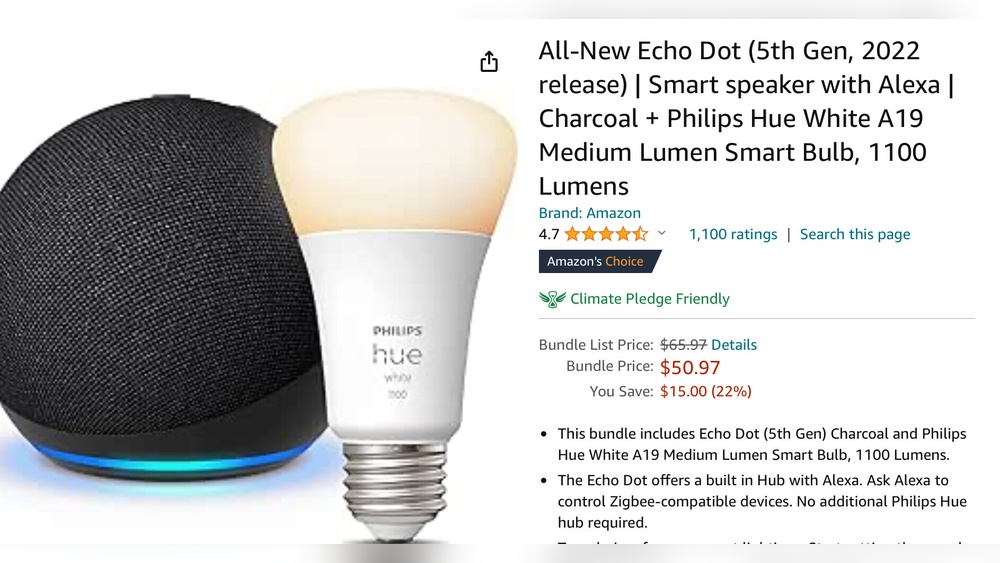
Is Echo Dot A Zigbee Hub?
Smart homes are getting more popular every year. People want to control their lights, locks, and thermostats with just a voice command or a tap on their phone. Amazon’s Echo Dot is one of the most popular devices for this, but there’s a common question: Is Echo Dot a Zigbee hub? This might sound simple, but the answer has some details that many people miss. Knowing the truth helps you decide if Echo Dot is enough for your smart home, or if you need something more.
Amazon’s Echo Dot is well-known for its voice assistant, Alexa, and its affordable price. It’s often the first device people buy when starting with smart home automation. But while Echo Dot connects to many devices, there are limits to what it can do.
If you’re thinking of building a smart home with Zigbee devices, you need to understand what the Echo Dot offers and what it does not. In this article, we’ll break down the technical facts, compare Echo Dot to other hubs, and guide you on making the best choice for your home.
If you’re not a tech expert, don’t worry—everything here is explained in simple, clear English.
What Is Zigbee?
Many people hear the word Zigbee but don’t know what it means. Zigbee is a wireless technology that lets smart devices talk to each other. It’s used for things like smart bulbs, locks, sensors, and plugs. Zigbee is different from Wi-Fi and Bluetooth because it uses less power and can connect many devices together in a mesh network.
Here are some key facts about Zigbee:
- It’s mainly used in smart home devices.
- Zigbee devices can connect to each other without needing a Wi-Fi signal.
- It’s known for low energy use, which is good for battery-powered gadgets.
- Zigbee allows devices to work together, even if some are far from your router.
For example, if you have a Zigbee light bulb in your living room and a Zigbee door sensor in your bedroom, they can communicate through each other, not just through a central hub. This makes Zigbee networks reliable and flexible.
Echo Dot: Features And Limitations
The Echo Dot is a small, affordable smart speaker. It comes with Alexa, Amazon’s voice assistant. You can use Echo Dot to play music, answer questions, set timers, or control smart devices. But when it comes to connecting with Zigbee gadgets, Echo Dot’s abilities are limited.
Key Features Of Echo Dot
- Built-in Alexa voice assistant
- Connects to Wi-Fi and Bluetooth
- Can control many smart home devices (lights, plugs, thermostats)
- Small size and simple design
- Affordable price
What Echo Dot Can And Cannot Do
Echo Dot can control smart devices if those devices work with Alexa. Many Wi-Fi devices (like Philips Hue bulbs or TP-Link plugs) connect directly to Alexa. The Echo Dot sends commands to them through your Wi-Fi network.
But Zigbee devices are different. Most Zigbee gadgets need a Zigbee hub—a special device that understands Zigbee signals and connects them to your Wi-Fi. Echo Dot does not have Zigbee hardware built in. That means it cannot talk directly to Zigbee devices.
Here is a comparison of Echo Dot’s smart home support:
| Device Type | Echo Dot Support | Requires Extra Hub? |
|---|---|---|
| Wi-Fi Devices | Yes | No |
| Bluetooth Devices | Limited | No |
| Zigbee Devices | No | Yes |
This table shows that Echo Dot is not a Zigbee hub by itself. If you want to use Zigbee devices, you will need another hub.

Credit: www.amazon.com
Zigbee Hubs: What Are They?
A Zigbee hub is a device that lets Zigbee gadgets connect to your home network. It listens for Zigbee signals and translates them into commands your Wi-Fi can understand. Zigbee hubs are usually built into some smart speakers or sold as separate devices.
Popular Zigbee hubs include:
- Amazon Echo (4th Generation) – This smart speaker has a built-in Zigbee hub.
- Samsung SmartThings Hub – A separate box that connects Zigbee devices to your network.
- Philips Hue Bridge – For Philips Hue bulbs and accessories.
- Aqara Hub – For Aqara smart home products.
With a Zigbee hub, you can control Zigbee devices from your phone or with voice commands. The hub acts as a bridge between Zigbee and your home Wi-Fi.
How Zigbee Hubs Work
- They receive Zigbee signals from devices (like sensors or bulbs)
- They connect to your Wi-Fi router
- They let you control Zigbee devices through apps or voice assistants
Without a Zigbee hub, Zigbee devices cannot talk to your Echo Dot or other Wi-Fi gadgets. This is a key point many beginners miss.
Echo Dot Vs. Echo Devices With Zigbee
Amazon sells several Echo models. Some have Zigbee hubs built in, but most do not. It’s easy to get confused, so let’s compare the main models.
| Echo Model | Zigbee Hub Built-In? | Smart Home Support |
|---|---|---|
| Echo Dot (all versions) | No | Wi-Fi, some Bluetooth |
| Echo (4th Gen) | Yes | Wi-Fi, Zigbee, Bluetooth |
| Echo Plus (discontinued) | Yes | Wi-Fi, Zigbee, Bluetooth |
| Echo Show 10 (3rd Gen) | Yes | Wi-Fi, Zigbee, Bluetooth |
| Echo Show 5/8 | No | Wi-Fi, Bluetooth |
The main point: Echo Dot does not have a Zigbee hub. If you want to use Zigbee devices with Alexa, you need an Echo model with a Zigbee hub (like Echo 4th Gen) or a separate Zigbee hub.
Why Zigbee Matters For Smart Homes
Why do people want Zigbee in their smart homes? There are several important reasons:
- Zigbee devices use less power, so they work well for sensors or battery-powered gadgets.
- Zigbee networks are reliable because devices help each other stay connected.
- Zigbee lets you connect many devices without slowing down your Wi-Fi.
For example, Zigbee is popular for door sensors, motion sensors, and light bulbs. It’s also used in smart locks and thermostats. If you want a smart home with many devices, Zigbee is often the best choice.
Setting Up Zigbee Devices With Echo Dot
If you already own an Echo Dot and want to use Zigbee devices, you need to add a Zigbee hub. Here’s how you can do it:
- Buy a Zigbee hub (like Samsung SmartThings or Philips Hue Bridge).
- Plug the hub into your Wi-Fi router.
- Follow the hub’s setup instructions to connect it to your network.
- Add Zigbee devices to the hub (using the hub’s app).
- Link the hub to Alexa (in the Alexa app).
After setup, you can control Zigbee devices through Alexa, but Echo Dot is not doing the Zigbee work. The hub is the bridge.
Example: Using Philips Hue Bulbs
Philips Hue bulbs use Zigbee. If you want to control them with Echo Dot, you need the Hue Bridge. You connect the bridge to your router, add bulbs in the Hue app, and then link your Hue account to Alexa. Now you can say, “Alexa, turn on the living room lights,” and Echo Dot will send the command through the Hue Bridge.

Credit: slimhuisje.nl
Common Misconceptions
Many people think Echo Dot is a Zigbee hub because it can control smart devices. This is a mistake. It controls Wi-Fi devices, not Zigbee ones, unless there’s a hub in the middle.
Here are some common misconceptions:
- “Echo Dot can talk to all smart devices.” Actually, Echo Dot only talks to devices that use Wi-Fi or Alexa-compatible Bluetooth.
- “Echo Dot controls Zigbee bulbs directly.” It does not. You need a hub like Hue Bridge.
- “All Echo devices have Zigbee built in.” Only some Echo models have Zigbee support.
If you want to avoid problems, check your device’s requirements before buying.
Advantages And Disadvantages Of Using Echo Dot
Advantages
- Affordable price
- Easy to set up and use
- Works well with Wi-Fi smart devices
- Alexa is helpful for daily tasks
Disadvantages
- No Zigbee hub built in
- Limited smart home compatibility without extra hubs
- Cannot control Zigbee-only devices directly
For many people, Echo Dot is a good starting point, but it’s not enough for a complex smart home.
Alternatives To Echo Dot For Zigbee Support
If Zigbee is important for your smart home, consider these alternatives:
- Amazon Echo (4th Gen): Has Zigbee hub built in. You can control Zigbee devices directly.
- Samsung SmartThings: A powerful hub for Zigbee and Z-Wave devices.
- Philips Hue Bridge: For Hue bulbs and accessories.
- Aqara Hub: For Aqara smart home products.
Here’s a comparison of Zigbee hub options:
| Hub Name | Zigbee Support | Alexa Integration | Price Range |
|---|---|---|---|
| Echo (4th Gen) | Built-in | Yes | $80-100 |
| SmartThings Hub | Built-in | Yes | $70-120 |
| Hue Bridge | Built-in | Yes | $45-60 |
| Aqara Hub | Built-in | Yes | $50-70 |
If you already have Echo Dot, you can add a separate hub. But if you’re starting fresh, Echo (4th Gen) is a simple choice.
Real-world Examples And Data
Smart homes are not just a trend. According to Statista, over 60 million US households had at least one smart home device in 2023. Most people start with smart speakers like Echo Dot, but later want to add sensors and bulbs that use Zigbee.
Here are some real-world examples:
- John’s Experience: John bought Echo Dot and Philips Hue bulbs. He couldn’t connect them directly. After buying Hue Bridge, everything worked smoothly.
- Lisa’s Mistake: Lisa thought Echo Dot could control her Zigbee door sensor. It didn’t work. She had to buy SmartThings hub to make it work.
- Maria’s Upgrade: Maria switched from Echo Dot to Echo (4th Gen) to control Zigbee devices without extra hubs. She found setup easier and more reliable.
These stories show that planning is important. If you want Zigbee, pick devices carefully.
Practical Tips For Smart Home Buyers
If you’re new to smart homes, here are some tips:
- Check device compatibility. Not all smart devices work with all hubs.
- Plan for future upgrades. If you want to add more devices later, choose a hub that supports Zigbee.
- Read product details. Look for “Zigbee support” in the specs.
- Don’t assume Echo Dot is enough. If you want Zigbee, you need another hub or a different Echo.
- Avoid mixing too many brands. Sometimes, brands don’t work well together.
- Use the Alexa app to link hubs. This makes control easier.
Many beginners think Echo Dot can do everything. It’s a good start, but for Zigbee, you need more.
Echo Dot And Matter: The New Standard
There’s a new smart home standard called Matter. Matter aims to make smart devices work together, no matter the brand. Some Echo devices are getting Matter updates, but Echo Dot (3rd and 4th Gen) does not support Zigbee directly, even with Matter.
Matter is promising, but for Zigbee devices, you still need a Zigbee hub or a smart speaker with Zigbee built in.
Technical Details: Why Echo Dot Lacks Zigbee
Echo Dot does not have Zigbee hardware inside. Zigbee uses a special radio chip. Only Echo devices with Zigbee hubs have this chip. Echo Dot’s hardware is designed for Wi-Fi and basic Bluetooth.
If you want to understand the technical side:
- Zigbee works on the 2.4 GHz frequency.
- It uses mesh networking.
- Echo Dot’s chip cannot handle Zigbee signals.
This is why Echo Dot cannot act as a Zigbee hub.
Alexa Routines And Zigbee
Alexa lets you create routines—custom actions that happen when you say a command or when a device changes state. If you want to use Zigbee sensors (like a motion detector) in routines, you need a Zigbee hub connected to Alexa.
For example, you can create a routine: “When motion is detected, turn on the lights.” But Echo Dot alone cannot trigger routines from Zigbee sensors. With a hub, it’s possible.
Security And Reliability
Smart home security is important. Zigbee is considered secure because it uses encryption. But if you connect Zigbee devices through Echo Dot (with a hub), your security depends on the hub and the Alexa app.
Tips for better security:
- Use strong passwords for your hub and Alexa account.
- Keep your hub’s firmware updated.
- Only buy Zigbee devices from trusted brands.
Zigbee networks are also reliable. If one device fails, others can keep the network running.
Common Mistakes Beginners Make
- Buying Zigbee devices without a hub, thinking Echo Dot can connect directly.
- Mixing too many brands, which causes compatibility issues.
- Forgetting to check if their Echo device has Zigbee support.
- Not reading setup instructions for hubs.
- Assuming Matter will solve everything (Matter is new and not fully supported yet).
If you avoid these mistakes, your smart home will work better and be less frustrating.

Credit: community.smartthings.com
Expert Insights: What You Should Know
Many experts recommend starting with a hub that supports both Zigbee and Wi-Fi. This gives you flexibility. If you want a simple setup, Echo (4th Gen) is a good choice. But if you need advanced features, SmartThings is better.
Another insight: Zigbee is best for large homes with many devices. Wi-Fi works well for small setups. If you plan to expand, choose Zigbee.
Also, Zigbee devices often cost less and use less power than Wi-Fi devices.
Should You Upgrade Your Echo Dot?
If you already own Echo Dot, you don’t need to throw it away. You can add a Zigbee hub and link it to Alexa. But if you want fewer devices and cables, upgrading to Echo (4th Gen) is easier.
Things to consider:
- How many Zigbee devices do you want?
- Do you want routines triggered by sensors?
- Is simplicity important to you?
If you answer “yes” to these, consider upgrading.
Making The Right Choice For Your Smart Home
Smart homes are about convenience. But choosing the right devices is important. Echo Dot is a good start, but not a Zigbee hub. If you want to use Zigbee devices, you need a hub or a different Echo.
Here’s a simple decision guide:
- If you want basic smart home control: Echo Dot is enough.
- If you want Zigbee sensors and bulbs: Buy a Zigbee hub or Echo (4th Gen).
- If you want advanced routines: Choose a hub with Zigbee support.
Plan your smart home for the future. It’s better to spend a little more for flexibility.
Frequently Asked Questions
Is Echo Dot A Zigbee Hub?
No, Echo Dot does not have Zigbee hardware. It cannot connect directly to Zigbee devices. You need a separate Zigbee hub or a different Echo with Zigbee support.
Can Echo Dot Control Zigbee Devices With A Hub?
Yes, Echo Dot can control Zigbee devices if you add a hub (like SmartThings or Hue Bridge) and link it to Alexa. The hub connects Zigbee devices to your home network.
Which Echo Devices Have Zigbee Built In?
Echo (4th Generation), Echo Plus (discontinued), and Echo Show 10 (3rd Gen) have Zigbee hubs built in. Echo Dot and Echo Show 5/8 do not.
What’s The Difference Between Zigbee And Wi-fi Devices?
Zigbee devices use low power and connect in a mesh network. Wi-Fi devices connect directly to your router and use more power. Zigbee is better for sensors and large homes.
Is Matter Replacing Zigbee?
Matter is a new smart home standard, but it does not replace Zigbee. Many Zigbee devices still need a Zigbee hub. Matter aims to make devices work together, but Zigbee remains important.
Final Thoughts
Echo Dot is a great device for starting your smart home journey, but it’s not a Zigbee hub. If you want to use Zigbee sensors, bulbs, or other gadgets, you need to add a Zigbee hub or upgrade to an Echo with Zigbee support.
Making the right choice saves time, money, and frustration. Always check device compatibility, plan for future upgrades, and avoid common mistakes. With this knowledge, you can build a smart home that works smoothly and fits your needs.
If you want more technical details about Zigbee, visit Wikipedia for a deeper explanation. Smart homes are evolving fast, and with the right setup, you’ll enjoy comfort and control every day.