
Is Eero A Zigbee Hub?
Smart homes are becoming more popular every year. Many people want lights, locks, thermostats, and sensors that work together automatically. But connecting all these devices is not always simple. Different brands use different systems, and sometimes you need special hubs to make things talk to each other. One question many users ask is: “Is Eero a Zigbee hub?” If you are thinking about smart home upgrades, or you already own Eero Wi-Fi routers, understanding this question can save you time, money, and frustration. Let’s dig deep into what Eero offers, how Zigbee works, and whether Eero can be your Zigbee hub.
Understanding Zigbee: The Basics
Zigbee is a wireless protocol designed for smart home devices. It’s not Wi-Fi or Bluetooth. Zigbee lets gadgets like light bulbs, motion sensors, and door locks communicate with each other. It’s especially good for low-power devices, so batteries last longer. Zigbee works in the 2.4 GHz frequency band, which is also used by Wi-Fi, but it uses less energy and can form a mesh network. In a mesh network, devices repeat signals, so the network gets stronger as you add more gadgets.
Some key benefits of Zigbee include:
- Low power consumption: Devices stay connected with minimal battery use.
- Mesh networking: Each device extends the network, improving coverage.
- Interoperability: Many brands use Zigbee, so you can mix devices from different companies.
However, Zigbee devices need a hub or gateway. This hub talks to Zigbee gadgets and connects them to your Wi-Fi, so you can control everything with your phone or voice assistant.
Eero Routers: What They Offer
Eero is a well-known brand for mesh Wi-Fi routers. Their routers are popular because they are simple to set up, stable, and provide strong Wi-Fi coverage in homes of all sizes. Eero routers can also act as hubs for some smart home devices, which is why many people wonder about their compatibility with Zigbee.
Eero Models And Smart Home Features
Eero has released several models over the years. The most common are:
- Eero (original)
- Eero Pro
- Eero 6
- Eero Pro 6
- Eero 6E
- Eero Pro 6E
- Eero Max 7
Each model offers different features. The newer models, especially those with “6” or “6E,” are designed for faster speeds and better coverage. Some Eero models also include smart home radios, which means they can communicate with certain types of devices beyond Wi-Fi.
Eero’s Smart Home Hub Capabilities
Starting with the Eero 6 series, Eero routers began including a built-in smart home hub. This hub supports protocols like Zigbee, but not all Eero models have this feature. For example, the original Eero and Eero Pro do not have a smart home hub. The Eero 6, Eero Pro 6, and newer models do. This is an important detail: only some Eero routers can act as a Zigbee hub.
Zigbee Support In Eero: Which Models Have It?
Not all Eero routers are Zigbee hubs. Let’s look at which models support Zigbee and what that means.
Eero Models With Zigbee Hub
The following Eero models include a built-in Zigbee hub:
- Eero 6
- Eero Pro 6
- Eero 6E
- Eero Pro 6E
- Eero Max 7
These routers have a smart home radio that supports Zigbee. When you use one of these models, you can connect compatible Zigbee devices directly to your Eero network.
How Eero’s Zigbee Hub Works
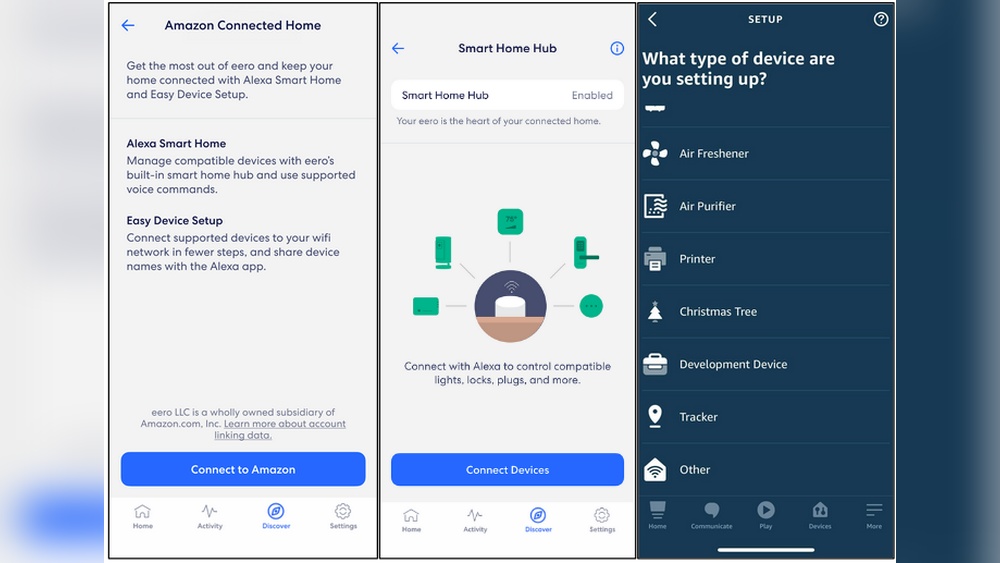
Eero’s Zigbee hub is not a separate device. It’s part of the router hardware. When you set up your Eero router, you can add Zigbee devices through the Eero app. The app guides you to connect and control Zigbee gadgets like smart lights, plugs, and sensors.
However, there are some things to keep in mind:
- Amazon Alexa required: The Zigbee hub in Eero works through integration with Amazon Alexa. You need to link your Eero with your Alexa account in the Eero app.
- Limited device support: Eero’s Zigbee hub supports only certain Zigbee devices. It’s not as universal as dedicated Zigbee hubs like the Samsung SmartThings or the Amazon Echo with Zigbee.
Models Without Zigbee Hub
Older Eero routers do not include Zigbee support. This includes:
- Eero (original)
- Eero Pro
If you have one of these models, you cannot use them as a Zigbee hub. You would need a separate hub for Zigbee devices.
Here’s a quick comparison of Eero models and Zigbee support:
| Eero Model | Zigbee Hub Support | Smart Home Radio |
|---|---|---|
| Eero (original) | No | No |
| Eero Pro | No | No |
| Eero 6 | Yes | Zigbee |
| Eero Pro 6 | Yes | Zigbee |
| Eero 6E | Yes | Zigbee |
| Eero Pro 6E | Yes | Zigbee |
| Eero Max 7 | Yes | Zigbee |
Setting Up Zigbee Devices With Eero
If you have a compatible Eero router, setting up Zigbee devices is straightforward. Here’s a practical guide:
Step-by-step Setup
- Install your Eero router and connect it to your internet.
- Download the Eero app (iOS or Android).
- Link your Eero with Amazon Alexa in the app. This step is required for Zigbee device setup.
- Choose “Add Device” in the Eero app. Select the type of Zigbee device you want to connect.
- Put your Zigbee device in pairing mode. Usually, this means pressing a button or following the device’s instructions.
- Follow prompts in the Eero app to complete the connection.
Once connected, you can control your Zigbee devices through the Alexa app, your voice, or the Eero app (in some cases). This process is easy for beginners, but there are a few things to watch out for.
Common Mistakes
- Not linking Alexa: If you skip linking Alexa, Zigbee devices will not connect.
- Device compatibility: Not all Zigbee devices will work. Check if your device is supported by Eero and Alexa.
- Distance from router: Zigbee devices should be close to your Eero router during setup. After setup, the mesh network can help extend coverage.
Limitations Of Eero’s Zigbee Hub
Eero’s Zigbee hub is a helpful feature, but it’s not perfect. Understanding its limitations will help you decide if it’s right for your smart home.
Limited Device Support
While Eero supports many Zigbee devices, it does not support all. Some advanced Zigbee gadgets may require a dedicated hub like Samsung SmartThings or the Amazon Echo Plus.
Integration With Alexa Only
Eero’s Zigbee hub works only when you link it to an Amazon Alexa account. If you prefer Google Home, Apple HomeKit, or another system, you may run into problems. The Zigbee hub is mainly designed for Alexa users.
No Advanced Automation
Eero’s Zigbee hub is simple. It allows basic control of devices, like turning lights on and off. For advanced automation, routines, or triggers, you may need to use Alexa or another app.
No Zigbee Mesh Extension
Unlike some Zigbee hubs, Eero routers do not extend the Zigbee mesh network. Only the main Eero router acts as a Zigbee hub. If you have multiple Eero units in your home, only the primary one connects Zigbee devices. This can limit coverage in larger homes.
Firmware Updates And Compatibility
Eero updates its firmware regularly. Sometimes, new devices are supported after updates, but occasionally, compatibility issues appear. It’s important to check for updates and review device support lists.
Here’s a comparison of Eero Zigbee hub vs. dedicated Zigbee hubs:
| Feature | Eero Zigbee Hub | Dedicated Zigbee Hub (e.g., SmartThings) |
|---|---|---|
| Device Support | Limited | Wide |
| Automation Features | Basic (Alexa) | Advanced |
| Mesh Extension | No | Yes |
| Integration Options | Alexa Only | Alexa, Google, HomeKit, etc. |
| Firmware Updates | Frequent | Frequent |
Comparing Eero Zigbee Hub To Other Solutions
If you want to build a smart home, you may wonder if Eero’s Zigbee hub is enough. Let’s compare Eero Zigbee hub to other popular smart home hubs.
Smartthings Hub
Samsung SmartThings is a dedicated smart home hub. It supports Zigbee, Z-Wave, Wi-Fi, and other protocols. SmartThings works with many brands and offers advanced automation.
- Device compatibility: Hundreds of brands.
- Automation: Complex routines and triggers.
- Integration: Works with Alexa, Google Assistant, and more.
Amazon Echo Devices With Zigbee
Some Amazon Echo devices, like the Echo Plus and Echo Show 10, include a Zigbee hub. These are similar to Eero’s Zigbee hub in that they focus on Alexa integration.
- Device compatibility: Good, but not as wide as SmartThings.
- Automation: Alexa routines.
- Mesh extension: No.
Dedicated Zigbee Hubs
Other hubs, like the Hubitat Elevation, focus on Zigbee and Z-Wave. They offer advanced features for smart home enthusiasts.
- Device compatibility: Very wide.
- Automation: Advanced scripting.
- Integration: Multiple platforms.
Here’s a comparison of Eero Zigbee hub with other solutions:
| Hub | Zigbee Support | Integration | Automation Level | Mesh Extension |
|---|---|---|---|---|
| Eero Zigbee Hub | Limited | Alexa Only | Basic | No |
| SmartThings | Wide | Alexa, Google, HomeKit | Advanced | Yes |
| Amazon Echo Plus | Good | Alexa Only | Medium | No |
| Hubitat Elevation | Very Wide | Multiple | Advanced | Yes |

Credit: www.amazon.com
Real-world Examples: Eero Zigbee Hub In Action
Let’s look at some practical uses of Eero’s Zigbee hub. These real-world examples show what you can do—and what you cannot.
Example 1: Smart Light Bulbs
Suppose you buy Zigbee light bulbs from Philips Hue or Sengled. With an Eero 6 router and Alexa integration, you can:
- Connect the bulbs directly to Eero
- Turn lights on/off with Alexa voice commands
- Set schedules and routines in Alexa
However, you cannot use advanced Hue features like color scenes unless you have the Hue Bridge.
Example 2: Smart Plugs
Many Zigbee smart plugs work with Eero’s Zigbee hub. You can:
- Add plugs through the Eero app (linked to Alexa)
- Control with voice or app
- Automate with Alexa routines
But, you may not be able to monitor energy usage unless the plug supports Alexa’s features.
Example 3: Motion Sensors
You can connect Zigbee motion sensors for simple routines, like turning lights on when motion is detected. But complex automations (like linking sensors to multiple devices) may require a dedicated hub or more advanced software.
Example 4: Door Locks
Some Zigbee smart locks connect to Eero’s Zigbee hub. You can lock/unlock with Alexa, but not all advanced security features will be available.
Example 5: Thermostats
Most Zigbee thermostats require a dedicated hub. Eero’s Zigbee hub usually does not support these devices, so you may need SmartThings or a specific thermostat hub.
Non-obvious Insights For Beginners
Many beginners miss these key points when choosing Eero for Zigbee:
- Zigbee mesh network is not extended by Eero mesh: The Eero mesh Wi-Fi does not boost Zigbee coverage. Only the main router acts as a Zigbee hub. Place your router carefully to maximize Zigbee range.
- Device compatibility is tied to Alexa: Eero’s Zigbee hub relies on Alexa integration. Devices must be supported by Alexa, not just Zigbee. Check compatibility lists before buying.
- Firmware updates affect Zigbee support: Eero firmware changes can affect Zigbee device support. Always check for updates before troubleshooting.
- No Z-Wave support: Eero does not support Z-Wave devices. If you need Z-Wave, consider SmartThings or Hubitat.

Credit: www.amazon.ae
Eero Zigbee Hub: Pros And Cons
To help you decide, here’s a summary of Eero’s Zigbee hub advantages and disadvantages.
Pros
- Easy setup: Simple connection process through Eero and Alexa apps.
- No extra hardware: Zigbee hub is built into the router.
- Good for beginners: Basic control and automation for common devices.
- Strong Wi-Fi: Eero mesh provides excellent Wi-Fi coverage.
Cons
- Limited Zigbee device support: Only certain devices work.
- Alexa required: Integration is tied to Amazon Alexa.
- No advanced automation: Basic routines only.
- No Zigbee mesh extension: Only main router acts as hub.
- No Z-Wave or other smart home protocol support: Zigbee only.
Who Should Use Eero As A Zigbee Hub?
Eero’s Zigbee hub is best for:
- Alexa users: If you use Amazon Alexa, Eero’s Zigbee hub is a good choice.
- Small to medium homes: Coverage is limited to main router’s Zigbee range.
- Basic smart home setups: If you want simple automation (lights, plugs, sensors), Eero works well.
- Beginners: Easy setup and basic features are friendly for new users.
If you want advanced automation, support for more devices, or integration with other platforms (Google, Apple), consider a dedicated Zigbee hub.
Alternatives To Eero’s Zigbee Hub
If you need more than Eero offers, here are alternatives:
- SmartThings Hub: Advanced automation, Zigbee and Z-Wave support, wide device compatibility.
- Amazon Echo Plus/Echo Show 10: Built-in Zigbee hub, Alexa integration.
- Hubitat Elevation: For advanced users, supports Zigbee, Z-Wave, and complex scripting.
- Philips Hue Bridge: For advanced lighting control.
- Home Assistant: Open-source, supports many protocols and advanced automation.
Each alternative offers different features. Compare carefully before buying.
Security And Privacy With Eero Zigbee Hub
Security is important in smart homes. Eero uses encryption and regular updates to protect your network. Zigbee devices connected through Eero also benefit from these protections. However, linking your Eero to Alexa means sharing data with Amazon. Review privacy settings in both the Eero and Alexa apps.
Eero also supports WPA3 security for Wi-Fi. Always use strong passwords and enable two-factor authentication where possible.
Future Of Zigbee And Eero
Smart home technology is always changing. Zigbee remains popular because it is reliable and low-power. Eero continues to update its routers and expand smart home features. New protocols like Matter are emerging, promising more compatibility between brands and devices. Matter will work alongside Zigbee in many homes.
If you buy an Eero router with Zigbee support, you may also benefit from future updates and protocols. Eero is working to support Matter, so your investment may last longer.
Frequently Asked Questions
Is Eero A Zigbee Hub?
Yes, but only certain models. Eero 6, Eero Pro 6, Eero 6E, Eero Pro 6E, and Eero Max 7 include a built-in Zigbee hub. You must link your Eero router with Amazon Alexa to use Zigbee devices.
Which Zigbee Devices Work With Eero?
Only devices supported by Alexa can connect to Eero’s Zigbee hub. Common supported devices include smart light bulbs, plugs, and some sensors. Always check compatibility lists before buying.
Can Eero Replace A Dedicated Zigbee Hub?
For simple setups, yes. But if you need advanced automation, wide device compatibility, or Z-Wave support, a dedicated hub like SmartThings or Hubitat is better.
Does Eero Support Z-wave Devices?
No. Eero routers do not support Z-Wave. They only support Zigbee (in compatible models) and Wi-Fi devices.
Is Eero A Good Choice For Smart Home Beginners?
Yes. The setup is simple, and basic automation works well with Alexa. However, if you want advanced features or integration with Google or Apple, consider other hubs.

Credit: support.eero.com
Final Thoughts
Smart home setups can be confusing, especially with so many protocols and devices on the market. The question “Is Eero a Zigbee hub?” depends on the model you own and how you want to use your smart home gadgets. Eero’s Zigbee hub is a convenient option for Alexa users and beginners. It lets you connect and control simple devices without extra hardware. But it has limitations: only certain devices are supported, automation is basic, and coverage is tied to the main router. If your needs are simple, Eero’s Zigbee hub is a great starting point. For more advanced setups, dedicated Zigbee hubs offer broader compatibility and features.
For more detailed information and compatibility lists, visit the official Eero website. Smart homes are evolving fast, so always check for the latest updates and features. With the right setup, your home can become smarter, safer, and more comfortable.