
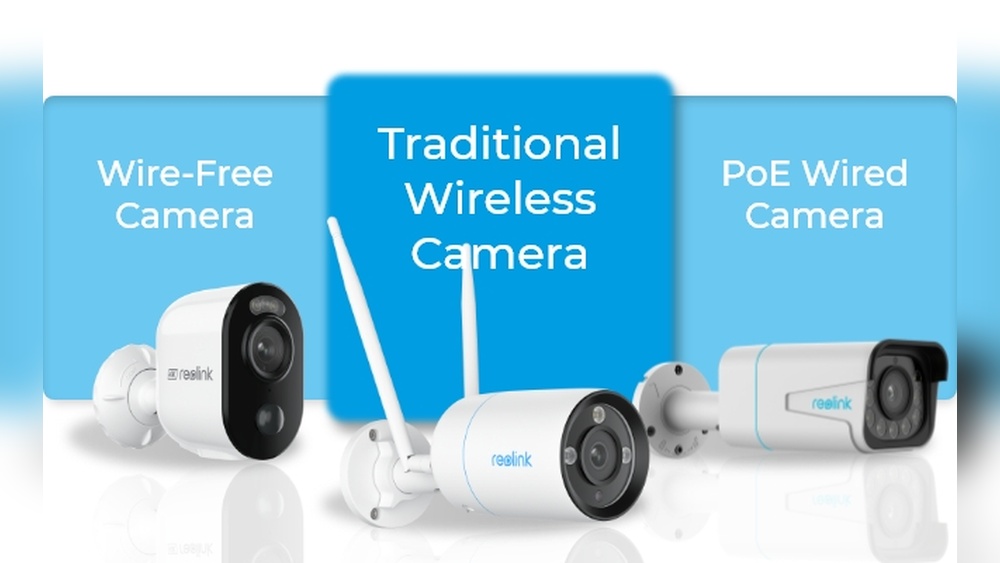
Security cameras are everywhere now. They watch over homes, offices, stores, and even quiet streets. As technology improves, we get more choices: should you pick wired cameras or the newer wireless types? This decision is not as simple as it first seems. Both wired and wireless security cameras have strong points and weak spots. The best choice depends on your needs, your building, and even your comfort with technology.
If you’re wondering which is better—wired or wireless security cameras—this guide will help. You’ll see how each system works, what you gain or lose, and how to match the right setup to your situation. We’ll look at real numbers, expert advice, and practical examples to make your choice clearer.
Understanding Wired Security Cameras
Wired security cameras have been around for decades. These cameras connect to a recording device or monitor using physical cables. The most common cables are coaxial cables for analog systems and Ethernet cables for digital systems (IP cameras). Power usually comes through a separate cable, but some digital models use Power over Ethernet (PoE), which combines video and power in one cable.
How Wired Cameras Work
A typical wired security camera setup includes:
- Cameras: Installed inside or outside your property.
- Cables: Run from each camera to a central device.
- DVR/NVR: Digital Video Recorder (for analog) or Network Video Recorder (for IP cameras). This records and stores the footage.
- Monitor: Optional, for live viewing.
The cables carry both video (and sometimes power) from the cameras to the recorder, which saves or displays the video.
Advantages Of Wired Security Cameras
Wired systems are known for their:
- Reliable connection: Video does not depend on Wi-Fi strength. There’s no risk of wireless interference.
- Consistent video quality: Wired links provide stable, high-resolution video, even for 4K cameras.
- Continuous power: Cameras don’t need batteries or recharging.
- Better for large properties: Cables can be run over long distances (up to 500 feet for Ethernet).
- Secure data transmission: It’s harder for hackers to intercept wired signals.
Disadvantages Of Wired Security Cameras
But wired cameras come with some real challenges:
- Difficult installation: Running cables through walls and ceilings is time-consuming and may need professional help.
- Limited flexibility: Once installed, moving cameras is not easy.
- Cost: Materials and installation can be expensive, especially for big properties.
- Visible cables: Some people find exposed wires unattractive or a security risk.
- Power outages: If your cameras or recorder lose power, they stop working (unless you have a backup system).
When To Choose Wired Cameras
Wired security cameras are a strong choice if you:
- Own your property and can drill or run cables
- Want a permanent, reliable system
- Need many cameras for a large area
- Want the best possible video quality
Understanding Wireless Security Cameras
Wireless security cameras use your Wi-Fi or another wireless signal to send video from the camera to a recorder or the cloud. Some wireless cameras need a power cable (these are often called “wireless” but not “wire-free”), while others run fully on batteries (these are truly “wire-free”).
How Wireless Cameras Work
A basic wireless camera setup includes:
- Cameras: Placed anywhere within Wi-Fi range.
- Wi-Fi router: Connects cameras to your home network.
- Recorder or cloud storage: Video is sent to a local device, or uploaded to a cloud service.
- App or web portal: Lets you view footage from your phone or computer.
Some wireless cameras can also use memory cards to store video locally.
Advantages Of Wireless Security Cameras
Wireless systems offer several key benefits:
- Easy installation: No need to run cables. Most people install them in under 30 minutes.
- Flexible placement: Move or add cameras easily.
- Remote access: Watch live or recorded video from anywhere using your phone.
- No damage to walls: Perfect for renters or those who don’t want to drill.
- Smart features: Many models include motion alerts, two-way audio, and integration with smart home systems.
Disadvantages Of Wireless Security Cameras
However, wireless cameras are not perfect:
- Wi-Fi dependency: If your network is weak or goes down, cameras may stop working.
- Battery life: Wire-free models need regular charging or battery replacement.
- Signal interference: Other wireless devices or thick walls can disrupt the connection.
- Video quality limits: Streaming high-definition video over Wi-Fi can use a lot of bandwidth and sometimes causes lag or lower quality.
- Security risks: Wireless signals can be hacked if not properly protected.
- Ongoing costs: Many brands charge monthly fees for cloud storage.
When To Choose Wireless Cameras
Wireless security cameras are ideal if you:
- Want a quick, simple setup
- Can’t (or don’t want to) run cables
- Rent your property or move often
- Need to monitor a small area, like a front porch or driveway
- Like the idea of smart home integration

Credit: www.vulcansecuritysystems.com
Wired Vs Wireless: Head-to-head Comparison
It’s easier to see the differences with a side-by-side comparison. Here’s a quick view of how wired and wireless security cameras match up in key areas:
| Feature | Wired | Wireless |
|---|---|---|
| Installation | Complex, may need professionals | Easy, DIY-friendly |
| Video Quality | High, stable | Good, may drop with weak Wi-Fi |
| Reliability | Very reliable | Depends on Wi-Fi strength |
| Flexibility | Hard to move cameras | Easy to reposition |
| Power Source | Continuous (wired) | Battery or plug-in |
| Security | Harder to hack | Vulnerable without encryption |
| Cost | Higher upfront | Lower upfront, possible ongoing fees |
Key Factors When Choosing Security Cameras
You’ve seen the main differences. But what really matters for you? Here are the most important points to consider before you decide.
1. Property Size And Layout
Wired cameras work best for large properties, multi-story buildings, or places with thick walls. Running cables through these areas is tough, but once set up, you get reliable coverage. For small apartments or single-story homes, wireless cameras are usually enough and much easier to install.
2. Installation Skills And Budget
Installing wired cameras often means drilling holes, running cables, and setting up a central recorder. If you’re not handy, you’ll need to pay for professional installation. This can cost $150–$500 per camera. Wireless cameras, on the other hand, are truly DIY.
Most people can mount and set up a wireless camera in under an hour, with no special tools.
3. Video Quality Needs
If you need crystal clear video (for example, reading license plates or faces at a distance), wired cameras are usually better. They can handle 4K video without lag, and aren’t affected by Wi-Fi problems. Wireless cameras often compress video to save bandwidth, which can lower detail, especially during busy hours or if your network is slow.
4. Power Source And Maintenance
Wired cameras get power from the same cable as the video (with PoE) or a separate wire. They never need charging. Wireless, battery-powered cameras need regular attention—most last 2–6 months on a charge, but this drops fast if you record lots of motion or use features like night vision.
Plug-in wireless cameras avoid this, but then you’re back to needing power outlets in the right spots.
5. Security And Privacy
Wired cameras are tough to hack unless someone physically accesses the cables. Wireless cameras send data over the air, so you must protect them with strong passwords, updated firmware, and network encryption. If privacy is a big concern, wired systems are usually safer.
6. Remote Access
If you travel or want to watch your property from anywhere, wireless cameras shine. Most offer easy remote viewing through apps. Some modern wired systems also allow this, but setup can be more complex.
7. Scalability
Adding more cameras to a wired system means running more cables and possibly upgrading your recorder. Wireless systems make it much easier to add new cameras, but your Wi-Fi network has limits; too many cameras can slow everything down.

Credit: www.gensecurity.com
Real-world Scenarios: Which System Wins?
It’s easier to decide with real examples. Here are common situations and which camera type fits best.
Small Apartment Or Rental
You move often, can’t drill holes, or don’t want to mess with wires. Wireless cameras are perfect. Stick them up, connect to Wi-Fi, and you’re protected. When you move, just take them with you.
Large House With Many Entry Points
A big home with lots of doors, windows, and a backyard needs reliable, 24/7 monitoring. Wired cameras are a safer bet. Yes, installation is harder, but you’ll get stable video and coverage for every corner.
Business Or Office
For shops, offices, or warehouses, security is critical. Wired cameras offer better reliability and can store weeks of footage. Some insurance companies even require wired systems for coverage.
Outdoor Monitoring
If you need to cover a driveway, backyard, or remote area, wireless cameras are easier to install (no need to dig trenches for wires). But remember: battery life drops in cold weather or with lots of motion.
Elderly Care Or Baby Monitoring
Wireless cameras with two-way audio are popular for checking on loved ones. You can watch and talk through your phone from anywhere. Wired cameras usually don’t offer these features or easy remote access.
Hidden Details Beginners Often Miss
You’ve probably heard the basics. But here are some less obvious facts that can make a big difference:
- Interference Isn’t Just Wi-Fi: Wireless cameras can suffer from interference caused by microwaves, cordless phones, or even thick concrete walls. Not all wireless cameras are equal—some use different frequencies (like 5 GHz instead of 2.4 GHz) to help avoid this.
- Data Security Gaps: Many people forget to regularly update the firmware on their wireless cameras, leaving them open to hackers. Even large brands have had data breaches in the past. Wired cameras are less exposed, but you should still secure your recorder with strong passwords.
- Bandwidth Bottlenecks: If you have many wireless cameras streaming in HD, they can use up to 4 Mbps each. With four cameras, that’s 16 Mbps—more than many basic internet plans. If your family is streaming movies or gaming, camera video may lag or even cut out.
- Legal Considerations: In some places, it’s illegal to record audio or video in certain locations without permission. Wireless cameras often come with microphones. Always check local laws before installing.
- Hidden Costs: Cloud storage is convenient, but fees add up. Some brands charge $5–$15 per camera per month. Over several years, this can cost more than the cameras themselves.
Cost Breakdown: Wired Vs Wireless
To see how costs can stack up, here’s an example for a 4-camera system:
| Item | Wired System | Wireless System |
|---|---|---|
| Camera (each) | $80 | $100 |
| DVR/NVR or Hub | $200 | $100 |
| Cabling/Accessories | $100 | $0 |
| Installation (optional) | $400 | $0 |
| Cloud storage (yearly) | $0 | $240 |
| Total First Year | $1,120 | $840 |
This is a sample; actual prices vary by brand and location. Notice how wireless cameras cost less upfront and are easy to set up, but cloud fees can quickly add up. Wired systems are pricier to start, but usually have no ongoing fees.
Installation: What To Expect
Wired Camera Installation
- Plan your layout. Decide where each camera and the recorder will go.
- Run cables through walls, ceilings, or outside along the building.
- Mount cameras securely, usually with screws.
- Connect everything to the recorder.
- Power up, test, and adjust the camera angles.
This process can take a few hours for a small home, or several days for large buildings. You may need a professional installer, especially for multi-story buildings or outdoor runs.
Wireless Camera Installation
- Charge the cameras if they use batteries.
- Download the app and connect each camera to your Wi-Fi.
- Mount cameras with screws or adhesive pads.
- Position and test to make sure there’s a strong Wi-Fi signal.
Most people can do this in under an hour. If you rent, choose adhesive pads so you don’t damage walls.
Credit: myliveeye.com
Security Concerns: Protecting Your System
No matter what type you choose, security is key. Here’s how to keep your system safe:
- Change default passwords: Never use the factory-set password.
- Update firmware: Check for updates from the manufacturer.
- Encrypt your network: Use WPA2 or WPA3 Wi-Fi security.
- Limit remote access: Only allow trusted devices to connect.
- Physical security: For wired systems, hide or protect cables to prevent tampering.
Wireless systems need extra attention. Hackers sometimes target popular brands. Check for security news related to your camera model and follow any recommendations.
Environmental Considerations
Outdoor cameras face weather, dust, and sometimes even wildlife. When choosing cameras:
- Look for an IP66 or IP67 rating. This means they’re waterproof and dustproof.
- For cold climates, check the operating temperature range. Some batteries fail in extreme cold.
- In hot areas, ensure your cameras can handle high temperatures without shutting down.
Wired cameras often come in rugged, weatherproof cases. Some wireless cameras are designed for indoor use only—always check before installing outside.
Upgrading Your System: What To Know
If you already have a wired system, adding wireless cameras for extra spots is possible. Some modern recorders support both types. But mixing systems can make things complicated, especially when viewing footage from different apps.
For wireless systems, adding new cameras is easy, but make sure your Wi-Fi router can handle more devices. You may need a mesh system or a new router if you want to expand.
Performance In Emergencies
During power outages, both wired and wireless cameras can fail—unless you have backup power.
- Wired systems: Add an uninterruptible power supply (UPS) for the recorder and cameras. This keeps them running for 30–60 minutes.
- Wireless battery-powered cameras: They keep recording during outages, but if your Wi-Fi router loses power, you may not get alerts or remote access.
- Cellular backup: Some wireless cameras use cellular data if Wi-Fi fails, but this can be expensive and uses more battery.
If security during blackouts is important, plan for backup power on all critical devices.
Future-proofing: Trends To Watch
Security cameras keep improving. Here are trends that may affect your choice:
- AI-powered alerts: Cameras can now tell the difference between people, cars, and animals, reducing false alarms.
- Integration with smart homes: Cameras can trigger lights, lock doors, or even contact emergency services.
- Higher resolutions: 4K and even 8K cameras are becoming common in wired systems.
- Longer battery life: Newer wireless models last longer on a charge.
- Privacy features: Some cameras have shutter covers or customizable privacy zones.
If you want the latest features, wireless cameras often get updates faster. Wired systems focus on stability and quality.
Expert Opinions And Research
According to a 2022 report by Statista, about 38% of U.S. households with security cameras use wireless systems, while 28% use wired, and the rest use a mix. Experts say the shift to wireless is driven by smart home trends and ease of use, but wired systems are still preferred for critical, long-term surveillance.
A survey by the Security Industry Association found that businesses still trust wired cameras more for sensitive areas, while consumers prefer wireless for convenience.
For deeper research, you can read industry reports at the Security Industry Association.
Frequently Asked Questions
What Is The Biggest Drawback Of Wireless Security Cameras?
The main issue is reliance on Wi-Fi. If your network is weak, overcrowded, or goes down, cameras may lose connection, miss events, or record poor-quality video. Battery-powered models also need regular charging.
Can Wired Cameras Be Hacked?
It’s much harder to hack a wired camera because the video signal travels through physical cables, not the air. However, if your recorder is connected to the internet for remote viewing, weak passwords or outdated software can still leave you vulnerable.
Do Wired Cameras Work If The Internet Goes Down?
Yes. Wired systems record and store footage locally, so they keep working even if your internet fails. You may lose remote viewing, but local recording continues as long as there’s power.
How Long Do Batteries Last In Wireless Cameras?
Battery life varies. Most wireless cameras last 2–6 months per charge under normal use, but frequent recording, cold weather, or using two-way audio can reduce this to just a few weeks.
Can I Mix Wired And Wireless Cameras In One System?
Yes, some modern recorders (called hybrid NVRs) support both types. But you may need to use different apps or systems for viewing, and setup can be trickier.
Making the right choice between wired and wireless security cameras is about more than just price or convenience. Think about your space, your tech skills, your need for video quality, and how much maintenance you’re willing to handle. Wired cameras are best for reliability and long-term coverage, while wireless cameras win for flexibility and ease of use. By weighing the pros and cons based on your real needs, you’ll build a safer, smarter space—without regrets.