
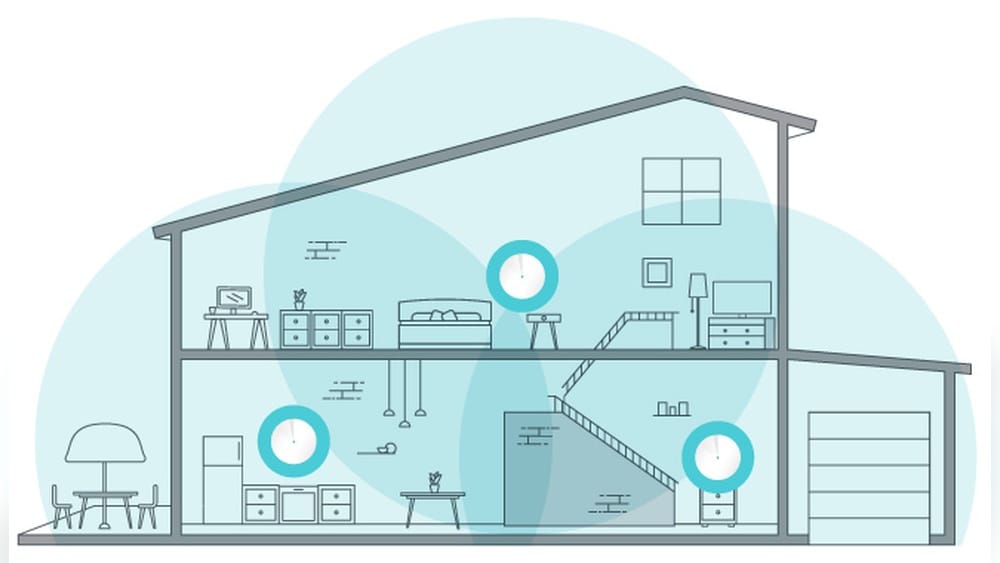
Are you tired of weak Wi-Fi signals and dead zones in your home? You’re not alone.
Many people struggle with slow internet or dropped connections, especially in larger spaces. That’s where mesh routers come in. They can change the way your Wi-Fi works, giving you strong, reliable coverage everywhere. You’ll discover what mesh routers are and how they can make your internet faster and more dependable.
Keep reading—you might just find the solution to all your Wi-Fi problems.
Credit: www.signalboosters.com
Mesh Router Basics
Mesh routers are a modern way to improve Wi-Fi coverage in homes and offices. They create a network that spreads internet signals evenly. This helps reduce dead zones and slow connections. Mesh systems are easy to set up and manage. They work well in large or multi-story buildings.
Understanding how mesh routers work can help you decide if this system fits your needs. The basics are simple but very effective. This section explains how mesh networks function and the key parts that make them work.
How Mesh Networks Work
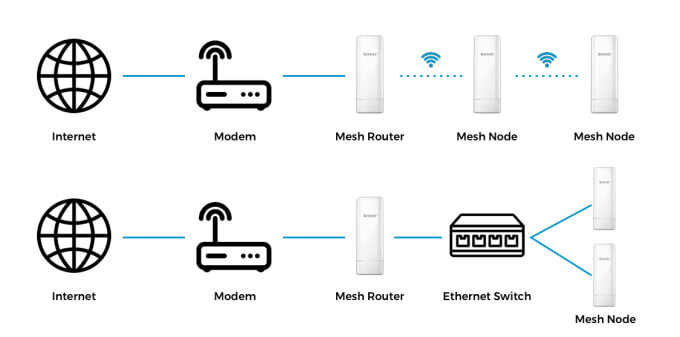
Mesh networks use multiple devices called nodes. Each node connects to the others to form a web of Wi-Fi signals. Data travels through the fastest path between nodes. This keeps your internet strong and stable throughout the area.
If one node has trouble, the network finds another route. This self-healing feature keeps your connection steady. Unlike traditional routers, mesh systems do not rely on a single point. This reduces the chance of losing connection in parts of your home.
Key Components Of Mesh Systems
Mesh systems have a few main parts. The first is the main router, which connects to your modem. Other nodes are placed around your home. These nodes communicate with the main router and each other.
Each node acts as a mini router. They send and receive signals to cover wide areas. Some systems include a dedicated backhaul channel. This helps nodes talk to each other without slowing down your devices.
Most mesh routers come with easy-to-use apps. These apps help set up the network and manage devices. They show signal strength and allow parental controls or guest access. This makes mesh systems user-friendly and flexible.

Credit: www.engeniustech.com
Benefits Of Mesh Routers
Mesh routers offer many benefits for home and office Wi-Fi. They create a strong and reliable network that covers large areas. This technology helps avoid dead zones and keeps devices connected smoothly. The design suits busy places with many devices. Understanding their advantages helps choose the right Wi-Fi setup.
Extended Wi-fi Coverage
Mesh routers spread Wi-Fi signals across wide spaces. Multiple units work together to cover every corner. This reduces weak signals and dead spots in your home or office. You get fast internet in rooms far from the main router. It suits big houses and multi-story buildings well.
Improved Network Reliability
Mesh systems keep your connection stable. If one unit fails, others still provide internet. This avoids sudden drops or slow speeds. Devices switch smoothly between nodes without losing signal. It supports many devices without slowing down the network.
Easy Scalability
Adding more coverage is simple with mesh routers. Just add extra units to the network. The system automatically connects new nodes without complex setup. This flexibility fits growing homes or offices. You can expand Wi-Fi as your needs change.
Comparing Mesh And Traditional Routers
Mesh routers and traditional routers serve the same basic purpose: to connect devices to the internet. They differ in how they cover your home, perform, and how easy they are to set up. Understanding these differences helps you choose the right router for your needs.
Coverage Differences
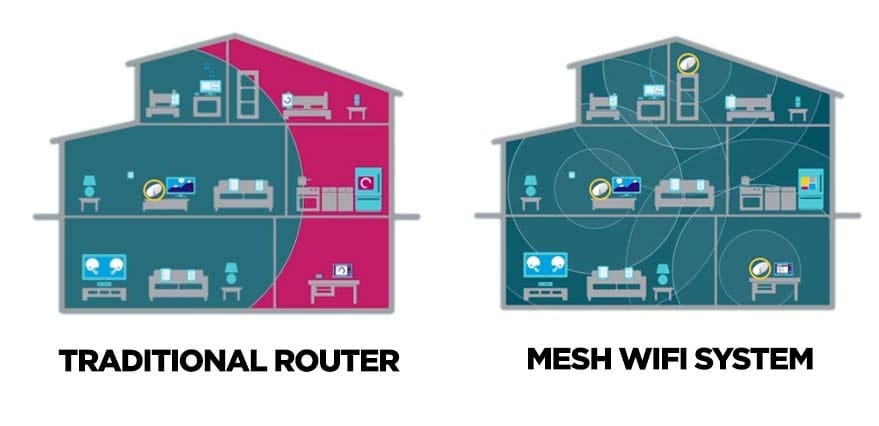
Traditional routers use one device to send Wi-Fi signals. This works well in small spaces but can struggle in large homes. Walls and furniture can block signals, causing dead zones.
Mesh routers use several devices called nodes. These nodes spread Wi-Fi evenly across your home. This creates a strong signal in every room, even far from the main router.
Performance Variations
Traditional routers can slow down when many devices connect at once. They handle fewer devices well but struggle with many users or smart home gadgets.
Mesh routers share the load between nodes. This means they keep speeds fast even with many devices connected. They adapt to your home’s layout to give steady performance.
Setup And Maintenance
Traditional routers often require manual setup. You may need to adjust settings and place the router carefully.
Mesh routers are easier to set up. Apps guide you step-by-step to place nodes and connect devices. Updating software is often automatic, reducing maintenance tasks.
Choosing The Right Mesh Router
Choosing the right mesh router is important for strong Wi-Fi everywhere in your home. Mesh routers work together to cover large areas with fast internet. Picking the best one means thinking about your home size, internet speed, and budget. This guide helps you find the best mesh router for your needs.
Factors To Consider
Start with the size of your home. Large homes need more mesh units to cover every corner. Check the internet speed your provider offers. Choose a mesh system that supports that speed or higher. Look at the number of devices you use. More devices need stronger routers. Easy setup and management apps help control your network. Also, check if the system supports the latest Wi-Fi standards like Wi-Fi 6. Battery backup and parental controls can be useful features.
Top Brands And Models
Popular brands include Google Nest Wifi, Netgear Orbi, and Eero. Google Nest Wifi is simple to set up and covers medium to large homes well. Netgear Orbi offers high speed and wide coverage, good for big houses. Eero is user-friendly and has flexible plans. Other good options are TP-Link Deco and Asus ZenWiFi. These brands offer reliable performance and easy management. Compare prices and features before choosing your mesh router.
Setting Up A Mesh Network
Setting up a mesh network is simple and helps cover large areas with strong Wi-Fi. Mesh routers work together to create one big network. This setup removes dead zones and keeps your connection steady everywhere.
The process involves placing nodes, configuring the system, and fixing small problems. Each step ensures the network runs smoothly and fast.
Placement Tips For Nodes
Place nodes in open areas, not inside cabinets or behind furniture. Keep nodes 30 to 50 feet apart for good signal sharing. Avoid walls made of thick materials like brick or metal. Place nodes near where you use Wi-Fi most, such as living rooms or offices. Proper placement creates a strong and stable network.
Configuring The System
Start by connecting the main node to your modem with a cable. Use the mesh system’s app to add more nodes. Follow app instructions carefully to link each node. Name your network and set a secure password. Keep the system updated for better security and performance.
Troubleshooting Common Issues
Check if a node loses connection by moving it closer to the main node. Restart nodes if the Wi-Fi slows down or drops. Reset nodes to factory settings if problems persist. Make sure firmware is current to avoid bugs. Contact support if issues continue after trying fixes.
Optimizing Mesh Network Performance
Optimizing the performance of a mesh network helps keep your internet fast and reliable. A well-maintained network avoids slowdowns and connection drops. Small steps can improve your mesh system’s coverage and speed. Focus on key areas to get the best results from your mesh router.
Firmware Updates
Firmware updates fix bugs and add new features. These updates improve network stability and speed. Check your mesh router’s app or website regularly. Install updates as soon as they become available. Updated firmware keeps your network running smoothly.
Network Security Measures
Strong security protects your network from hackers. Use a strong password for your Wi-Fi. Enable WPA3 encryption if your router supports it. Turn off features you don’t need, like remote access. Regularly change your password to keep your network safe.
Managing Connected Devices
Too many devices can slow down your mesh network. Limit the number of devices connected at once. Use your router’s app to see all connected devices. Prioritize important devices for better performance. Disconnect devices that are not in use to save bandwidth.
Credit: www.eurotecwater.com
Frequently Asked Questions
What Are Mesh Routers And How Do They Work?
Mesh routers are a group of devices that provide seamless Wi-Fi coverage. They communicate wirelessly to extend your network across large areas. Each node acts as a router, creating a single, unified network with strong signals everywhere.
Why Choose Mesh Routers Over Traditional Routers?
Mesh routers eliminate dead zones by covering larger spaces with multiple nodes. They offer better reliability, easy setup, and automatic optimization. This makes them ideal for large homes or offices with complex layouts.
Can Mesh Routers Improve Wi-fi Speed And Stability?
Yes, mesh routers enhance speed by reducing congestion and providing direct connections. They intelligently route traffic for stable, consistent performance. This results in fewer dropouts and faster internet throughout your space.
Are Mesh Routers Easy To Install And Manage?
Most mesh systems come with user-friendly apps for easy setup and management. You can monitor network health, add nodes, and prioritize devices easily. This simplifies maintaining strong Wi-Fi without technical expertise.
Conclusion
Mesh routers help spread Wi-Fi evenly throughout your home. They stop dead zones and keep your connection strong. Setting them up is simple, even for beginners. These systems work by linking multiple devices to cover large areas. They support many users without slowing down your internet.
Choosing the right mesh router can improve daily online activities. Reliable Wi-Fi means better streaming, gaming, and browsing. Consider mesh routers to make your internet easier and faster. A smart choice for a modern home network.