
A security camera is a silent guard that keeps your home or business safe. But not all security cameras are the same. If you want clear images, reliable performance, and easy installation, you may have heard about Poe Security Cameras. These cameras are becoming popular because they solve some common problems with older systems. But what is a Poe Security Camera, and why are so many people choosing them today?
Let’s dive in. You’ll learn how Poe cameras work, why they’re different, what makes them useful, and how to choose the right one. If you’re thinking about installing security cameras or just want to understand the technology, this guide will make everything clear—using simple language and practical examples.
What Is A Poe Security Camera?
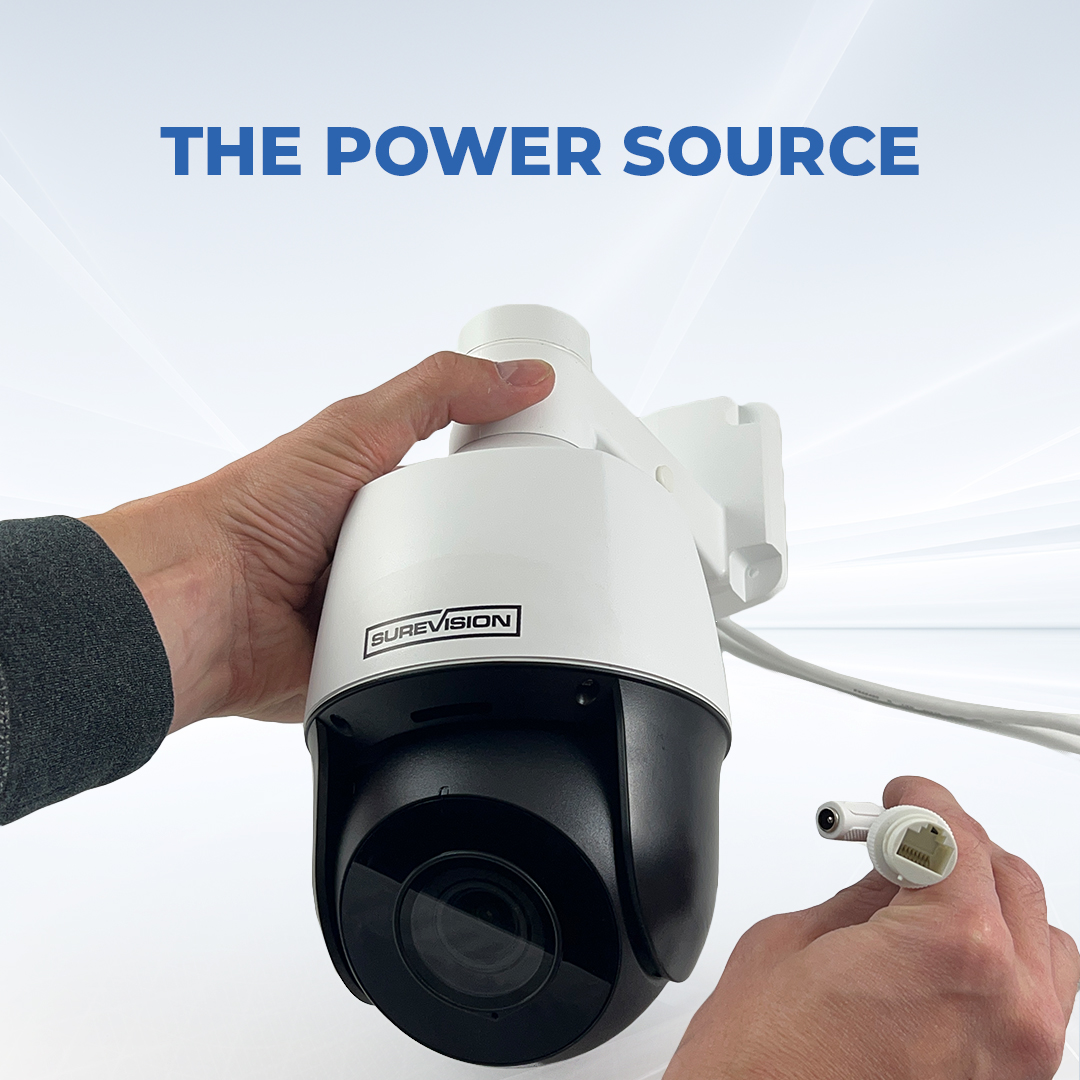
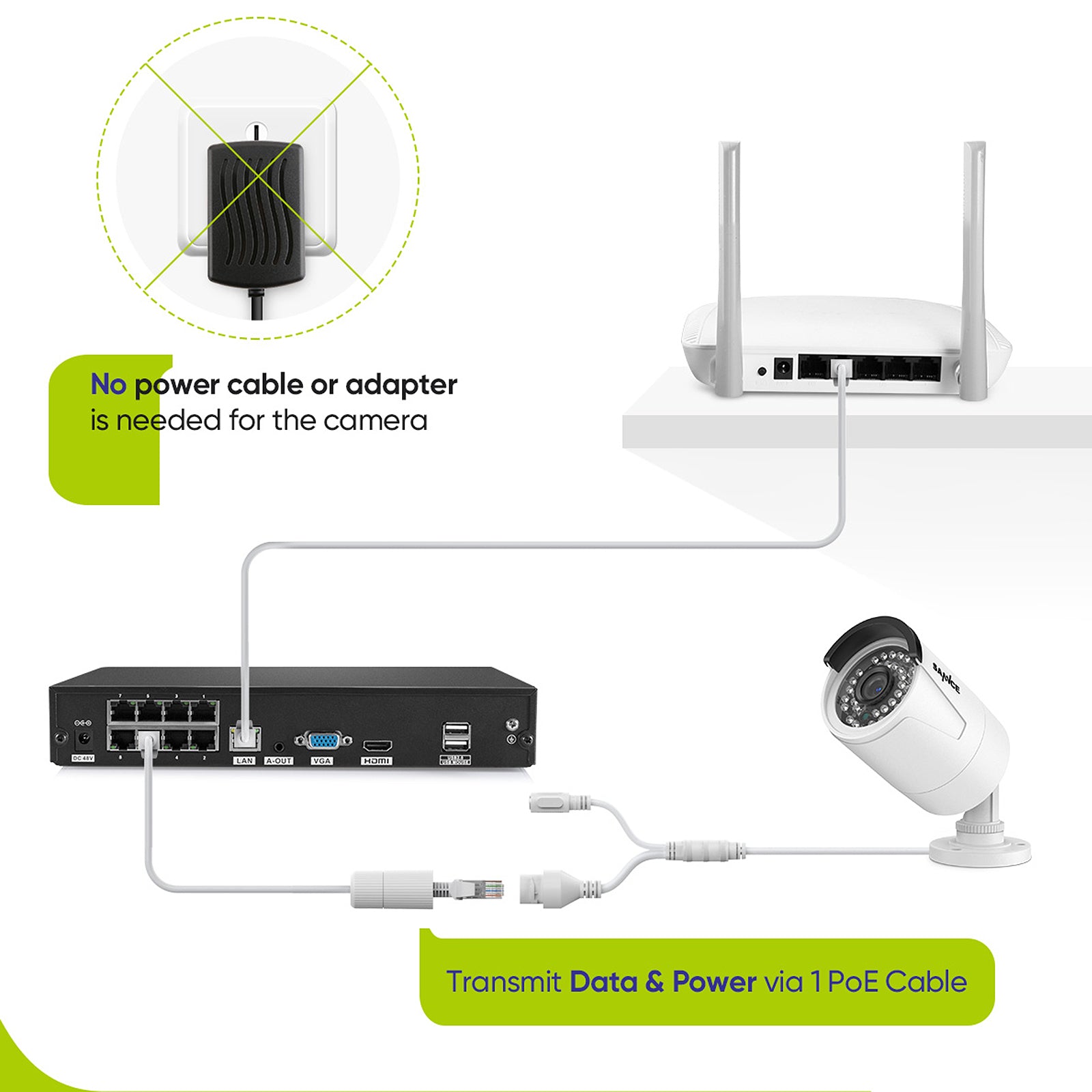
A Poe Security Camera is a network camera that uses Power over Ethernet (PoE) technology. This means the camera gets both electric power and data connection from the same Ethernet cable. You don’t need a separate power supply for each camera. Poe makes installation easier, reduces cable clutter, and improves reliability.
Most Poe cameras are part of an IP (Internet Protocol) camera system. Unlike older analog CCTV cameras, IP cameras send video digitally. This results in sharper images and better integration with computers and smartphones.
How Poe Works
Poe technology follows standards like IEEE 802.3af, 802.3at, or 802.3bt. These standards allow Ethernet cables to carry power safely. You need a Poe-enabled switch or Poe injector to supply power. The camera plugs into the switch, and everything works over a single cable.
For example, in a typical setup:
- You connect the Poe camera to a Poe switch using a Cat5e or Cat6 Ethernet cable.
- The switch provides power and network access to the camera.
- The camera sends video data to a recorder or directly to your computer or phone.
Key Features
- Single cable for power and data
- Easy installation
- Supports high-definition video
- Remote access via internet
- Scalable for large systems
Poe Security Camera Vs. Traditional Cameras
Understanding the difference helps you see why Poe is special.
| Feature | Poe Security Camera | Traditional Analog Camera |
|---|---|---|
| Cabling | Single Ethernet cable for power & data | Separate power cable & coaxial for video |
| Image Quality | HD or Ultra HD | Standard definition |
| Remote Access | Easy via app or web | Usually limited, needs extra hardware |
| Installation | Quick, less wiring | Complex, more cables |
| Scalability | Easy to add cameras | Needs new power/video lines |
| Reliability | Fewer points of failure | More connections, more risks |
Example
Let’s say you want to install 8 cameras in a store. With Poe, you run 8 Ethernet cables to a Poe switch. That’s it. With analog, you need 8 video cables and 8 separate power cables. If you want to move a camera, Poe makes it simple—just reconnect the cable.
Credit: www.cctvsecuritypros.com
Types Of Poe Security Cameras
There are several kinds of Poe cameras. Each type suits different needs.
1. Bullet Cameras
These are long, tube-shaped cameras. They are easy to spot and often used outdoors. Their shape helps keep rain off the lens.
2. Dome Cameras
These are round and often used indoors. The dome cover protects the lens and makes it hard to tell where the camera is pointing.
3. Turret Cameras
Similar to dome, but with a flat face. They have fewer reflection issues at night.
4. Ptz Cameras (pan-tilt-zoom)
These can move and zoom in on areas. Useful for large spaces like parking lots.
5. Fisheye Cameras
They offer wide-angle views—sometimes a full 360 degrees. Good for rooms that need complete coverage.
6. Mini Poe Cameras
These are small and easy to hide. Used for discreet monitoring.
Specialized Poe Cameras
Some Poe cameras are built for special jobs:
- Audio Poe Cameras: With built-in microphones for recording sound.
- Weatherproof Poe Cameras: Designed for harsh environments.
- Night Vision Poe Cameras: Use infrared LEDs to see in the dark.
Why Choose A Poe Security Camera?
People pick Poe cameras for good reasons. Here are the main benefits:
1. Simpler Installation
With just one cable, you save time and avoid mistakes. If you’re not an electrician, Poe makes life easier.
2. Better Video Quality
Digital video is clearer and supports higher resolutions—1080p, 4K, or even higher. You see faces, license plates, and details much better.
3. Remote Viewing
You can watch live video from your phone, tablet, or computer. Many Poe systems offer free apps. This is great for checking your home while traveling.
4. Reliable Power
Poe switches are designed for stable power. If you use a battery or unreliable power supply, your camera may fail. Poe fixes this.
5. Expandable Systems
Want more cameras later? Just plug them into your Poe switch. No need to worry about new power outlets.
6. Lower Maintenance
Fewer cables mean fewer things can break. This saves money and time.
7. Advanced Features
Many Poe cameras support smart features:
- Motion detection
- Face recognition
- Alarm triggers
- Cloud storage
Hidden Benefits Most Beginners Miss
- Network Segmentation: Poe cameras can be put on a separate network, making your security system safer from hacking.
- Power Management: Some Poe switches let you turn cameras on/off remotely. This saves power or lets you reboot a camera without touching it.
Credit: www.cctvsecuritypros.com
How Poe Security Cameras Connect
Understanding the setup helps you plan your system.
Basic Components
- Poe Camera
- Ethernet Cable (Cat5e or Cat6)
- Poe Switch or Poe Injector
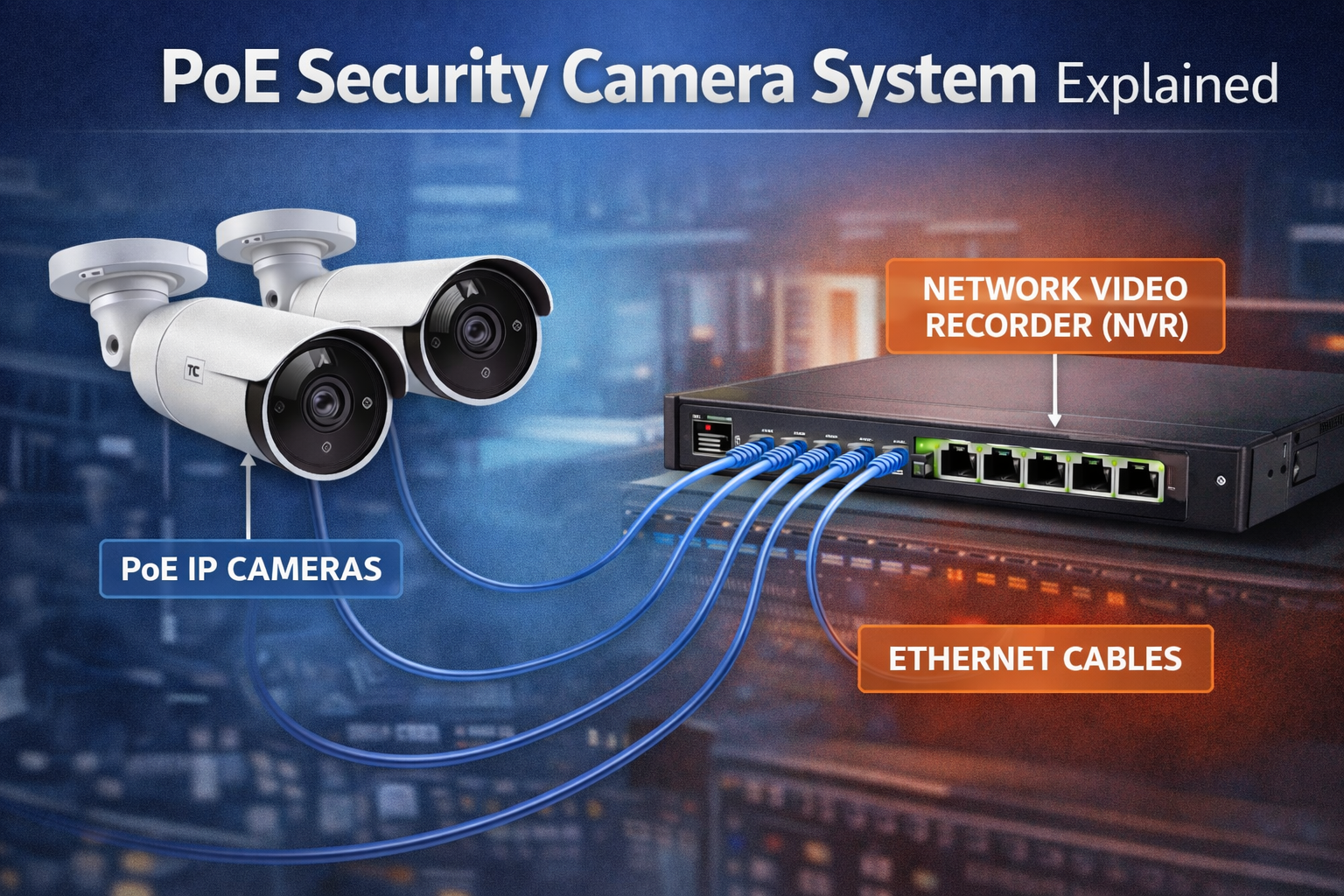
- Network Video Recorder (NVR)
- Internet Router (optional for remote access)
Typical Setup
- Each camera connects to the Poe switch with an Ethernet cable.
- The Poe switch connects to your NVR for recording.
- The NVR connects to your router for remote access.
- You can view video on monitors, computers, or phones.
Poe Switch Vs. Poe Injector
A Poe switch powers multiple cameras. A Poe injector powers one camera when your switch doesn’t support Poe.
| Device | Use Case | Number of Cameras Supported |
|---|---|---|
| Poe Switch | Large systems | 4–48+ |
| Poe Injector | Single camera | 1 |
Cabling Distance
Poe works up to 328 feet (100 meters) per cable. If you need longer, special extenders can help, but video quality may drop.
Technical Specifications Of Poe Security Cameras
When you shop for Poe cameras, you’ll see many technical details. Let’s break them down.
Resolution
- Common options: 1080p (Full HD), 4K (Ultra HD)
- Higher resolution means clearer images but needs more storage.
Frame Rate
- Usually 15–30 frames per second (fps)
- Higher fps gives smoother video.
Lens Type
- Fixed lens: Always the same view.
- Varifocal lens: Adjustable zoom.
Night Vision
- Infrared LEDs let cameras see in darkness, often up to 100 feet.
Audio
- Some cameras have built-in microphones.
- Audio recording laws vary—check your local rules.
Storage
- NVRs: Store video on hard drives.
- Cloud storage: Some systems offer online storage.
Weatherproof Ratings
- Look for IP66 or IP67 ratings. These mean the camera resists dust and water.
Power Requirements
- Most Poe cameras use IEEE 802.3af (up to 15.4 watts).
- PTZ cameras may need IEEE 802.3at (up to 30 watts).
Compatibility
- Check if your camera works with your NVR and network.
- ONVIF standard helps cameras and recorders from different brands work together.
Credit: www.sannce.com
Poe Security Camera Installation Guide
Installing a Poe camera is easier than you think. Here’s how to do it:
Step 1: Plan Camera Locations
Decide where you need coverage. Entry points, driveways, main rooms, and parking lots are common spots.
Step 2: Measure Cable Lengths
Use a tape measure to check distances. Remember Poe works up to 328 feet per cable.
Step 3: Mount The Cameras
Attach cameras to walls, ceilings, or poles. Use screws and anchors. Make sure the lens faces the right area.
Step 4: Run Ethernet Cables
Route cables from each camera to the Poe switch. Keep cables tidy and avoid sharp bends.
Step 5: Connect To Poe Switch
Plug each camera’s cable into the switch. The switch powers and connects the cameras.
Step 6: Set Up Nvr
Connect the switch to your NVR. The NVR records video and manages cameras.
Step 7: Configure Network
Connect NVR to your router. Set up remote access using the app or web interface.
Step 8: Test Cameras
Check live video. Adjust camera angles and settings for best coverage.
Step 9: Secure Your System
Change default passwords. Enable encryption if possible.
Practical Tips
- Label your cables for easy troubleshooting.
- Use surge protectors if your area has lightning.
- Hide cameras to avoid tampering, but make some visible for deterrence.
Common Mistakes
- Using low-quality cables (results in weak signal).
- Forgetting to check compatibility (camera may not work with your NVR).
- Skipping password changes (risk of hacking).
- Placing cameras behind glass (infrared reflects and ruins night vision).
Choosing The Right Poe Security Camera
Picking the best Poe camera depends on your needs. Here’s what to consider:
1. Purpose
- Home security: Look for wide-angle, night vision, and audio.
- Business: High resolution, remote access, and reliable storage.
2. Location
- Indoors: Dome or turret cameras.
- Outdoors: Bullet, weatherproof cameras.
3. Budget
- Poe cameras range from $50 to $500+.
- Higher price means better features, but don’t overpay for things you won’t use.
4. Compatibility
- Make sure your camera matches your NVR and switch.
- Look for ONVIF support.
5. Extra Features
- Motion detection
- Two-way audio
- Smart alerts
6. Brand Reputation
- Popular brands: Hikvision, Dahua, Axis, Reolink
- Choose brands with good support and warranties.
7. Storage Needs
- Estimate how much video you want to keep.
- A 4K camera uses about 3–6 GB per hour.
Data Table: Sample Poe Camera Specs
| Brand | Resolution | Night Vision | Audio | Weatherproof | Price |
|---|---|---|---|---|---|
| Reolink RLC-820A | 4K | 100 ft | Yes | IP66 | $110 |
| Hikvision DS-2CD2043G0 | 4MP | 100 ft | No | IP67 | $150 |
| Dahua IPC-HFW4831E | 4K | 100 ft | No | IP67 | $200 |
Non-obvious Insight
Many beginners think more megapixels are always better. But higher resolution needs more storage and can slow your network. Check your NVR specs before buying a 4K camera.
Another tip: If you have pets, use cameras with smart alerts. Otherwise, you’ll get too many false alarms.
Poe Security Camera Maintenance And Troubleshooting
Keeping your system running smoothly is vital. Here’s how to do it:
Regular Maintenance
- Clean camera lenses monthly.
- Check cables for damage.
- Update firmware to fix bugs and improve security.
- Review video footage to confirm quality.
Troubleshooting Common Problems
1. Camera Not Powering On
Check the cable, Poe switch, and camera. Try another cable or port.
2. No Video Feed
Restart the camera and NVR. Check network settings.
3. Poor Night Vision
Clean the lens. Make sure nothing blocks infrared LEDs.
4. Blurry Images
Adjust focus or replace the lens.
5. Cannot Access Remotely
Check router settings. Open the right ports or use cloud access.
Advanced Troubleshooting
- Use network tools to test cable quality.
- Check Poe switch power budget—too many cameras may overload it.
- Look for firmware updates from the manufacturer.
Security Risks And How To Protect Poe Cameras
Every technology has risks. Poe cameras connect to your network, so you must protect them.
Main Risks
- Hacking: Unsecured cameras can be accessed by outsiders.
- Privacy leaks: Video may be stolen.
- Physical tampering: Someone may damage or cover cameras.
Protection Steps
- Change default usernames and passwords.
- Keep firmware updated.
- Use encrypted connections (HTTPS).
- Segment your security camera network from your main network.
- Limit who can access video feeds.
Example
A major hack in 2021 involved thousands of unsecured cameras. The lesson: never leave default passwords and always update firmware.
Poe Security Camera Use Cases
Poe cameras are used everywhere:
- Home security: Front doors, garages, living rooms.
- Businesses: Offices, stores, warehouses.
- Schools: Hallways, entrances, playgrounds.
- Parking lots: Wide coverage, PTZ cameras.
- Construction sites: Temporary monitoring, easy to move.
- Hospitals: Protect patients and staff.
Real-world Data
A study by the National Retail Federation found that stores with modern IP/Poe cameras reduced theft by 25% compared to older analog systems.
Many police departments now use Poe cameras for city surveillance. They report sharper images and faster response times.
Poe Security Camera Trends And Innovations
Technology is moving fast. Here are some new trends:
1. Ai Integration
Modern Poe cameras use artificial intelligence to recognize faces, detect movement, and filter false alarms.
2. Higher Resolutions
8K cameras are coming, but most homes don’t need them yet.
3. Wireless Poe (hybrid Systems)
Some systems combine Poe with wireless connections for flexibility.
4. Edge Storage
Cameras now store video on local SD cards as backup.
5. Eco-friendly Poe
New Poe switches use less power and support green energy.
Cost Analysis: Poe Security Camera Systems
Is Poe more expensive? Let’s look at the numbers.
Upfront Costs
- Poe camera: $80–$200 each
- Poe switch: $60–$300 (depends on number of ports)
- NVR: $150–$500
- Cables: $20–$100
Total For A 4-camera System: $600–$1200
Ongoing Costs
- Power: Poe is efficient, low monthly cost.
- Maintenance: Minimal if installed well.
- Cloud storage (optional): $5–$20 per month.
Comparison Table: Poe Vs. Wireless Camera System
| Feature | Poe System | Wireless System |
|---|---|---|
| Reliability | High | Medium (depends on Wi-Fi) |
| Video Quality | HD/4K | HD/4K |
| Cabling | Ethernet required | None |
| Power | Poe switch/injector | Batteries or outlets |
| Maintenance | Low | Battery replacements |
| Scalability | Easy | Can be limited by Wi-Fi |
| Cost | Medium | Medium/High |
Wireless systems are easier for small homes but can be less reliable in big areas or places with Wi-Fi issues.
Environmental Impact Of Poe Security Cameras
Poe systems are efficient. They use less power than older analog systems and reduce cable waste. Many Poe switches now meet Energy Star standards. When you upgrade to Poe, you help the environment—especially if you recycle old equipment.
Where To Buy Poe Security Cameras
You can find Poe cameras at:
- Online retailers: Amazon, Newegg, B&H
- Specialty stores: Security camera shops
- Direct from manufacturers: Hikvision, Dahua, Axis
Always check reviews and warranty details. Ask for technical support before buying.
Frequently Asked Questions
What Is Power Over Ethernet (poe)?
Power over Ethernet (Poe) is a technology that lets Ethernet cables deliver both power and data to devices like cameras. This means you don’t need separate power cables. Poe simplifies installation, reduces clutter, and makes your system more reliable.
Can I Use Poe Cameras With Any Network Switch?
No. Only Poe-enabled switches or Poe injectors can supply power to Poe cameras. Regular switches don’t provide power, so your cameras won’t turn on. Always check your switch’s specs before connecting.
How Far Can I Run A Poe Camera Cable?
Most Poe systems work up to 328 feet (100 meters) per cable. If you need more distance, use Poe extenders or fiber solutions. But video quality may drop if cables are too long.
Are Poe Security Cameras Safe From Hacking?
Poe cameras can be secure, but only if you follow best practices. Change default passwords, update firmware, and use network segmentation. Unsecured cameras are at risk. For more info, see CISA’s guide.
What Happens During A Power Outage?
If your Poe switch loses power, all connected cameras stop working. To avoid this, use a UPS (Uninterruptible Power Supply). It keeps your cameras running during outages.
Final Thoughts
A Poe Security Camera is more than just a gadget—it’s a smart tool for protecting your property. With simple installation, high-quality video, and easy expansion, Poe cameras are the top choice for homes and businesses. They solve common problems and offer features older systems can’t match. Whether you need basic coverage or advanced security, Poe gives you flexibility and peace of mind. By understanding the technology and following the right steps, you can build a system that works reliably for years. If you’re ready to upgrade your security, Poe cameras are a wise investment.