
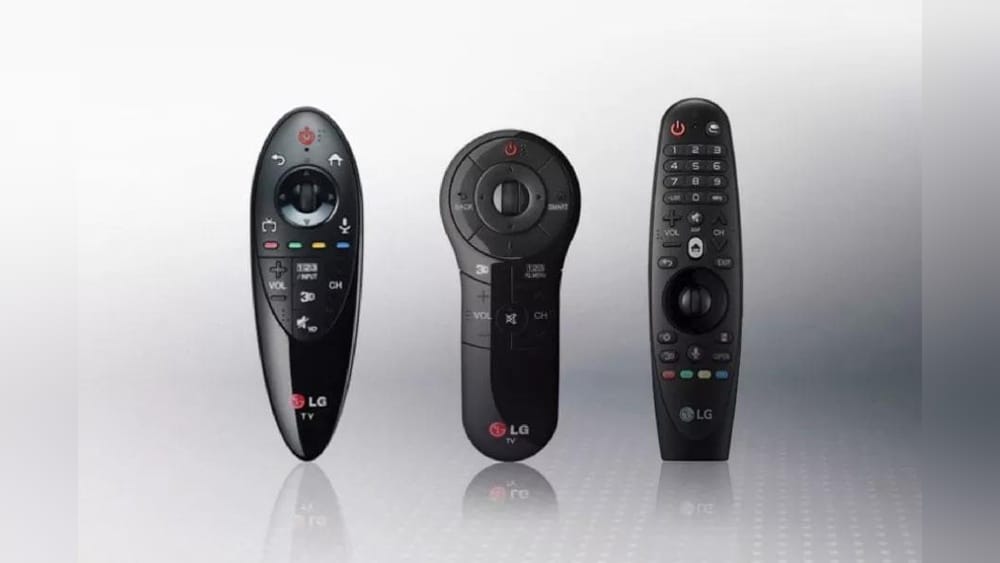
For many people, a TV remote is just a tool to change channels or adjust the volume. But the LG Magic Remote Control is much more. It has changed how people interact with their TVs. Instead of pushing buttons again and again, you can point, click, scroll, and even use your voice. This device brings the convenience of a computer mouse to your living room, making smart TVs easier and more fun to use.
But what exactly is the LG Magic Remote? How does it work, and why do so many users recommend it? In this article, you’ll learn everything you need to know about the LG Magic Remote. We’ll look at its features, how to set it up, how it compares with traditional remotes, and tips for getting the most from it.
You’ll also find answers to common questions and some hidden tricks that even many owners don’t know.
The Basics: What Is The Lg Magic Remote Control?
The LG Magic Remote is an advanced remote control designed for LG smart TVs. Unlike traditional remotes, it allows users to control their TV using point-and-click, scrolling, and voice commands. With built-in motion sensors, it works a bit like a wireless mouse. When you move the remote, a pointer appears on the screen, letting you navigate menus quickly.
This remote is part of LG’s effort to make TVs smarter and easier to use. It’s not just about changing channels or turning the TV on and off. The Magic Remote lets you search for shows, control smart home devices, and even interact with streaming apps—all from your couch.
For many users, it’s a big upgrade from regular remotes.
Key Features Of The Lg Magic Remote
The LG Magic Remote stands out because of its combination of unique features. Here’s a closer look at what makes it special:
1. Point And Click
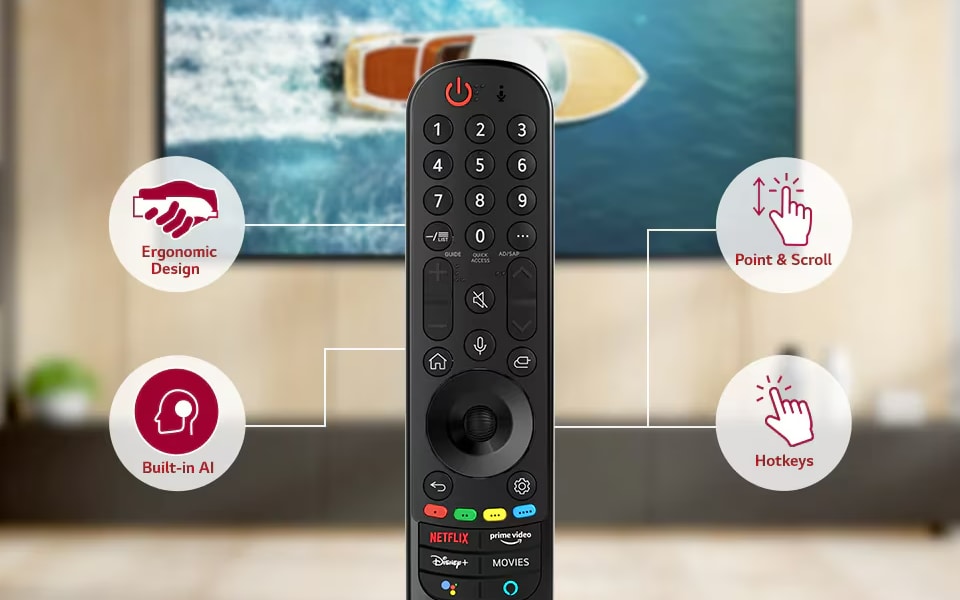
The most popular feature is the pointer function. Move the remote, and a cursor appears on the screen, just like a mouse pointer. You can click on apps, menus, or settings by pressing the OK button. This saves time and makes navigation much faster than pressing arrow buttons repeatedly.
2. Voice Commands
With built-in microphones, the Magic Remote lets you search by speaking. Want to find a movie or change the channel? Press the microphone button and say your request. It understands a variety of commands in different languages. This is especially useful for non-native English speakers, as you can use your own language if supported.
3. Universal Control
The Magic Remote can also work as a universal remote. It can control other devices connected to your TV, such as soundbars, Blu-ray players, or set-top boxes. This means you might need only one remote instead of several.
4. Scroll Wheel
In the center of the remote is a scroll wheel. This makes it easy to move through long lists, web pages, or menus. It’s like using a mouse on your computer.
5. Quick Access Buttons
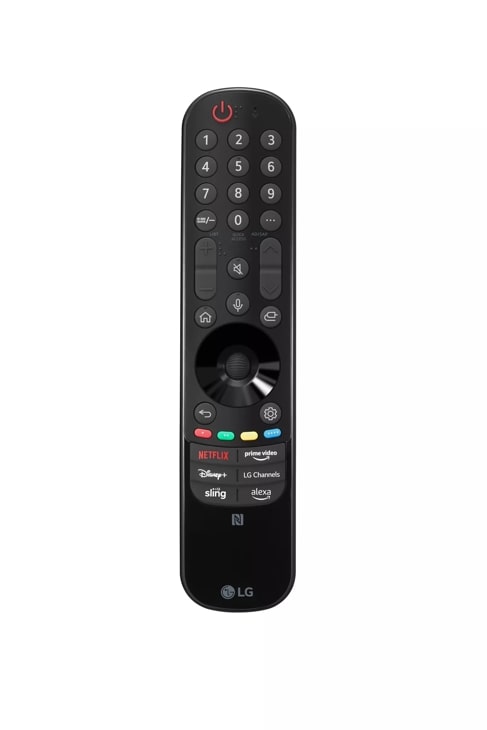
There are special buttons for popular streaming services like Netflix, Amazon Prime Video, and sometimes YouTube. These one-touch buttons open your favorite apps instantly.
6. Smart Home Integration
The Magic Remote can control smart home devices that are compatible with LG ThinQ. For example, you can check your smart fridge or adjust your smart lights using your TV.
7. Voice Assistant Support
LG TVs with the Magic Remote often support Google Assistant or Amazon Alexa. This lets you ask questions, control smart devices, or get weather updates right from your TV.
8. Ergonomic Design
The remote is designed to fit comfortably in your hand. The buttons are easy to reach, and the remote is not too heavy.
9. Bluetooth And Infrared
The Magic Remote uses both Bluetooth and infrared technology. Bluetooth allows for pointing and voice features, while infrared lets it control older devices that don’t support Bluetooth.
10. Customizable Buttons
Some Magic Remote models let you customize buttons for quick access to your favorite features or apps.

Credit: www.amazon.com
How The Magic Remote Works: Technology Explained
The LG Magic Remote combines several technologies to create a seamless experience.
- Motion Sensors: Small sensors inside the remote detect movement. When you move the remote, it sends signals to the TV, which moves the on-screen pointer.
- Bluetooth: This allows wireless communication between the remote and the TV, supporting pointing and voice features.
- Infrared (IR): Standard signals for controlling older devices, like cable boxes or DVD players.
- Microphone: Used for voice commands.
- Universal Code Library: The remote can be programmed to control various devices using preset codes.
This combination allows you to control many aspects of your home theater system with one device.
Setting Up The Lg Magic Remote
Getting started with the LG Magic Remote is simple, but there are a few steps. Here’s a basic guide:
Pairing With Your Tv
- Insert Batteries: Open the back cover, insert the required batteries (usually AA or AAA), and close it.
- Turn On the TV: Make sure your LG smart TV is on.
- Automatic Pairing: Most Magic Remotes pair automatically when you press any button. If not, hold down the OK (center) button for a few seconds until you see a message on the screen.
- Manual Pairing: For some models, you may need to press and hold both the Home and Back buttons at the same time until the pairing message appears.
Connecting Other Devices
To use the remote as a universal controller:
- Go to Settings > General > Device Connection Settings.
- Follow the on-screen instructions to set up devices like soundbars or set-top boxes.
- Test the remote to make sure it works with each device.
Voice Command Setup
If your TV supports voice assistants, you might need to sign in or link your Google or Amazon account. This usually takes just a few minutes.
Troubleshooting Pairing Issues
If pairing fails:
- Check the batteries.
- Make sure there are no objects blocking the remote’s signal.
- Restart your TV and try again.
Comparing Lg Magic Remote To Standard Remotes
How much better is the Magic Remote compared to a regular remote? The table below highlights the main differences.
| Feature | LG Magic Remote | Standard Remote |
|---|---|---|
| Pointer Function | Yes | No |
| Voice Control | Yes | No or Limited |
| Scroll Wheel | Yes | No |
| Universal Control | Yes | Some Models Only |
| Smart Home Integration | Yes | No |
| Design | Ergonomic, Modern | Basic, Traditional |
The LG Magic Remote offers many functions that standard remotes do not. For users who watch a lot of streaming content or use smart features, the difference is clear.
Lg Magic Remote Models And Compatibility
LG has released several versions of the Magic Remote over the years. Each model is designed for certain TV series and years. Not all LG TVs are compatible with every Magic Remote. Here’s a look at some of the most common models:
- AN-MR19BA: For 2019 LG smart TVs.
- AN-MR20GA: For 2020 models.
- AN-MR21GA: For 2021 models.
- AN-MR22GA: For 2022 models.
Some remotes are bundled with the TV, while others are sold separately. Always check your TV’s model number before buying a Magic Remote. Using the wrong remote can lead to limited features or no connection at all.
Compatibility Table
Here’s a quick guide to which Magic Remote works with different LG TV models.
| TV Year | Compatible Magic Remote | Notes |
|---|---|---|
| 2018 | AN-MR18BA | Some models only |
| 2019 | AN-MR19BA | Most smart TVs |
| 2020 | AN-MR20GA | Most smart TVs |
| 2021 | AN-MR21GA | All webOS 6.0 TVs |
| 2022 | AN-MR22GA | Latest webOS 22 TVs |
If you’re unsure, check the LG website or your TV manual for the exact model compatibility.
Advantages Of Using The Lg Magic Remote
Why do many people recommend switching to the Magic Remote? Here are the top reasons:
- Faster Navigation: Pointing and clicking is much quicker than pressing arrow keys.
- Easier Typing: When searching for shows or entering passwords, the pointer makes typing on the on-screen keyboard less frustrating.
- Voice Search: Find content without typing at all—just speak.
- Fewer Remotes: Control your TV, soundbar, and other devices with a single remote.
- Smart Home Control: Adjust lights, check your fridge, or control other smart devices without getting up.
- Kids and Elderly Friendly: The pointer and voice features are easier for children or older adults who struggle with traditional remotes.
- Personalization: Some models let you set shortcuts to your favorite apps or channels.
Disadvantages And Common Complaints
No device is perfect. While the Magic Remote is popular, it has a few downsides:
- Learning Curve: Some users find the pointer “jumpy” or hard to control at first.
- Battery Use: The remote may use batteries faster than simpler remotes, especially with frequent pointer or voice use.
- Compatibility: Not all LG TVs or devices are supported.
- Lost Remotes: The sleek design can slip between couch cushions easily.
- Limited Universal Control: While it supports many devices, some brands or older models may not work fully.
A common beginner mistake is not updating the TV’s software. Without the latest webOS updates, some features may not work correctly. Always update your TV software for the best experience.
Setting Up Universal Control For Other Devices
One strong benefit of the Magic Remote is the ability to control devices like soundbars or cable boxes. Here’s how to set it up:
- Connect Device: Make sure your soundbar or other device is connected to the TV using HDMI, Optical, or AV cables.
- Open Device Connection Settings: On your TV, go to Settings > General > Device Connection Settings.
- Choose Device Type: Select the device (e.g., Soundbar, Set-Top Box).
- Follow On-Screen Prompts: The TV may ask for the brand or model.
- Test the Remote: Try adjusting the volume or changing the channel to see if it works.
If your device isn’t listed, try using the “Universal Remote” setup and select the closest brand or device type. Some users don’t realize that not all functions may work, especially with very old or uncommon brands.
Using Voice Commands: Practical Examples
Voice commands make using your TV much easier. Here are some things you can do:
- “Turn on subtitles.”
- “Open YouTube.”
- “Volume up.”
- “Switch to HDMI 2.”
- “What’s the weather today?”
- “Find action movies.”
You can also control smart home devices if they’re connected to your LG ThinQ account. For example:
- “Turn off the living room lights.”
- “Check the status of the washing machine.”
Non-obvious tip: Speak naturally and clearly. You don’t have to use special phrases. The voice assistant understands everyday language.
Hidden Features And Tips For Power Users
Many owners miss some clever tricks with the LG Magic Remote:
- Quick Access: Hold a number button (1-9) to assign it to an app. Next time, hold that number to open the app directly.
- Screen Share: Use the remote to quickly access screen mirroring or device sharing features.
- Input Change: Use the voice command to switch between HDMI inputs instead of pressing multiple buttons.
- Magnifier: Some models let you zoom in on a part of the screen using the pointer and scroll wheel.
One advanced insight: If you pair the Magic Remote with newer LG TVs, it can sync with LG’s mobile app for even more control. You can use your phone as a backup remote or to type faster.
Lg Magic Remote And Streaming Apps
Streaming is a big reason why people love the Magic Remote. Most popular apps are supported:
- Netflix
- Amazon Prime Video
- Disney+
- Hulu
- YouTube
The dedicated buttons make launching these apps instant. You can also use voice to search across multiple apps at once, saving time.
A common beginner mistake is not signing into their streaming accounts during setup. Make sure you’re logged into your favorite apps for the best experience.
Maintaining And Troubleshooting Your Lg Magic Remote
To keep your remote working smoothly:
- Replace batteries when the pointer or voice command stops working.
- Clean the remote with a soft cloth to remove dust and dirt from the buttons and sensors.
- Update your TV’s software regularly.
- Re-pair the remote if it becomes unresponsive. Hold the OK button or follow the pairing steps again.
- Check for obstructions if the pointer is not moving smoothly.
If your remote is not working:
- Try new batteries.
- Check for interference from other wireless devices.
- Reset the remote by removing the batteries and pressing all buttons for a few seconds before reinserting them.
If problems continue, check LG’s support site or contact customer service.
Comparing Lg Magic Remote With Other Smart Tv Remotes
How does the LG Magic Remote compare with remotes from other brands? Here’s a comparison with Samsung’s Smart Remote and Sony’s Voice Remote.
| Feature | LG Magic Remote | Samsung Smart Remote | Sony Voice Remote |
|---|---|---|---|
| Pointer Function | Yes | No | No |
| Voice Commands | Yes | Yes | Yes |
| Scroll Wheel | Yes | No | No |
| Universal Control | Yes | Yes | Some Models |
| Dedicated App Buttons | Yes | Yes | Yes |
| Ergonomic Design | Yes | Yes | Yes |
| Smart Home Integration | Yes | Yes (SmartThings) | Yes (Google Home) |
The pointer and scroll wheel are unique strengths of the Magic Remote. Samsung and Sony offer strong voice features, but their remotes use more traditional navigation.
Credit: www.lg.com
Safety, Batteries, And Environmental Impact
The Magic Remote usually uses AA or AAA batteries. Battery life depends on how much you use the pointer and voice features. On average, batteries last 3-6 months with regular use. Rechargeable batteries can help reduce waste.
When disposing of old batteries, always use proper recycling methods to help the environment. Never throw batteries in the regular trash.
LG has also started making remotes with more recyclable materials. Some models use plastic from recycled sources, helping reduce plastic waste.
Where To Buy The Lg Magic Remote
You can buy the Magic Remote from:
- LG’s official website
- Major electronics stores (Best Buy, Walmart, etc.)
- Online retailers (Amazon, eBay)
Always check compatibility with your TV before buying. Some stores may let you try the remote before you buy.
For more official information, visit the LG Magic Remote Guide.
Future Of Tv Remote Controls
Remotes are becoming smarter every year. LG continues to improve the Magic Remote, adding more voice languages, better motion control, and integration with new smart home devices. In the future, we may see even more advanced features, like touchscreens, gesture controls, or full smartphone integration.
Many experts believe that remote controls will continue to evolve until they become almost invisible—possibly replaced by voice, smartphones, or even wearable devices. But for now, the Magic Remote remains one of the most user-friendly and advanced options available.
Frequently Asked Questions
What Should I Do If My Lg Magic Remote Pointer Is Not Moving?
First, check the batteries and replace them if needed. Make sure there are no objects blocking the signal between the remote and the TV. If the pointer still does not move, try re-pairing the remote by holding the OK button or following the pairing instructions in your TV’s menu.
Updating your TV’s software can also solve pointer issues.
Can The Lg Magic Remote Control My Cable Or Satellite Box?
Yes, most Magic Remotes can control cable or satellite boxes using the universal remote function. Go to your TV’s device connection settings and follow the prompts to set up the remote for your specific box. If your device is not recognized, choose the closest brand or use manual programming.
Does The Lg Magic Remote Work With All Lg Tvs?
No, not every LG TV supports the Magic Remote. Compatibility depends on the TV’s year and model. Always check your TV’s manual or the LG website to confirm which Magic Remote model works with your TV.
How Do I Use Voice Commands With The Lg Magic Remote?
Press and hold the microphone button on the remote, then speak your command clearly. Release the button when you finish speaking. You can ask to open apps, search for movies, check the weather, or control smart home devices, depending on your TV’s features.
Is The Lg Magic Remote Worth Buying?
For most users, especially those who use smart features, streaming apps, or smart home devices, the Magic Remote is a worthwhile upgrade. It makes navigation faster, adds voice control, and can reduce the number of remotes you need. If you only watch basic TV channels, you might not need all its features, but most people enjoy the added convenience.
With its mix of point-and-click, voice control, and smart features, the LG Magic Remote offers a new way to enjoy your TV. Whether you’re a tech lover or just want things to be easier, this remote can make your TV experience smoother and more fun.
Credit: www.lg.com