
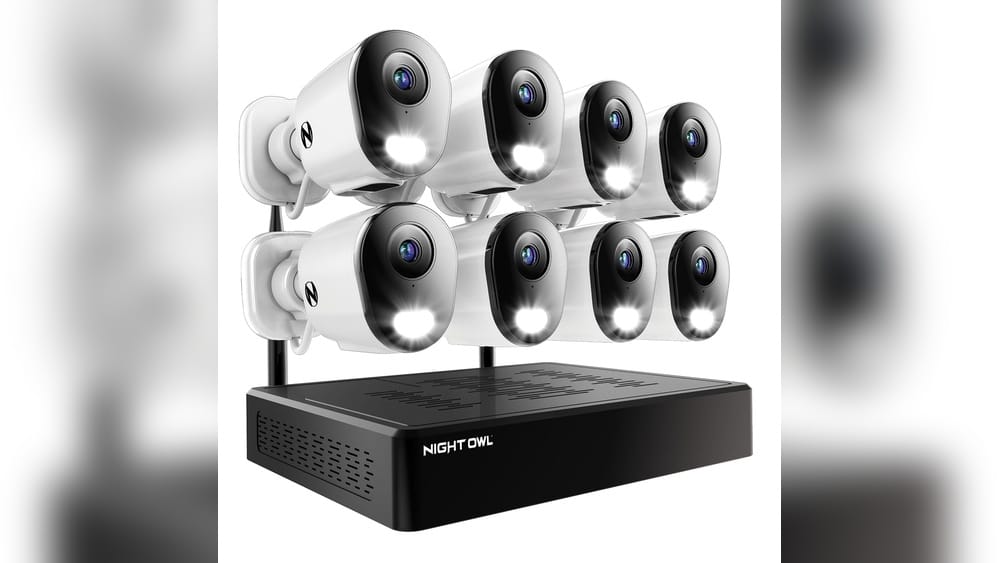
Security cameras have become a normal part of modern life. From small shops to large offices and even homes, these cameras help us feel safer and more in control. But behind every camera, there is a system that stores, organizes, and lets you watch the videos. One term you will see a lot is NVR. If you are new to security cameras, the letters NVR might sound confusing. What is NVR? How is it different from other systems? And do you really need one for your security setup?
In this guide, you’ll discover what an NVR is, how it works, and why it matters for security cameras. We’ll look at real examples, compare NVRs with other systems, and answer the most common questions people have. Whether you want to protect your business or your home, understanding NVR is key.
Let’s make it simple.
What Does Nvr Mean?
NVR stands for Network Video Recorder. This is a device that records video footage from security cameras and stores it on a hard drive. But unlike older systems, an NVR works with IP cameras (Internet Protocol cameras). These cameras send video over a computer network, not through old-fashioned cables.
With an NVR, you don’t need to run special video wires all over your building. Instead, the cameras connect using your existing network cables or even Wi-Fi. The NVR collects all the video, saves it, and lets you play it back whenever you want.
How Does An Nvr Work?
Here’s what happens in a typical NVR system:
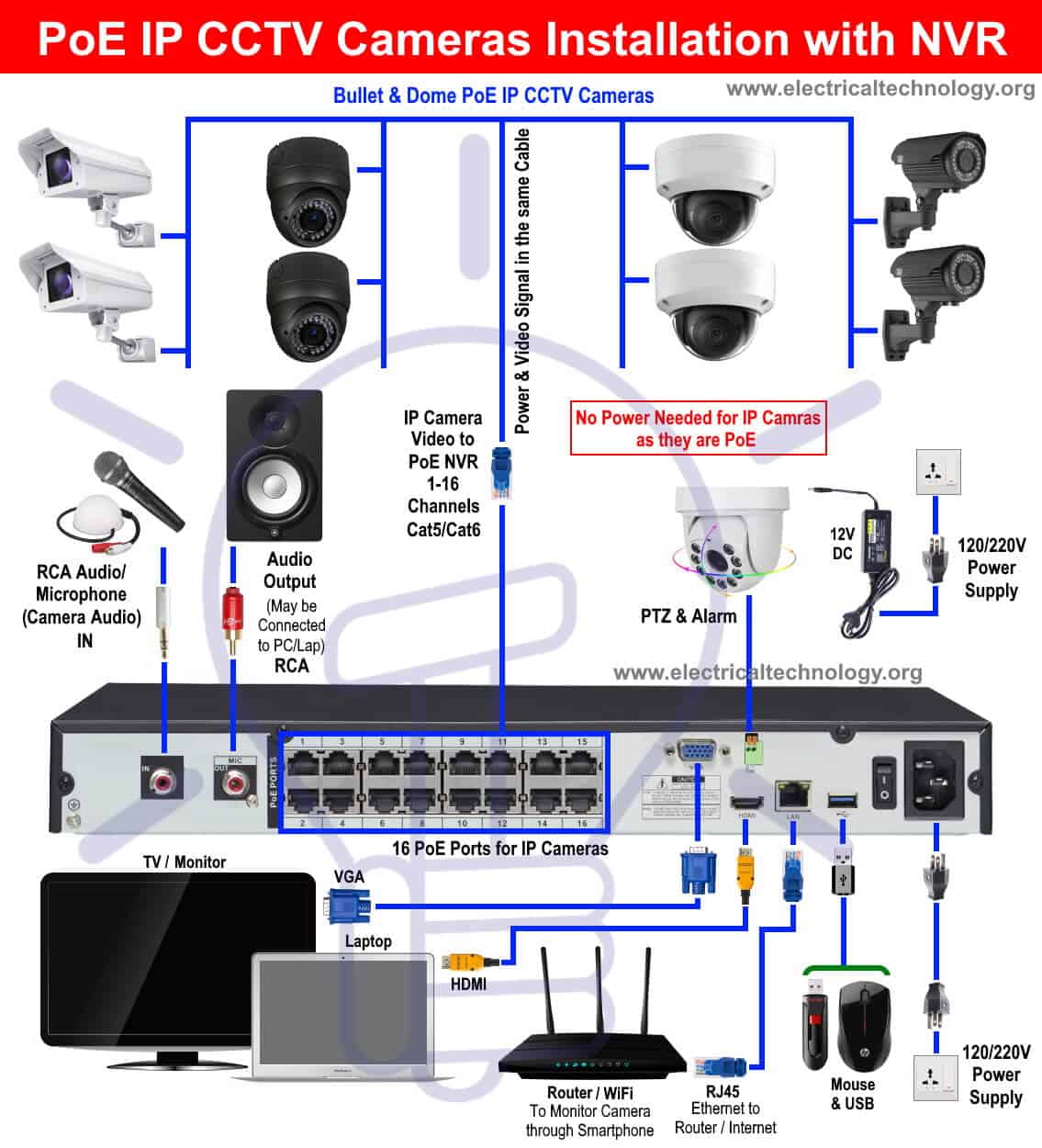
- IP cameras capture video and send it as data packets over a network.
- The NVR receives these data packets.
- The NVR writes the video onto a hard drive or other storage.
- You can watch live footage or view past recordings through a monitor, web browser, or app.
This network-based method gives you more flexibility and features compared to older systems.
Key Parts Of An Nvr System
An NVR system is made up of several important components. Let’s break them down:
1. Ip Cameras
These are digital cameras that send video as data over a network. IP cameras offer higher resolution, better image quality, and advanced features like motion detection.
2. Network Infrastructure
This includes Ethernet cables, switches, and routers. They connect the cameras to the NVR and help data move smoothly.
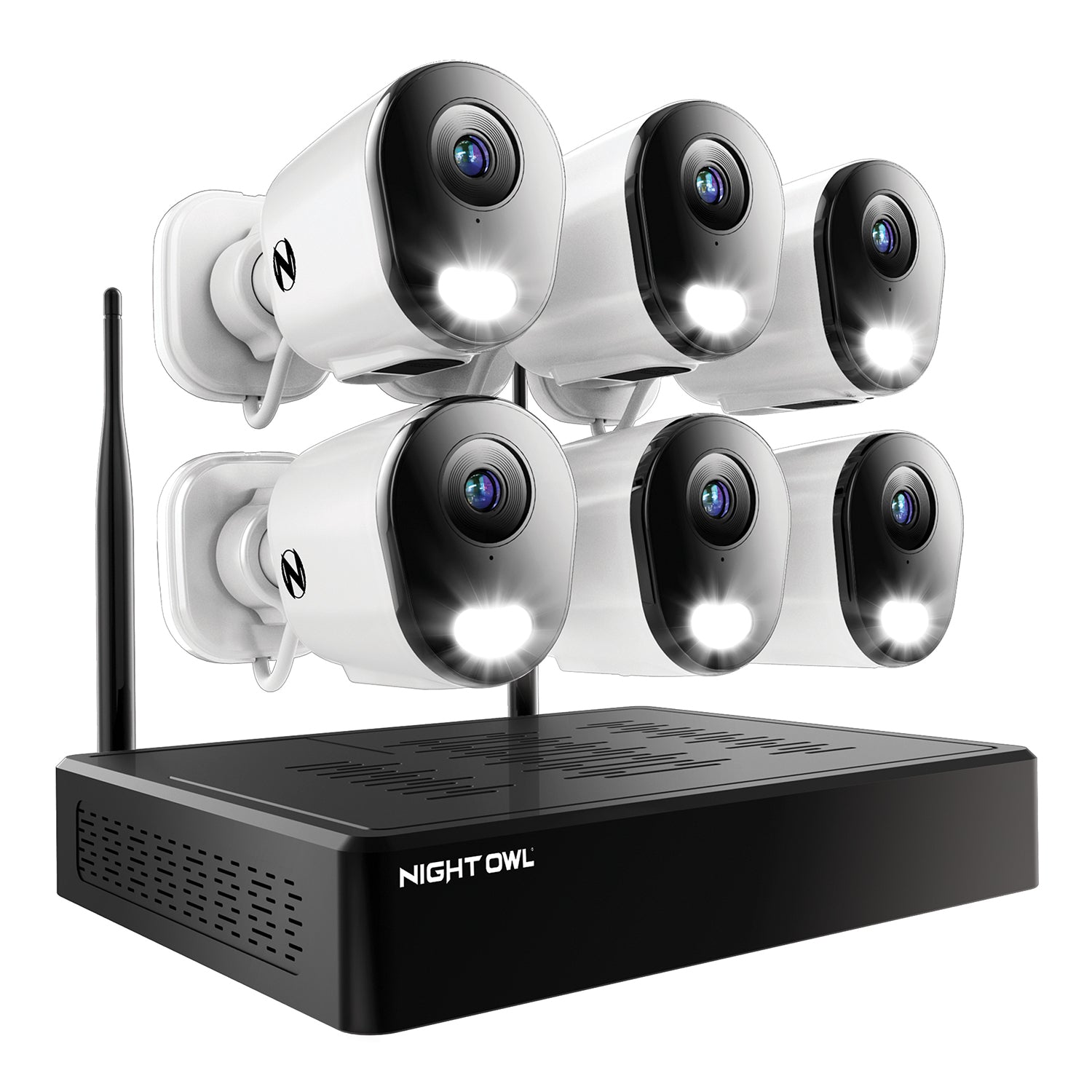
3. The Nvr Device
This is the “brain” of the system. It receives, manages, and stores video from all connected cameras. Most NVRs have a built-in hard drive, and some let you add more storage.
4. Monitor Or App
You’ll need a way to see your camera footage. Many NVRs connect to a regular monitor or TV. Some also offer web or mobile apps for remote viewing.
Nvr Vs. Dvr: What’s The Difference?
Many people confuse NVR with DVR (Digital Video Recorder). They are both video recorders, but they work differently.
Here’s a comparison to make things clear:
| Feature | NVR | DVR |
|---|---|---|
| Cameras Used | IP cameras (digital) | Analog cameras |
| Video Transmission | Network cables (Ethernet/Wi-Fi) | Coaxial cables |
| Image Quality | High (up to 4K+) | Lower (usually 720p–1080p) |
| Installation | Flexible, uses network | Rigid, needs new wiring |
| Smart Features | Yes (motion, AI, etc.) | Limited |
NVRs are the choice for modern systems because they support better cameras, remote access, and smart features. DVRs are still used in older setups or where budgets are tight.
Main Features Of An Nvr
When you buy an NVR, you get more than just a storage box. Here are some key features you’ll find in most NVRs:
- High video resolution: Many NVRs support cameras up to 4K Ultra HD.
- Remote access: Watch live or recorded video from your phone, tablet, or computer.
- Motion detection: Get alerts when something moves on camera.
- Audio recording: Some NVRs support cameras with microphones.
- Multiple channels: Connect several cameras (sometimes 4, 8, 16, or more).
- Backup options: Save video to USB, cloud, or network drives.
- Search and playback: Find footage quickly by time, date, or event.
Some advanced NVRs also offer AI features like facial recognition or license plate capture.
How Nvrs Store And Manage Video
Storing days or weeks of video takes a lot of space. Here’s how NVRs handle it:
Video Compression
Most NVRs use formats like H.264 or H.265 to shrink video files without losing too much quality. This means you can store more footage on the same hard drive.
Storage Capacity
NVRs come with different hard drive sizes, from 1TB up to 20TB or more. Some let you add extra drives for longer storage.
Overwriting
When the hard drive is full, the NVR can automatically overwrite the oldest footage first. This way, you always have the most recent video.
Search Tools
Instead of watching hours of video, you can search by:
- Date and time
- Camera location
- Motion events
- Special tags (like “person detected”)
This saves time and helps you find important clips fast.
Types Of Nvrs
Not all NVRs are the same. Here are the main types you’ll see:
1. Standalone Nvr
A small box you connect to your network and cameras. It often comes with its own software and can be used with a monitor.
2. Pc-based Nvr
Software installed on a regular computer. Good for large systems, but needs more setup and maintenance.
3. Cloud Nvr
Some systems use the cloud to store video instead of a hard drive. You can access footage from anywhere, but it needs a strong internet connection and may have monthly fees.
4. Hybrid Nvr
A hybrid can record from both IP and analog cameras. This is useful if you’re upgrading an old system but want to keep some older cameras.
How To Choose The Right Nvr
Picking the best NVR isn’t only about price. Here’s what really matters:
Number Of Channels
Each camera needs one “channel. ” If you want eight cameras, get an 8-channel NVR (or larger). Always plan for future growth.
Video Resolution Support
Make sure the NVR matches your cameras’ quality. For 4K cameras, you need a 4K-capable NVR.
Storage Options
Check how many hard drives you can add and the maximum size supported. For businesses, more storage means longer video history.
Remote Access
Most modern NVRs let you view video from anywhere. Check if the mobile app is easy to use and works on your devices.
Power Over Ethernet (poe)
Some NVRs support PoE, which lets you power cameras and send data over one cable. This makes installation simpler and cheaper.
Compatibility
Not all NVRs work with all cameras. Make sure your cameras are on the NVR’s compatibility list or support ONVIF (an open standard for IP cameras).
User Interface
A clean, simple menu saves time. Try to see sample screenshots or demos before buying.
Backup And Export
Look for easy ways to copy important footage—USB ports, cloud upload, or network backup.
Warranty And Support
Good brands offer at least one year of warranty and quick tech support.
Real-world Example: Small Business Security
Imagine you own a bakery with three entrances and a cash register. You want to keep an eye on customers and staff. Here’s how an NVR system could work for you:
- You install four IP cameras (one for each entrance and one for the register).
- The cameras connect to a PoE switch, which powers them and sends video to the NVR.
- Your NVR has a 2TB hard drive, enough for 30 days of continuous recording.
- You set up motion alerts, so your phone buzzes if someone enters after hours.
- If there’s a problem, you search by date and camera to find the video clip.
This setup is simple, reliable, and easy to expand if your business grows.

Credit: www.sannce.com
Nvr Installation: Step-by-step
If you want to install an NVR system, here’s a basic guide:
- Plan camera locations – Cover all key areas but avoid privacy-sensitive spots like bathrooms.
- Run network cables (or set up Wi-Fi) from each camera to your NVR or PoE switch.
- Mount the cameras – Use weatherproof models outdoors.
- Connect cameras to the network switch or directly to the NVR (if it has built-in PoE ports).
- Connect the NVR to your monitor and router.
- Install hard drives if not pre-installed.
- Power on the NVR and follow setup instructions.
- Set passwords and user permissions for security.
- Test each camera to make sure you can see live video.
- Set up alerts and remote access using the mobile or web app.
A small system can be set up in a few hours, but large buildings may need professional help.
Advantages Of Using An Nvr
Why are so many people switching to NVRs? Here’s what makes them stand out:
High Video Quality
NVRs work with high-definition IP cameras. You get sharper images, which help with identification.
Easy Installation
No need for expensive video cables. Use your existing network or even Wi-Fi.
Flexible And Scalable
Add more cameras at any time. Just connect them to your network.
Smart Features
Many NVRs support smart detection, alerts, and even AI-powered tools.
Remote Access
Check your cameras from anywhere in the world using your phone or computer.
Lower Maintenance
Fewer cables and modern technology mean fewer breakdowns.
Future-proof
As technology improves, it’s easier to upgrade cameras and storage.
Credit: www.infinibandta.org
Challenges And Limitations Of Nvrs
Of course, NVRs aren’t perfect. Here are some limits to consider:
Higher Initial Cost
IP cameras and NVRs often cost more upfront than simple analog systems. But prices are dropping every year.
Network Dependence
If your network is slow or unstable, video quality may suffer. For best results, use wired Ethernet for cameras.
Cybersecurity Risks
NVRs connect to your network and sometimes the internet. Always use strong passwords and update firmware to prevent hacking.
Compatibility Issues
Not all cameras work with all NVRs. Stick to well-known brands or ONVIF-compatible devices.
Storage Needs
High-resolution video takes more space. You may need to invest in larger hard drives or cloud storage.
Nvr Vs. Cloud Storage: Which Is Better?
Some companies now offer cloud-based video storage. Should you skip the NVR and use the cloud instead? Let’s compare:
| Feature | NVR | Cloud Storage |
|---|---|---|
| Where Video is Stored | Local hard drive | Online, remote servers |
| Internet Needed? | No (only for remote access) | Yes (always) |
| Cost | One-time purchase | Monthly or yearly fees |
| Privacy | You control data | Data managed by provider |
| Expandability | Add more drives | Pay for more storage |
NVRs give you control and no ongoing fees, but cloud storage is easy to access from anywhere and won’t be lost in a fire or theft. Many businesses now use both for extra safety.
Common Myths About Nvrs
Let’s clear up a few misunderstandings:
“nvrs Are Only For Big Companies.”
Not true. Homeowners and small shops use NVRs every day. There are budget models with just 4 channels.
“nvrs Are Hard To Set Up.”
Most plug-and-play NVRs take just a few hours to install. You don’t need to be a tech expert.
“all Nvrs Are The Same.”
They may look similar, but features, quality, and compatibility can vary a lot. Always check the details.
“nvrs Can’t Be Hacked.”
Any network device is a target. Always use strong passwords, change default logins, and update firmware.
Advanced Features In Modern Nvrs
Technology is moving fast. Here are some smart features you might find in newer NVRs:
Artificial Intelligence (ai)
Some NVRs can tell the difference between people, cars, and animals. This means fewer false alarms and more useful alerts.
License Plate Recognition
Useful for parking lots or gated communities. The NVR can log car plates and alert you if a certain car is seen.
Face Recognition
For high-security areas, NVRs can match faces to a database and send alerts if an unknown person appears.
Integration With Other Systems
Modern NVRs can work with alarms, access control, and even smart home devices.
Multi-site Viewing
If you have several locations, some NVRs let you see all your cameras in one app.
Third-party App Support
Some NVRs work with popular home automation platforms, like Alexa or Google Assistant.
Security Tips For Nvr Owners
Protecting your NVR is as important as protecting your cameras. Here are some real tips:
- Change default usernames and passwords. Never leave “admin/admin” as your login.
- Update firmware regularly. This fixes bugs and blocks new threats.
- Use network firewalls. Limit who can access your NVR from outside.
- Set up user roles. Give only trusted people admin access.
- Monitor access logs. Check for strange login attempts or changes.
A small effort now can prevent big problems later.
Popular Nvr Brands
Some of the most trusted names in NVRs are:
- Hikvision
- Dahua
- Axis Communications
- Lorex
- Reolink
- Hanwha Techwin
Each brand offers different features and price ranges. Reviews and user experiences are helpful before you buy.
Credit: nightowlsp.com
Troubleshooting Common Nvr Problems
Even the best systems can hit problems. Here are some quick fixes for common issues:
Can’t See Camera Video
- Check cables and power.
- Restart the camera and NVR.
- Make sure the camera is compatible.
No Remote Access
- Check your internet connection.
- Make sure port forwarding is set up on your router.
- Update your NVR app.
Storage Full
- Set older footage to auto-delete.
- Add a bigger hard drive.
- Use motion recording instead of always-on.
System Freezes Or Crashes
- Restart the NVR.
- Update firmware.
- Check for overheating or full hard drives.
If you get stuck, your brand’s support team or online forums can help.
Nvrs And Privacy Laws
Recording video comes with responsibilities. Most countries have laws about where and how you can use cameras.
- Public areas: Usually allowed, but signs should warn people.
- Private areas: Bathrooms, changing rooms, and bedrooms are usually off-limits.
- Audio recording: Check local laws—some places need all parties to agree.
Always inform staff and customers if you’re recording. Respect privacy and store footage securely.
For more legal details, see this guide from the Federal Trade Commission.
Practical Insights Most Beginners Miss
Many first-time buyers overlook these points:
- Network planning matters. IP cameras use a lot of data. Make sure your network switch and cables can handle the load, especially with 4K video.
- Hard drives wear out. Video storage is heavy work. Use “surveillance-grade” drives, not regular desktop models. Plan to replace them every 3–5 years.
- Label your cables and cameras. During setup, label each cable at both ends. It saves hours if you ever need to move or troubleshoot a camera.
- Testing is key. After installation, check every camera at different times of day. Low light, backlighting, and glare can all affect quality.
- Don’t forget battery backup. If the power goes out, your NVR and cameras will stop recording unless you have a UPS (Uninterruptible Power Supply).
Frequently Asked Questions
What Does Nvr Stand For In Security Cameras?
NVR stands for Network Video Recorder. It is a device that records and stores video from IP security cameras over a computer network, rather than using old analog cables.
Can I Use Any Ip Camera With Any Nvr?
Not always. While most NVRs work with ONVIF-compliant cameras, some brands use special features that only work with their own cameras. Always check compatibility before buying.
How Long Can An Nvr Store Video?
This depends on your hard drive size, number of cameras, and video quality settings. For example, a 2TB drive with four 1080p cameras might store about 2–4 weeks of footage. Higher resolution or more cameras use more space.
Do Nvrs Need The Internet To Work?
No. NVRs record video on a local hard drive and do not need the internet for basic operation. However, you need internet if you want to view footage remotely or get alerts on your phone.
What Is The Main Advantage Of Nvr Over Dvr?
NVRs work with IP cameras, so you get better image quality, easier installation, and more smart features. They are also easier to expand as your needs grow.
Security is always changing, and so is video technology. Understanding how NVRs work gives you the power to choose the best system for your needs—whether for your home, business, or something bigger. By investing a little time in planning and setup, you’ll enjoy peace of mind for years to come.