
What Is Ptz Camera Control
If you’ve ever seen a conference room camera smoothly pan to a speaker, or watched a live event online where the view follows the action seamlessly, you’ve experienced the power of PTZ camera control. PTZ stands for Pan-Tilt-Zoom, describing cameras that move left and right, up and down, and zoom in or out—all by remote command. These cameras have become essential in video conferencing, broadcasting, security, and even live-streaming church services or sports. But how does PTZ camera control actually work? Why do organizations invest in these systems, and what features should you care about? Let’s explore the technology, benefits, common uses, and practical advice for getting the most from PTZ camera control.
Understanding Ptz Camera Control
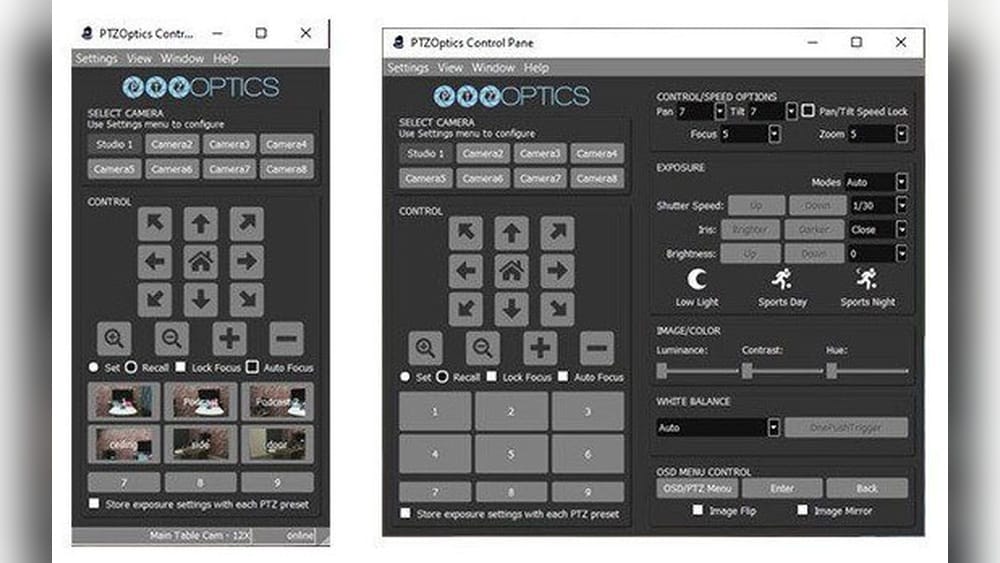
PTZ camera control is the process of operating a camera’s movement and zoom remotely. Unlike fixed cameras, PTZ models can change their view and focus with the push of a button or through automated software. This remote control can happen over a network, using a physical joystick, or even from a smartphone app.
The main elements of PTZ camera control include:
- Pan: Moving the camera left or right
- Tilt: Moving the camera up or down
- Zoom: Adjusting the lens to move closer or farther from the subject
While the concept seems simple, the technology behind these features is quite advanced. Motors inside the camera move it smoothly and quietly. The zoom lens can be optical (using glass elements) or digital (using image processing), and modern PTZ cameras often combine both for better results.
Types Of Ptz Camera Control
PTZ camera control comes in different forms, depending on how you want to operate the camera:
- Manual Control: Using a joystick or buttons to move the camera in real-time.
- Preset Control: Storing certain camera positions, so you can return to a specific view instantly.
- Automated Control: Using software or artificial intelligence to follow movement, faces, or set schedules.
How Ptz Camera Control Works
To understand PTZ camera control, let’s break down the main components and how they work together.
The Hardware
A PTZ camera contains several key parts:
- Motors: Small, quiet motors move the camera’s body for pan and tilt, and adjust the lens for zoom.
- Sensors: These detect the camera’s position and help it move to the correct spot.
- Controller: The brains of the system, which receives commands and tells the motors what to do.
- Lens: Provides optical zoom for clear close-ups.
The Control Methods
PTZ cameras can be controlled in a few different ways:
- Wired control: Using cables, such as RS-232 or RS-485, to send commands.
- Network control: Using IP (Internet Protocol) over Ethernet cables or Wi-Fi for remote access.
- Infrared remote: Similar to a TV remote, but with limited range.
Software Integration
Modern PTZ cameras often connect to computers or networks, allowing for advanced software control. This includes:
- Camera management software: Lets you control many cameras from one place.
- Video conferencing platforms: Such as Zoom or Teams, which can move the camera to focus on the person speaking.
- Live streaming software: Like OBS, to automate camera movements during broadcasts.
Credit: marshall-usa.com
Key Features Of Ptz Camera Control Systems
When choosing or using a PTZ camera control system, several features matter most:
- Preset positions: Save up to hundreds of camera angles for quick recall.
- Speed control: Adjust how fast the camera pans, tilts, or zooms for smooth motion.
- Focus modes: Switch between auto and manual focus, depending on your needs.
- Image stabilization: Reduces shakiness, especially when zoomed in far.
- Power over Ethernet (PoE): Allows both power and control signals over one cable, making installation easier.
Not all PTZ cameras have every feature, so it’s important to match your needs to the camera’s capabilities.
Common Uses Of Ptz Camera Control
PTZ camera control is valuable in many settings. Here are some of the most popular:
Video Conferencing
In conference rooms, PTZ cameras let teams focus on the speaker or a whiteboard, improving engagement. Presets allow fast switching between people or areas. Some advanced systems use voice tracking, so the camera moves automatically to whoever is talking.
Live Broadcasting
TV studios, churches, and sports venues use PTZ cameras to capture events from different angles. Operators can control multiple cameras from a single station, making broadcasts more dynamic and cost-effective.
Security And Surveillance
PTZ cameras are common in security systems for banks, airports, and public spaces. Operators can follow suspicious people or zoom in for details, covering large areas with fewer cameras.
Education
Schools and universities use PTZ cameras to record lectures or stream classes. Teachers can move around the room while the camera follows them, creating more interactive videos.
Houses Of Worship
Many churches use PTZ cameras for live streaming services, switching views between the pulpit, choir, and audience. Volunteers can control cameras easily, even with little technical experience.

Credit: datavideo.com
Advantages Of Ptz Camera Control
Why are PTZ cameras so popular compared to fixed cameras or manual operation?
1. Flexibility
With one PTZ camera, you can cover many angles and zoom levels. This reduces the number of cameras needed and allows for creative shots.
2. Remote Operation
You don’t need to be in the room with the camera. Operators can control cameras from another location, or even from home, which is especially useful for live events.
3. Cost Savings
Fewer cameras and less staff time mean lower costs. In many cases, one person can control multiple PTZ cameras at once.
4. Professional Quality
PTZ cameras deliver smooth, cinematic movements and can focus quickly, producing high-quality video for streaming or recording.
5. Easy Integration
PTZ camera control systems work well with modern video platforms and automation tools, making them suitable for almost any workflow.
Challenges And Limitations
While PTZ camera control offers many benefits, it’s not perfect. Here are a few challenges to consider:
Learning Curve
Operating a PTZ camera smoothly takes practice. Beginners may struggle with jerky movements, slow reaction times, or accidentally losing track of the subject.
Limited Field Of View
While PTZ cameras can move, they can only see one area at a time. For full coverage, you may still need multiple cameras.
Latency
Network-controlled cameras may have a slight delay, especially over Wi-Fi. This can make fast-moving subjects harder to follow.
Wear And Tear
The motors and moving parts in PTZ cameras can wear out over time, especially with heavy use.
Security Risks
Networked PTZ cameras can be targets for hackers. It’s important to keep software updated and use strong passwords.
Manual Vs. Automated Ptz Camera Control
Let’s compare the two main approaches to PTZ camera control: manual and automated.
| Feature | Manual Control | Automated Control |
|---|---|---|
| Operator Needed | Yes | No or minimal |
| Precision | High (with skilled operator) | Depends on software |
| Reaction Time | Immediate | May lag with complex tasks |
| Setup Complexity | Simple | Requires configuration |
| Cost | Lower (basic systems) | Higher (advanced software) |
Manual control is best for live events where human judgment matters, like sports. Automated control is great for routine tasks, such as tracking a lecturer or speaker in a meeting.
Key Technologies Behind Ptz Camera Control
Modern PTZ camera control relies on several technologies:
Motorized Movement
High-quality PTZ cameras use stepper motors for precise, smooth movement. Cheaper models may use less accurate motors, leading to jerky or noisy movements.
Control Protocols
Cameras and controllers communicate using protocols like VISCA, Pelco-D, or IP-based commands. VISCA, developed by Sony, is very common and allows for advanced features like presets and speed control.
Video Transmission
PTZ cameras can send video over:
- HDMI or SDI: For broadcast-quality, low-latency transmission.
- USB: For plug-and-play use with computers.
- IP Streaming: For sending video over a network or the internet.
Some cameras offer multiple output types for maximum flexibility.
Integration With Other Systems
PTZ cameras often work alongside microphones, lighting, and other equipment. Integration allows for features like auto-framing, where the camera follows whoever is talking, or scene presets that change lighting and camera angles together.
Practical Tips For Using Ptz Camera Control
To get the most from PTZ camera control, keep these tips in mind:
- Plan your shots: Before an event, set up and test preset positions. This saves time and avoids mistakes.
- Practice smooth movements: Don’t jerk the camera—use slow, steady motions for a professional look.
- Use presets wisely: Store common angles (like wide shot, speaker close-up) to switch quickly during live events.
- Keep the lens clean: Dust or fingerprints can ruin your video quality, especially when zoomed in.
- Update firmware: New software updates can add features or fix bugs, making your camera more reliable and secure.
- Secure your network: Use strong passwords and keep cameras behind firewalls to prevent hacking.
- Label cables: If you use multiple cameras or controllers, clear labels help avoid confusion during setup or troubleshooting.
Many beginners forget to check network bandwidth. If your camera streams over Wi-Fi, weak signals can cause lag or dropped frames. Always test your setup in advance.
Ptz Camera Control In Different Industries
PTZ camera control is a flexible tool, but each industry uses it in unique ways.
Broadcasting And Live Events
In TV studios or concert halls, PTZ cameras often handle wide shots, close-ups, and roaming views. Operators may control several cameras from a central console, switching between presets to capture the best angles.
Education
Colleges stream lectures or classroom discussions with PTZ cameras. Some systems use face tracking to follow teachers as they move, while others rely on students pressing a button to focus the camera.
Security
Security operators use PTZ cameras to scan parking lots, airports, or stadiums. Automated systems can patrol on schedules, but manual control is used for suspicious activity.
Corporate Meetings
Many companies use PTZ cameras in boardrooms. Integration with meeting software lets users control the camera with their laptop or even by voice.
Houses Of Worship
Churches and synagogues use PTZ cameras to stream services. Volunteers can run the cameras from a simple tablet interface, switching views for music, readings, or sermons.
Choosing The Right Ptz Camera Control System
With so many options, how do you pick the right PTZ camera control setup? Here are the most important factors:
| Feature | Why It Matters | What to Look For |
|---|---|---|
| Control Type | Determines ease of use and flexibility | Joystick, software, app, or automation |
| Camera Quality | Affects image sharpness and zoom performance | Full HD or 4K resolution, optical zoom |
| Integration | Works with your existing video systems | Compatibility with Zoom, OBS, Teams, etc. |
| Presets | Saves time in live events or meetings | Number of presets, speed of recall |
| Network Security | Protects against hacking | Encryption, password controls |
| Power Options | Simplifies installation | Power over Ethernet (PoE) support |
Always read reviews and talk to other users in your field. Some features may look great on paper but add complexity you don’t need.
Common Mistakes When Using Ptz Camera Control
Many first-time PTZ camera users make these errors:
- Ignoring camera placement: Put your camera too high or too low, and you’ll get awkward angles. Test before final installation.
- Overusing zoom: Zooming in too much can make the video shaky and lose detail.
- Forgetting to save presets: Not setting up presets wastes time and leads to missed shots.
- Neglecting security: Leaving default passwords is a major risk for networked cameras.
- Underestimating cable length: Always measure your room and make sure your cables reach comfortably.
A non-obvious mistake is forgetting audio sync. If your camera’s video and your microphone’s audio don’t match, viewers will notice. Test your full system before going live.
Future Trends In Ptz Camera Control
PTZ camera control is evolving quickly. Here’s what’s coming next:
Artificial Intelligence
AI-powered PTZ cameras can recognize faces, track speakers, and even follow gestures. Some systems use AI to automatically switch between cameras for the most interesting view.
Cloud Control
Soon, you’ll be able to control cameras from anywhere using cloud-based dashboards. This is useful for organizations managing many locations.
4k And 8k Video
Higher resolution cameras are becoming affordable. These allow for digital zoom and cropping without losing quality, making PTZ cameras even more versatile.
Integration With Other Devices
PTZ cameras will increasingly work with smart lighting, microphones, and even presentation software, allowing for fully automated events.
Real-world Example: Ptz Camera Control In Action
Imagine a university lecture hall. A PTZ camera is installed at the back of the room. The IT department sets up three presets:
- Wide shot: Shows the whole class.
- Lectern shot: Focuses on the professor.
- Whiteboard shot: Zooms in for notes.
During class, the professor presses a button to change views. The camera moves smoothly between presets. When the professor walks around, the camera uses face tracking to follow. The class is recorded and live-streamed for remote students.
After a semester, the university finds that student engagement is up, and remote learners report better understanding. The IT team spends less time managing equipment, and the camera has not needed repairs thanks to gentle, automated movements.
Credit: feelworld.ltd
How To Set Up Ptz Camera Control
If you’re planning to install a PTZ camera control system, follow these steps for success:
- Assess your space: Map out where you need coverage. Consider line of sight and lighting.
- Choose your camera: Match your needs for resolution, zoom, and control type.
- Plan your cabling: Decide if you’ll use Power over Ethernet, HDMI, or wireless. Run cables cleanly and label them.
- Install the camera: Mount securely, avoiding vibration or movement from doors or HVAC.
- Configure the network: Assign static IP addresses to network cameras, and set strong passwords.
- Set up presets: Program common views for quick access.
- Test and train: Practice using the camera and presets. Teach others who will operate it.
- Integrate with other systems: Link to your streaming software or video conference platform.
- Maintain regularly: Clean the lens, update firmware, and check connections.
A key insight: Lighting makes a big difference. Even the best PTZ camera can look bad in poor light. Invest in good, even lighting for best results.
Ptz Camera Control Vs. Fixed Cameras
Is a PTZ camera always better than a fixed camera? Not always. Here’s a quick comparison:
- PTZ cameras are best for flexible coverage, large areas, or when you need to follow action.
- Fixed cameras are simpler, cheaper, and often more reliable since they have no moving parts.
In many setups, a combination works best. Use PTZ cameras for main action and fixed cameras for backup or wide shots.
Essential Accessories For Ptz Camera Control
To get the most from your PTZ camera control system, consider these accessories:
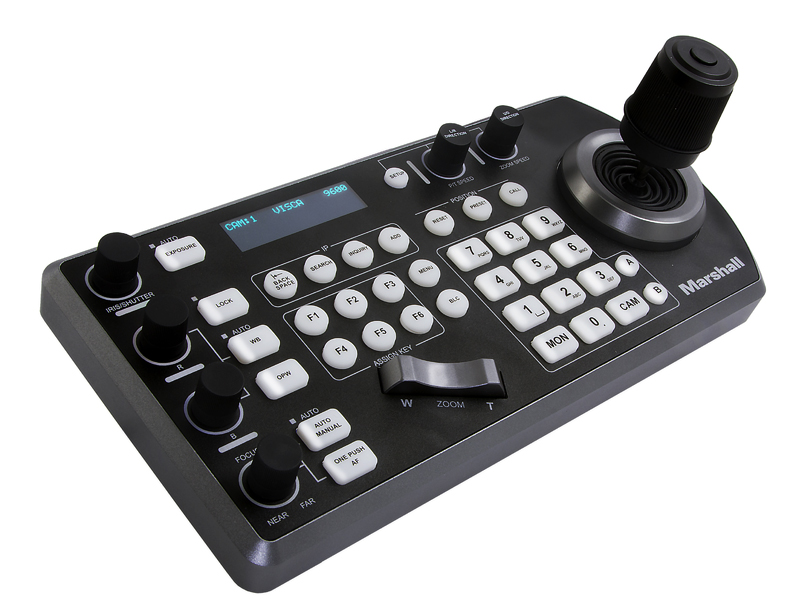
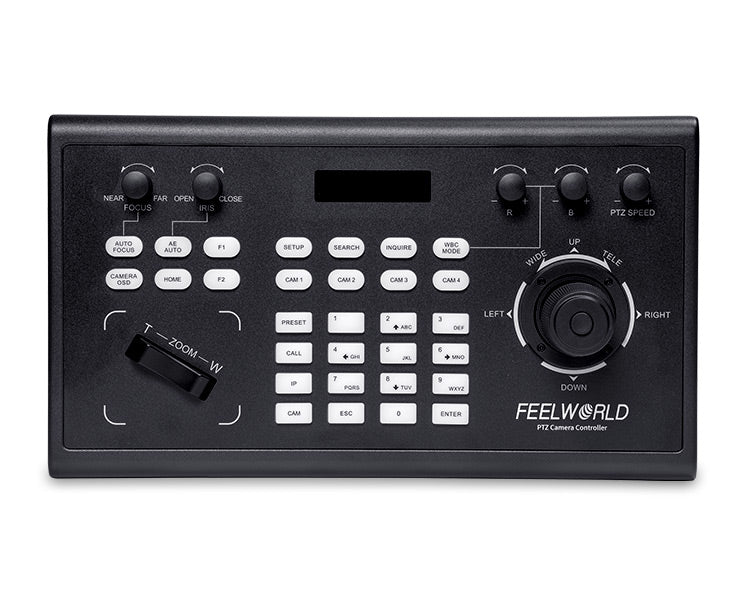
- Joysticks: Physical controllers for precise movement.
- Wall or ceiling mounts: For secure installation and best angles.
- PoE injectors or switches: To supply power and data over a single cable.
- Remote control extenders: For controlling cameras from far away.
- Protective cases or housings: For outdoor or dusty environments.
- Cable management kits: To keep installations neat.
Investing in the right accessories can save time and prevent issues down the line.
Security Tips For Ptz Camera Control
Because PTZ cameras are often networked, security matters. Here’s how to stay safe:
- Change default passwords: Use strong, unique passwords for every camera.
- Keep firmware updated: Manufacturers release updates to fix security holes.
- Use firewalls: Block unwanted traffic to your cameras.
- Disable unused features: Turn off remote access or ports you don’t need.
- Monitor logs: Watch for unexpected logins or activity.
For more on camera security, see the Cybersecurity & Infrastructure Security Agency.
Frequently Asked Questions
What Does Ptz Stand For In Cameras?
PTZ stands for Pan-Tilt-Zoom. It describes a camera that can move left and right (pan), up and down (tilt), and zoom in or out, all by remote control.
Can I Control A Ptz Camera From My Phone?
Yes, many PTZ cameras have apps for iOS or Android. These apps let you move the camera, zoom, and change settings from your phone, as long as the camera is connected to the same network.
How Many Presets Can A Ptz Camera Store?
Most PTZ cameras can store between 10 and 250 preset positions. The exact number depends on the camera model and control system.
Are Ptz Cameras Good For Live Streaming?
Yes, PTZ cameras are ideal for live streaming because they can cover multiple angles, follow action, and switch views smoothly—all from one device.
How Do I Secure My Ptz Camera From Hackers?
To secure your PTZ camera, change default passwords, update the firmware regularly, use strong network security, and disable any features you don’t use. Always follow best practices for IT security.
PTZ camera control has transformed the way we capture, stream, and monitor video. From classrooms to stadiums, these powerful tools offer flexibility, quality, and convenience. By understanding how they work and following best practices, you’ll get professional results and avoid common pitfalls.
Whether you’re running a business, producing live events, or improving security, PTZ camera control can make your video operations smoother, smarter, and more engaging.