
What Is Uid On Security Camera
If you have ever set up a security camera at home or in your office, you might have seen the term Uid in the manual or on the box. For many people, this word is confusing. Is it a password? Is it a username? Or is it something more technical? In the world of security cameras, understanding the Uid is important for both security and convenience. Cameras are getting smarter, and remote monitoring is now common. Still, the technical words can make things confusing.
Knowing what Uid means, why it exists, and how it works will help you set up your security camera correctly and keep your video feeds secure. This guide will explain everything about Uid in security cameras, from its definition to how it is used in practice. We will also discuss common problems, security risks, and practical tips to make your camera setup smoother and safer.
What Is Uid? Breaking Down The Term
Uid stands for Unique Identifier. In the context of security cameras, it is a special code given to each camera device. Think of it as a fingerprint or an ID card for your camera. No two cameras have the same Uid, even if they are the same model or from the same company.
How Is A Uid Formed?
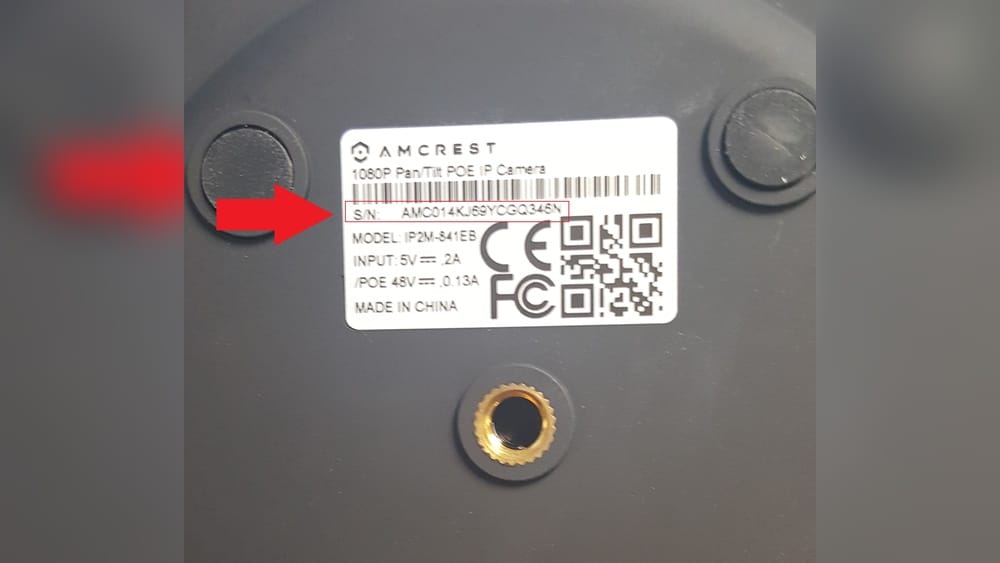
Usually, the Uid is a combination of letters and numbers. It can be printed on a sticker on the camera, written in the manual, or shown on the camera’s box. The format can look like this: “AB12-CD34-EF56-7890”. Some Uids are shorter, and some are longer. The main point is that the code is unique to your camera.
Uid Vs Username Vs Password
Many people confuse the Uid with a username or password. Here’s how they are different:
- Uid: A unique code for identifying the camera. Usually cannot be changed.
- Username: The name you use to log in to the camera or app. Can often be changed.
- Password: A secret key for logging in and keeping the camera secure. Should always be changed from the default.
The Uid is mostly used for finding and connecting to your camera, especially when using a mobile app or remote viewing software.
Why Do Security Cameras Use A Uid?
Security cameras are often placed in different locations — sometimes far from the main internet router or outside the building. This can make setting up the camera complicated, especially if you want to access the video from your smartphone or laptop when you are not at home.
The Role Of Uid In Camera Networking
Before the use of Uids, cameras had to be set up using IP addresses. IP addresses can change or may be hard to remember, especially for people who are not tech experts. The Uid makes things easier:
- Plug and Play Setup: Many modern cameras use “P2P” (Peer to Peer) technology. Here, the Uid is the key to linking your camera with your app instantly, without complex network settings.
- Remote Access: The Uid allows you to view your camera feed from anywhere, as long as you have the right app and the Uid code.
- No Need for Static IP: Static IP addresses cost extra and need more setup. Uids avoid this requirement.
Example: Adding A Camera By Uid
Imagine you buy a new security camera. The setup app asks you for the Uid. You scan the QR code on the camera, and the app adds your device automatically. No network expert needed.
Where To Find The Uid On A Security Camera
For most cameras, the Uid is easy to find if you know where to look:
- Sticker on the Camera: Most manufacturers put a label on the camera’s body, often near the power plug or on the bottom.
- Packaging Box: The Uid is sometimes printed on the box, near the barcode or product information.
- User Manual: Some brands include the Uid in the manual that comes with the camera.
- Camera App: If the camera is already set up, you can often find the Uid in the settings menu of the app or web interface.
If you lose the sticker or box, you might have to check the camera’s software or contact the manufacturer.
How Does Uid Work In Security Camera Systems?
Understanding how the Uid works behind the scenes gives you more control and confidence in managing your camera.
The Technical Process
When you connect a security camera to your network and start the app, this is what usually happens:
- The camera connects to your internet router.
- The camera sends its Uid and status to a central server (usually managed by the camera brand).
- When you open the app and enter the Uid, the app talks to the same server.
- The server matches the Uid with your camera and helps the app connect to the video feed.
This process is called P2P (Peer to Peer) communication. The Uid is the link between your device and the camera, even if you are in a different city.
Uid And Cloud Servers
Many cameras use cloud servers to handle Uid connections. This has some advantages:
- Easy setup: No need to mess with firewalls or port forwarding.
- Remote access: Check your camera from anywhere with an internet connection.
But there are some downsides too, especially around privacy and security, which we will discuss later.
Common Formats Of Uid
Not all Uids look the same. The format depends on the camera brand and the technology used.
Sample Uid Formats
- Alphanumeric with Hyphens: AB12-CD34-EF56-7890
- All Numbers: 123456789012
- Letters Only: CAMERAXYZ
- QR Code: Many cameras print a QR code containing the Uid for easy scanning.
Example Brands And Their Uid Styles
Here is a sample comparison of how different brands use Uid formats:
| Brand | Uid Format | How to Find |
|---|---|---|
| Hikvision | Alphanumeric, 9-16 chars | Sticker, App Settings |
| Dahua | Letters + Numbers, 16 chars | Label, Manual |
| Wyze | QR code (encoded Uid) | On Device, Box |
| Foscam | 12-digit number | Sticker, Web UI |
How To Use Uid For Remote Viewing
Most people use the Uid when they want to view their camera from far away — for example, checking your home while you are at work or on vacation.
Typical Steps For Remote Access
- Install the Camera App: Download the official app for your camera brand.
- Register or Log In: Some apps need you to create an account for extra security.
- Add Device by Uid: The app will ask for the Uid. You can type it or scan the QR code.
- Connect and View: The app uses the Uid to connect to your camera. If your phone and camera are online, you can see the video.
Using Uid On Multiple Devices
You can often add the same camera to more than one phone or tablet using the Uid. This is useful for families or businesses, but always check your camera’s settings for security options.

Credit: www.ebay.com
Uid Security: Risks And Best Practices
The Uid system makes camera setup simple, but it also creates some security risks. If someone knows your camera’s Uid, they may try to access it. Understanding these risks helps you protect your privacy.
Main Security Risks
- Default Passwords: Many cameras come with weak or public default passwords. If someone has your Uid and the default password, they might get access.
- Uid Sharing: If you share your Uid with people you do not trust, they can add your camera in their own app.
- Cloud Server Breaches: If the manufacturer’s cloud server is hacked, Uids and camera data could be leaked.
Real-world Example
In 2019, security researchers found that some cheap cameras had public default passwords and simple Uids. Hackers were able to watch thousands of cameras by guessing Uids and using default logins.
How To Make Your Camera Safer
- Change Default Passwords: After setup, always use a strong, unique password.
- Do Not Share Uid Publicly: Treat your Uid like a password — share only with trusted people.
- Check Manufacturer Updates: Update your camera’s firmware for the latest security fixes.
- Use Two-Factor Authentication: Some brands offer this for extra protection.
Uid Vs Mac Address Vs Serial Number
It is easy to confuse these terms. Here’s a quick comparison:
| Term | What It Is | Can It Be Changed? | Main Use |
|---|---|---|---|
| Uid | Unique code for camera | No (usually fixed) | Remote access, app setup |
| MAC Address | Network hardware ID | No (hardware set) | Network connection |
| Serial Number | Product identifier | No (device label) | Warranty, support |
When Uid Is Not Enough: Extra Security Steps
Some advanced users want even more protection than just a strong password and Uid. Here are a few options:
Network Isolation
Set up your camera on a separate network, called a VLAN or guest network, to keep it away from your main devices. If the camera is hacked, your other devices stay safe.
Disable P2p/uid If Not Needed
Some cameras allow you to turn off P2P/Uid remote access. If you only view your camera on your home network, you can turn this off for better security.
Use A Vpn
A Virtual Private Network (VPN) lets you access your home network securely from anywhere. If you are comfortable with technology, this is one of the safest ways to view your cameras.

Credit: support.amcrest.com
Common Problems With Uid On Security Cameras
While Uid systems are designed to be easy, things can still go wrong. Knowing how to solve these issues can save you time and stress.
Typical Uid Problems
- App Cannot Find Camera by Uid: This happens if the camera is offline or if the Uid is entered incorrectly.
- Uid Already Registered: If you bought a used camera, the Uid might be linked to a previous owner’s account.
- Uid Not Recognized: Rare, but sometimes a manufacturing error or a fake camera can cause this.
Troubleshooting Tips
- Check Camera Power and Network: Make sure your camera is plugged in and connected to the internet.
- Double-Check the Uid: Type it exactly as shown, paying attention to similar letters and numbers (like “O” and “0”).
- Reset the Camera: Most cameras have a reset button. Hold it for 10 seconds to restart setup.
- Contact Support: If nothing works, reach out to the manufacturer with your Uid and camera details.
Uid And Privacy: What You Need To Know
Privacy is a big concern for anyone using internet-connected cameras. The Uid system helps with easy access, but it also creates new privacy questions.
Who Can See Your Camera Feed?
- You and Trusted Users: Anyone with the Uid and password.
- Manufacturer’s Servers: Some brands can view your camera for support or troubleshooting, but this should be clear in their privacy policy.
- Hackers: If your Uid and password are leaked, hackers may try to access your feed.
Tips For Better Privacy
- Read the Privacy Policy: Make sure you understand what the manufacturer can see.
- Turn Off Cameras When Not Needed: Some cameras have a “privacy mode” that disables video.
- Delete Old Uids: If you sell or give away a camera, reset it to factory settings to remove your Uid info.
Data Handling And Legal Issues
In some countries, strict laws control how camera data is stored and who can access it. This is important for businesses, landlords, and even private homeowners. Check your local laws to avoid trouble.
Credit: www.kentfaith.com
Uid In Multi-camera Systems
If you have more than one camera, each one will have its own Uid. Managing many cameras can be a challenge, but Uids make it easier.
Adding Multiple Cameras
Most camera apps let you add several devices by their Uids. You can give each camera a name (“Front Door”, “Garage”, etc. ) In the app for easy control.
Uid Management In Businesses
For large installations (like offices, warehouses, or stores), keeping track of Uids is important. Some companies use spreadsheets or special software to record Uids, passwords, and camera locations.
Example Workflow
A small business with 10 cameras might:
- Keep a secure list of all Uids and device names.
- Assign different user accounts for managers and staff.
- Use the app to monitor all cameras in one dashboard.
Uid And Integration With Smart Home Systems
Many people want their security cameras to work with other smart devices, such as alarms or smart lights. The Uid is usually part of this integration, especially when using cloud-based smart home platforms.
How Integration Works
- Connect Camera to Smart Hub: Use the camera’s Uid to add it to a smart home app (like Alexa or Google Home).
- Set Automation Rules: For example, if motion is detected on a camera (identified by Uid), turn on the porch light.
- View Feeds in One Place: Some smart home apps let you see all your cameras (by their Uids) in a single view.
Limits And Compatibility
Not every camera brand works with every smart home system. Always check compatibility before buying. Look for brands that support open standards or have good integration guides.
Uid And Firmware Updates
Updating your camera’s firmware is important for security and new features. The Uid is often used by the manufacturer to identify your device for updates.
How Updates Use Uid
- The update server checks your camera’s Uid to see what version it is running.
- The right firmware package is sent to your camera based on its Uid.
- After the update, the Uid remains the same, but the camera’s features or security may improve.
Why Updates Matter
Ignoring updates can leave your camera open to hackers, especially if a security flaw is found. Always enable automatic updates if your camera supports it.
What To Do If You Lose Or Forget Your Uid
Sometimes, people lose the sticker or cannot find the Uid for their camera. Here is what you can do:
- Check the App: If the camera is already added, you can usually find the Uid in the app’s device info section.
- Web Interface: Many cameras have a web portal. Log in and look for device info.
- Contact Manufacturer: Give them your serial number and any proof of purchase. They may be able to help.
- Camera Reset: As a last resort, reset the camera to factory settings and go through setup again. This may generate a new Uid.
Uid In The Age Of Cloud Security Cameras
Cloud-based cameras are becoming more popular. The Uid is a key part of how these systems work.
How Cloud Cameras Use Uid
- Quick Setup: Just scan the Uid and connect to the cloud.
- Multi-Location Viewing: Log in from anywhere and see your video feeds.
- Subscription Services: Some brands tie the Uid to your cloud plan, so you can store footage safely online.
Cloud Security Concerns
While cloud storage is convenient, it is important to trust the company with your data. Always use strong passwords and check how the company handles security. For more detail, you can visit Wikipedia’s Cloud Video Surveillance page.
Uid And Camera Replacement Or Resale
If you upgrade your camera or sell it, you must handle the Uid correctly.
For Sellers
- Factory Reset: Always reset the camera. This erases your Uid info from the device.
- Remove from App Account: Delete the camera from your account or app.
For Buyers
- Check for Old Uid Links: Make sure the camera is not still linked to someone else’s app.
- Register Your Own Account: Add the Uid to your own app to take full control.
Advanced: Uid-based Api And Automation
Tech-savvy users or businesses sometimes use the Uid for automation or integration with other systems.
Examples Of Advanced Usage
- API Integration: Some cameras allow third-party apps to connect using the Uid.
- Automated Alerts: Send notifications to your phone or email when a camera (identified by Uid) detects motion.
- Centralized Management: Use software to monitor many cameras across locations, all managed by their Uids.
Things To Watch Out For
- API Security: Make sure any integration uses secure methods (like encryption).
- Manufacturer Limitations: Not all brands allow API access by Uid.
The Future Of Uid In Security Cameras
Technology is always changing. The Uid system may evolve with new features and better security.
Trends To Watch
- Biometric Access: Some cameras may add fingerprint or face scanning in the future.
- Blockchain-Based Uids: For better security and tracking.
- More Smart Integrations: Cameras working with even more home and business systems.
What Will Stay The Same
The need for easy, secure identification of devices will not go away. The Uid (or a similar system) is likely to stay important for years to come.
Frequently Asked Questions
What Happens If Someone Else Knows My Camera’s Uid?
If someone knows your Uid and your password, they could potentially access your camera. Always use a strong password and do not share your Uid with people you do not trust.
Can I Change My Camera’s Uid?
Usually, the Uid is fixed by the manufacturer and cannot be changed. If you need a new Uid, you may need to reset or replace the camera.
Is The Uid The Same As The Camera’s Serial Number?
No, the Uid is used for connecting your camera in apps and for remote access, while the serial number is for warranty and support. They are different numbers.
What Should I Do If I Cannot Find My Camera’s Uid?
Check the camera’s body, box, or app. If you still cannot find it, contact the manufacturer with your serial number for help.
Are All Security Cameras Required To Have A Uid?
Most modern IP and cloud cameras use a Uid for easy setup and remote access. Some older or analog cameras do not have Uids and need more technical setup.
Security cameras are now part of daily life, at home and at work. The Uid system makes them easier to set up and use, but it is important to know how it works and how to keep your devices safe. By learning about Uids, you can enjoy the convenience of modern security without putting your privacy at risk. Stay informed, update your devices, and always use good security habits for the best protection.