

Every year, more people and businesses install security cameras to protect their homes, offices, and public spaces. One common question is: “Do security cameras record all the time?” If you’re considering buying a security system, or want to understand how your current cameras work, it’s important to know which cameras offer 24/7 recording—and what that actually means. This article explains what security cameras record continuously, how they operate, the benefits and drawbacks, and how to choose the right system for your needs.
Understanding 24/7 Security Camera Recording
Not all security cameras record all the time. Some only record when they detect motion or sound. Others offer continuous recording—they capture footage every minute of every day, even if nothing is happening.
What Does “24/7 Recording” Mean?
A camera with 24/7 recording is always on, always storing video. It does not wait for movement, light changes, or triggers. This means it can capture everything—helpful if you want a full record of what happens in a location.
Why Is 24/7 Recording Important?
There are several reasons people choose cameras that record nonstop:
- No missed moments: Even if a motion sensor fails, you have video.
- Better for investigations: You can review any time period, not just triggered clips.
- More reliable evidence: A continuous record is harder to dispute or tamper with.
- Works in busy or sensitive areas: In places with constant activity, motion-only recording would create too many clips.
However, this approach also means much more data to store and manage.
Types Of Security Cameras That Record 24/7
Many security cameras can record all the time, but not all do by default. Let’s look at the main types that support continuous recording.
1. Wired Analog Cctv Systems
Traditional CCTV cameras—often seen in stores, banks, and public buildings—are designed for nonstop recording. They use coaxial cables to connect to a digital video recorder (DVR).
- How they record: The DVR stores footage from every camera, 24 hours a day.
- Storage: Large hard drives, sometimes several terabytes, keep footage for days or weeks.
- Benefits: Reliable, hard to hack remotely, simple to operate.
- Drawbacks: Installation needs wiring; not wireless or cloud-based.
2. Network Video Recorder (nvr) Systems
Modern NVR systems work with IP cameras, sending digital video over Ethernet cables or Wi-Fi.
- How they record: The NVR receives video streams and can be set to record all the time, or only on events.
- Storage: High-capacity hard drives, sometimes with backup options.
- Benefits: High-quality video, easier remote access, add more cameras easily.
- Drawbacks: Higher upfront cost, network setup required.
3. Poe (power Over Ethernet) Cameras
PoE cameras are a type of IP camera powered and connected by a single Ethernet cable.
- How they record: Often used with NVRs for 24/7 capture.
- Benefits: Fewer cables, stable power and data, clear video.
- Drawbacks: Need Ethernet cable runs, not plug-and-play for beginners.
4. Some Wi-fi Cameras
Many Wi-Fi cameras are marketed as “smart” and often default to event-based (motion or sound) recording to save space. However, some models allow continuous recording if you add a large microSD card or subscribe to special cloud plans.
- How they record: Either to internal memory or the cloud.
- Benefits: Easy to install, good for renters or small spaces.
- Drawbacks: Not all Wi-Fi cameras support 24/7 recording; check specs.
5. Professional-grade Systems
Hospitals, casinos, airports, and government buildings use enterprise-level security systems that always record.
- How they record: Massive, multi-terabyte servers capture and store weeks or months of video.
- Benefits: Highest reliability, can integrate analytics, multiple backup options.
- Drawbacks: Expensive, need professional setup and maintenance.
6. Dvr/nvr Hybrid Systems
Some modern systems support both analog and digital cameras. They can be programmed for continuous recording across all connected devices.
- How they record: DVR for analog, NVR for IP cameras—both can record nonstop.
- Benefits: Flexible, good for upgrading old systems.
- Drawbacks: More complex management.
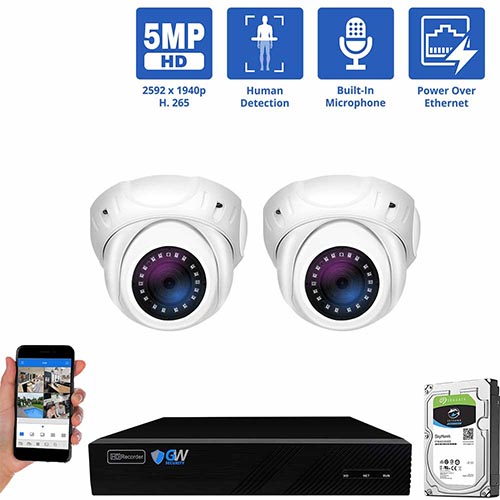
Credit: gwsecurityusa.com
How 24/7 Recording Works
To understand 24/7 video capture, it helps to know what happens “behind the scenes.”
Storage Methods
Continuous video creates large amounts of data. Security systems use several methods to handle this:
- Hard Drives: Most common for homes and small businesses. Drives range from 500GB to 12TB or more.
- Network Attached Storage (NAS): A dedicated device on your network that stores video from many cameras.
- Cloud Storage: Some cameras upload all video to the cloud, but this requires fast internet and costs more.
- SD Cards: Only for small setups (like 1–2 cameras), since cards fill up quickly.
Video Compression
To save space, cameras use video compression—formats like H.264, H.265, or newer standards. These reduce file size without losing too much quality.
Overwriting Old Footage
Most 24/7 systems use a “loop recording” method: when the drive fills up, the oldest video is deleted to make room for new footage. That means your “history” depends on storage size and the quality setting.
Example: How Many Days Can You Store?
Suppose you have a 2TB hard drive and 4 cameras, each recording at 1080p, 15 frames per second.
- At medium compression, you might store about 14–21 days of continuous video before old footage is overwritten.
A higher resolution or more cameras means less history. Lower settings (like 720p) mean you can keep footage longer.
Key Features To Look For In 24/7 Security Cameras
If you want a camera system that records all the time, pay attention to these features:
- Continuous Recording Mode: Not all cameras support this. Check the technical specs.
- Large Storage Capacity: Look for DVR/NVR systems that accept big hard drives (at least 1–2TB per camera for 2 weeks of history).
- Overwrite Function: The system should automatically delete old video.
- Remote Access: Can you view footage from your phone or computer?
- High Video Quality: 1080p or better is standard for useful evidence.
- Night Vision: Essential for 24/7 operation, especially outdoors.
- Durability: Weatherproof rating (IP66+) for outdoor use.
- Good Power Backup: Consider battery or UPS backup for power outages.

Credit: www.amazon.com
Comparing Popular 24/7 Security Camera Systems
Here’s a side-by-side look at some well-known options that support continuous recording:
| Brand/Model | Type | Max Cameras | Storage | Continuous Recording |
|---|---|---|---|---|
| Reolink RLK8-800B4 | NVR (PoE) | 8 | 2TB HDD (expandable) | Yes |
| Amcrest NV4108E | NVR (PoE) | 8 | 2TB HDD (expandable) | Yes |
| Hikvision DS-7608NI | NVR (PoE) | 8 | 6TB HDD (expandable) | Yes |
| Swann DVR-5580 | DVR (Analog) | 8 | 2TB HDD (expandable) | Yes |
| Arlo Ultra 2 | Wi-Fi | 5 | Cloud + local storage | Yes (with subscription) |
Benefits Of 24/7 Security Camera Recording
There are strong reasons to choose continuous video recording, especially for safety and legal reasons.
Always Have Evidence
With 24/7 recording, you never miss a moment. This is important if you:
- Want to catch sneaky behavior that avoids motion sensors
- Need to prove an event happened (or did not happen)
- Must monitor sensitive locations (like cash registers, entrances)
Peace Of Mind
Knowing every second is recorded can make people feel safer. It also helps in workplaces, where disputes over incidents can be resolved by checking the video.
Deterrence
Visible cameras that record all the time can discourage theft, vandalism, or even workplace issues. Criminals usually avoid places with active surveillance.
Supports Compliance
Some industries require continuous surveillance for legal reasons—like banks, pharmacies, and casinos. Not having 24/7 footage could mean fines or legal trouble.
Not Dependent On Motion Sensors
Motion detection can be fooled by slow movement, darkness, or clever tricks. With continuous recording, you don’t rely on software to decide what’s important.
Drawbacks And Challenges Of 24/7 Recording
While always-on recording has advantages, it’s not for everyone.
High Storage Needs
Continuous video eats up disk space fast. A single HD camera can use 60GB or more per day. Multiply by several cameras, and you need big, reliable storage.
Bandwidth Concerns (for Cloud Systems)
If your cameras upload to the cloud, 24/7 video can quickly fill your internet connection and cost more in monthly fees.
Privacy Issues
Recording every moment raises privacy questions, especially in homes, offices, or public places. Some countries have strict rules about who can record, where, and for how long.
Hardware Lifespan
Hard drives in always-on systems wear out faster. Plan for replacement every few years, or use drives rated for surveillance.
Reviewing Footage Takes Time
When you need to find a specific event, it can be slow to scroll through hours of footage. Good software helps by letting you search by time, date, or even motion bookmarks.
When To Choose 24/7 Recording Vs. Motion-triggered
Is nonstop recording the right choice for you? Consider these scenarios:
When 24/7 Recording Makes Sense
- High-risk locations: Banks, stores, parking lots, warehouses.
- Busy environments: Schools, hospitals, public buildings.
- Legal or insurance needs: Places where you may need full video records.
- Remote sites: Where you want a record even if no events happen for days.
When Motion-triggered Recording Is Enough
- Homes: Most people only need video of real activity.
- Low-traffic areas: Garages, storage rooms, backyards.
- Limited storage: If you can’t add big hard drives.
Hybrid Options
Some systems let you set different modes for each camera or schedule. For example, record 24/7 during business hours, and motion-only at night.
Practical Tips For Setting Up 24/7 Security Camera Recording
Small changes can make your system more reliable and easier to manage.
- Choose Surveillance-Grade Hard Drives: These are built for continuous writing and last longer than regular PC drives.
- Set Video Quality Wisely: Higher resolution means less storage time. Find a balance between detail and history length.
- Plan Storage Expansion: Buy NVR/DVR units that let you add more drives.
- Test Power Backup: Use an uninterruptible power supply (UPS) so cameras don’t stop during outages.
- Keep Firmware Updated: This helps prevent bugs and security holes.
- Use Secure Networks: For IP/Wi-Fi cameras, set strong passwords and update regularly to reduce hacking risks.
- Monitor Storage Space: Set alerts for low disk space so you don’t lose footage unexpectedly.
- Regularly Review Footage: Don’t just set and forget—check video quality and camera angles monthly.
- Respect Privacy Laws: Post signs if required and don’t record in private areas like bathrooms.
Cost Comparison: 24/7 Vs. Motion-based Security Systems
How does continuous recording affect cost? Here’s a simple breakdown.
| System Type | Upfront Cost | Ongoing Cost | Storage Needs | Internet Use |
|---|---|---|---|---|
| 24/7 Wired NVR/DVR | $$–$$$ | Low (replace drives) | High (large HDD) | Low (local) |
| Motion-Triggered Wi-Fi | $–$$ | Medium (cloud fees) | Low (SD card/cloud) | Medium–High (cloud) |
| 24/7 Cloud-Based | $–$$ | High (large cloud plan) | Unlimited (cloud) | High (constant upload) |
- Upfront cost is higher for wired systems but usually cheaper over time.
- Cloud storage is easy, but can be expensive for 24/7 video.
- Local storage is more private and reliable if the internet goes down.
Real-world Examples Of 24/7 Camera Use
Retail Stores
Shops often use DVR or NVR systems with 8–32 cameras, recording all day. This helps catch shoplifters, resolve staff disputes, and reduce fraud.
Apartment Buildings
Property managers install continuous-recording cameras at entrances, hallways, and garages. This protects tenants and property.
Gas Stations
Since gas stations are open late and attract crime, 24/7 video is essential. Footage often helps police solve cases.
Homeowners With Valuable Property
People with expensive cars, tools, or large homes may want continuous recording—especially in high-crime areas.
Industrial Sites
Factories and warehouses use nonstop video for safety, theft prevention, and to monitor operations.
Common Mistakes To Avoid With 24/7 Security Cameras
Not Checking Storage Limits
Many people set their cameras to always record, then discover footage only goes back a few days because the drive is too small. Always check how much video you can keep.
Ignoring Camera Placement
If a camera’s view is blocked, or it’s pointed at a wall, you’ll record hours of useless footage.
Forgetting Power Backup
A power outage can mean lost footage at a critical moment. Always use a UPS or battery backup for your recording device.
Using The Wrong Hard Drive
Regular computer hard drives may fail quickly. Use drives labeled for “surveillance” or “NAS. ”
Not Setting Up Alerts
If your system stops recording or runs out of space, you need to know right away. Set up email or app alerts.
Overlooking Privacy
Recording neighbors, employees, or public areas without warning can cause legal trouble. Know the laws in your area.
Not Testing The System
Check your footage regularly to make sure it’s clear and the cameras work—don’t wait until something happens.
How To Choose The Right 24/7 Security Camera System
Selecting a continuous-recording camera depends on your needs, budget, and technical ability.
Questions To Ask
- How many cameras do you need?
- Do you want local or cloud storage?
- How long do you need to keep footage?
- Is internet speed a concern?
- Will you install it yourself or hire a pro?
- Is remote access important?
Key Factors
- Reliability: Wired systems are usually more stable.
- Ease of Use: Wi-Fi cameras are easier for beginners but may not offer true 24/7 recording.
- Scalability: Can you add more cameras later?
- Support: Does the brand offer good customer service and updates?
Popular Choices
- For home use: Reolink, Amcrest, and Swann offer kits that support 24/7 NVR/DVR recording.
- For small businesses: Hikvision and Dahua provide robust systems.
- For cloud-based: Arlo and Nest (with paid plans) support continuous video.
For more technical details on video surveillance, you can visit the Wikipedia CCTV overview.
Security Camera Recording Laws And Best Practices
Know Your Local Rules
In the US and many other countries, it’s legal to record video where there’s no expectation of privacy (like public entrances). However, recording audio usually requires consent. Laws vary by state or country—always check before installing cameras.
Best Practices
- Post signs warning people about cameras.
- Avoid cameras in bathrooms, bedrooms, or other private spaces.
- Store footage securely and delete old files according to privacy rules.
- Only share footage with police or authorized people.
Data Protection
If your cameras store footage in the cloud, use strong passwords and two-factor authentication. Data leaks can be expensive and embarrassing.

Credit: www.amazon.com
Frequently Asked Questions
What’s The Difference Between 24/7 Recording And Motion-triggered Recording?
24/7 recording means the camera captures every second, all day, every day. Motion-triggered recording only records when the camera detects movement or sound. Continuous recording uses more storage, but guarantees nothing is missed.
How Much Storage Do I Need For 24/7 Video?
It depends on the number of cameras, video quality, and how long you want to keep footage. As a rough guide, a single 1080p camera recording 24/7 needs about 60GB per day. For a month of storage on 4 cameras, you’d need about 7TB.
Can Wireless Cameras Record 24/7?
Some Wi-Fi cameras offer continuous recording, but many only support event-based video. If you want 24/7, check the specs—look for microSD card slots, NVR compatibility, or paid cloud plans that allow constant recording.
Is It Legal To Record Video All The Time?
In most countries, you can record video in public or business areas. Private spaces (like bathrooms, bedrooms) are off-limits. Audio recording is more restricted. Always post signs and check local laws.
What Happens When The Storage Is Full?
Most 24/7 systems use loop recording—when the hard drive fills up, the oldest footage is automatically deleted to make space for new video. You can adjust settings to control how long clips are kept.
Security cameras that record 24/7 provide powerful protection, but require careful planning. Choose the right system for your needs, understand storage and privacy issues, and you’ll have peace of mind knowing your property is always under watch.