
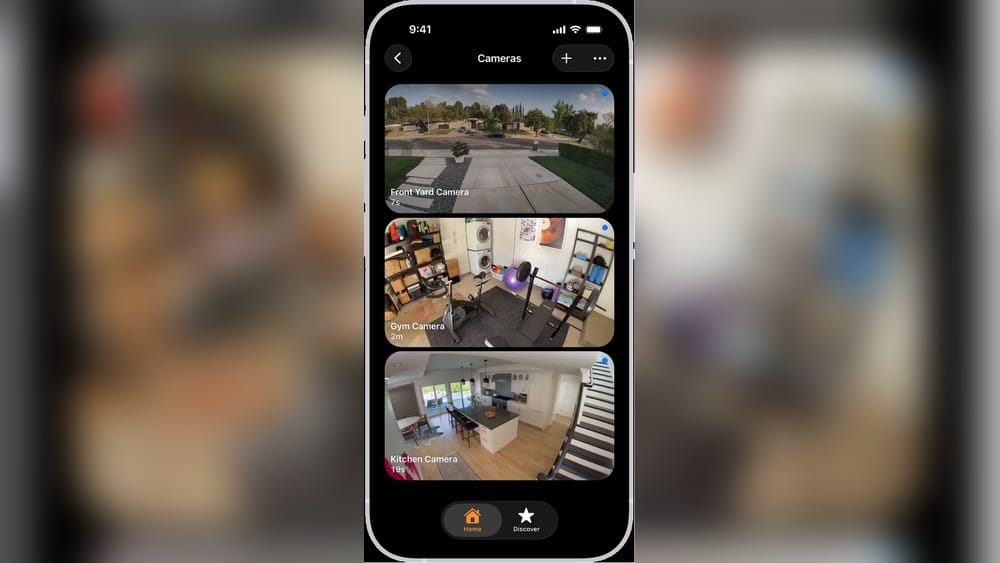
Every home is unique, but the need for security is universal. Today, more people want to control security cameras with their Apple HomeKit setup. HomeKit lets you manage smart devices from your iPhone, iPad, Apple Watch, or even with voice commands to Siri. But not every security camera works with HomeKit. Choosing the right camera means understanding compatibility, features, and what really matters for safety. This guide explores which security cameras work with Apple HomeKit, how they integrate, and what you need to know before buying.
Apple Homekit: A Quick Overview
Apple HomeKit is a smart home platform built into Apple devices. It connects and controls smart devices like lights, thermostats, door locks, and security cameras. With HomeKit, you can:
- Use the Home app to view cameras and control devices.
- Set up automations, like turning on lights when motion is detected.
- Get notifications on your Apple devices.
- Watch live video feeds or view recordings (if supported).
HomeKit gives privacy and security by encrypting your data and keeping it within the Apple ecosystem. To use a camera with HomeKit, it must have HomeKit certification. This means Apple has tested the camera for compatibility and security.
Why Choose Homekit-compatible Security Cameras?
HomeKit cameras are not just about seeing what’s happening. They add convenience and safety:
- Privacy: Apple protects video streams and recordings, so only you can access them.
- Integration: Cameras work with other HomeKit devices. For example, you can trigger alarms or lights.
- Remote Control: Watch live video from anywhere using your Apple device.
- Easy Setup: HomeKit cameras are usually simple to connect—just scan a code and follow instructions.
- Smart Notifications: Get alerts when motion or people are detected.
Not all smart cameras offer these features. Many popular brands support their own apps, but only a few work smoothly with HomeKit.
Understanding Homekit Secure Video
One feature that makes HomeKit cameras special is HomeKit Secure Video (HSV). It lets you store camera footage securely in iCloud. With HSV, you get:
- Encrypted recordings: Only you (and people you choose) can view videos.
- Advanced detection: The system can recognize people, pets, vehicles, and packages.
- Rich notifications: See snapshots and event details on your lock screen.
- Privacy controls: Choose when cameras record or stream (for example, only when you’re away).
To use HomeKit Secure Video, you need:
- A compatible camera (not all HomeKit cameras support HSV).
- An Apple Home hub (Apple TV, HomePod, or iPad).
- An iCloud+ subscription (minimum 50GB plan).
Which Security Cameras Work With Apple Homekit?
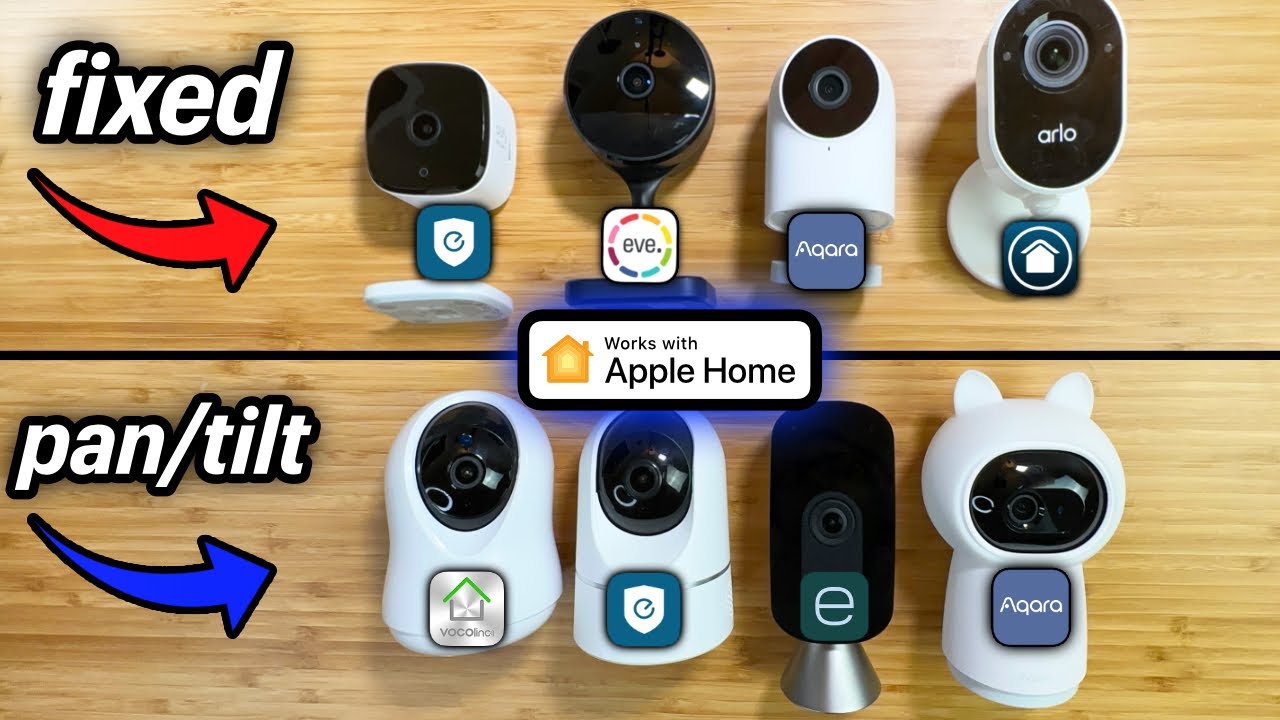
HomeKit compatibility is not universal, but more brands are joining. Here are the leading options in the market, with their main features and HSV support.
| Brand | Model | HomeKit Support | HomeKit Secure Video | Key Features |
|---|---|---|---|---|
| Logitech | Circle View | Yes | Yes | 1080p, night vision, weatherproof |
| Netatmo | Smart Indoor/Outdoor | Yes | Yes | Person detection, SD card backup |
| Eufy | Indoor Cam 2K | Yes | Yes | 2K resolution, pan & tilt |
| Arlo | Ultra 2, Pro 4 | Yes (via hub) | No | 4K video, wireless, color night vision |
| Aqara | Camera Hub G2H | Yes | Yes | Hub features, 1080p, compact |
| Ecobee | SmartCamera | Yes | Yes | 1080p, wide angle, person detection |
| D-Link | Omna 180 Cam HD | Yes | No | 180° view, microSD recording |
| VOCOlinc | VC1 Opto | Yes | Yes | 1080p, privacy shutter |
Many brands offer HomeKit support, but not all models support HomeKit Secure Video. This is important if you want to store recordings in iCloud.
Credit: deauvillegreenawards.com
Top Homekit-compatible Security Cameras: Detailed Review
Let’s look at the best HomeKit cameras, their features, and how they fit your needs.
Logitech Circle View
The Logitech Circle View is built for Apple HomeKit from the ground up. It offers 1080p HD video, night vision, and a weatherproof design for outdoor use. Setup is simple: plug in, scan the HomeKit code, and connect.
Key features:
- HomeKit Secure Video support.
- Privacy controls: Tilt the camera down or unplug to stop recording.
- Wide field of view: 180° angle covers more area.
- Easy integration: Works smoothly with other HomeKit devices.
Many users like its reliability and privacy. One beginner insight: the camera does not have a built-in speaker for two-way audio. If you need to talk through your camera, check other models.
Netatmo Smart Indoor And Outdoor Cameras
Netatmo offers both indoor and outdoor cameras with HomeKit support. These cameras are popular for their person detection and local recording (SD card backup).
Key features:
- HomeKit Secure Video (after recent firmware updates).
- Person detection: Only alerts when a person is seen, not just motion.
- Local backup: Record to SD card, so you don’t rely on cloud storage.
- Weatherproof: Outdoor version is designed for tough conditions.
A non-obvious insight: Netatmo cameras can work without a subscription, saving money long-term. However, setting up HSV requires updating firmware and connecting to a Home hub.
Eufy Indoor Cam 2k
Eufy is known for affordable, high-quality cameras. The Indoor Cam 2K works with HomeKit and supports HSV. It offers 2K resolution for sharp video and a pan-and-tilt feature for wider coverage.
Key features:
- HomeKit Secure Video enabled.
- 2K resolution: Better clarity than 1080p models.
- Pan & tilt: Remotely adjust camera angle.
- AI detection: Recognizes people and pets.
One detail many miss: Eufy cameras lose some advanced features (like local AI detection) when used only through HomeKit. You must choose between using Eufy’s app or full HomeKit integration.
Arlo Ultra 2 And Pro 4
Arlo cameras are popular for outdoor security. Models like Ultra 2 and Pro 4 support HomeKit, but only if you use the Arlo SmartHub. These cameras don’t support HomeKit Secure Video, so recordings stay in Arlo’s cloud.
Key features:
- 4K video: High resolution for clear images.
- Wireless design: Easy to install anywhere.
- Color night vision: See more detail at night.
Common mistake: Many think Arlo cameras will record to iCloud, but they don’t. You must use Arlo’s app and cloud for storage.
Aqara Camera Hub G2h
The Aqara G2H doubles as a HomeKit camera and a Zigbee hub for other smart devices. It is compact, records in 1080p, and supports HSV.
Key features:
- HomeKit Secure Video supported.
- Zigbee hub: Connects other smart sensors.
- Two-way audio: Talk and listen through the camera.
Aqara is often overlooked, but it’s ideal for small spaces or users wanting more automation.
Ecobee Smartcamera
Ecobee is famous for thermostats, but their SmartCamera is a strong HomeKit option. It offers wide-angle 1080p video and person detection.
Key features:
- HomeKit Secure Video enabled.
- Wide field of view: 180° covers large rooms.
- Person detection: Reduce false alerts.
One practical tip: Ecobee cameras are best for indoor use. They don’t have weatherproofing for outdoor installation.
D-link Omna 180 Cam Hd
The D-Link Omna was one of the first HomeKit cameras. It has a 180° view and records to microSD cards. However, it doesn’t support HSV.
Key features:
- HomeKit support (no Secure Video).
- Local recording: No cloud storage needed.
- Wide angle: See more of the room.
D-Link cameras are simple but lack advanced detection features.
Vocolinc Vc1 Opto
The VOCOlinc VC1 Opto is a newer HomeKit camera with privacy shutter and 1080p video. It supports HSV and is budget-friendly.
Key features:
- HomeKit Secure Video supported.
- Privacy shutter: Cover lens when not recording.
- Flexible mount: Place anywhere indoors.
Beginner mistake: Not all privacy shutters are motorized. Check if you need manual or automatic control.
How To Set Up A Security Camera With Apple Homekit
Setting up a HomeKit camera is usually simple. Here’s a step-by-step guide:
- Unbox and power up your camera. Plug it in and wait for lights to show it’s ready.
- Open the Home app on your iPhone or iPad.
- Scan the HomeKit code (usually found on the camera or in the manual).
- Follow prompts to name your camera and choose its location (room).
- Connect to Wi-Fi if needed.
- Adjust settings: Choose when to record, set notifications, and enable HSV if supported.
Tips for a smooth setup:
- Place your camera near your Wi-Fi router for strong signal.
- Update your camera firmware before connecting to HomeKit.
- Use an Apple TV, HomePod, or iPad as your Home hub for remote access and automation.
Many beginners forget to update firmware, which can block HomeKit features.

Credit: cannesamenagementhabitat.fr
Comparing Homekit Cameras: What Matters Most?
Choosing the right camera means balancing features, price, and compatibility. Here’s how popular HomeKit cameras compare on key points:
| Camera | Resolution | Indoor/Outdoor | HSV Support | Audio | Typical Price |
|---|---|---|---|---|---|
| Logitech Circle View | 1080p | Both | Yes | One-way | $160 |
| Netatmo Smart Outdoor | 1080p | Outdoor | Yes | Two-way | $299 |
| Eufy Indoor Cam 2K | 2K | Indoor | Yes | Two-way | $50 |
| Aqara G2H | 1080p | Indoor | Yes | Two-way | $65 |
| Arlo Ultra 2 | 4K | Outdoor | No | Two-way | $299 |
| Ecobee SmartCamera | 1080p | Indoor | Yes | Two-way | $99 |
Key factors to consider:
- Resolution: Higher is better for detail, but 1080p is enough for most homes.
- Indoor vs Outdoor: Weatherproof cameras are needed for outside.
- HomeKit Secure Video: Only some models support iCloud recording.
- Audio: Two-way audio lets you talk with visitors or pets.
- Price: Budget cameras often do the basics well; premium models add features.
Common Mistakes When Choosing Homekit Cameras
Many people buy cameras without checking important details. Here are mistakes to avoid:
- Ignoring HomeKit Secure Video: Not every HomeKit camera supports HSV. If you want iCloud recordings, check the specs.
- Forgetting about Home hub: You need an Apple TV, HomePod, or iPad as a Home hub for full features. Without it, remote access and automation may not work.
- Choosing the wrong Wi-Fi band: Some cameras only work on 2.4GHz Wi-Fi. If your router uses 5GHz, setup can fail.
- Overlooking firmware updates: New features and bug fixes come with updates. Always check for the latest firmware.
- Mixing brands: Not all brands support automations equally. Some advanced triggers only work with certain devices.
Non-obvious insight: If you use a mix of HomeKit and non-HomeKit cameras, you may have to juggle multiple apps and notifications.
Homekit Camera Privacy And Security
Apple HomeKit cameras focus on privacy. Here’s what you need to know:
- End-to-end encryption: Video streams and recordings are encrypted.
- Local processing: Detection happens on your device, not in the cloud.
- Selective recording: You control when cameras record (for example, only when you’re away).
- Access control: Only people invited to your Home can view cameras.
HomeKit Secure Video protects your footage, even if hackers target your network. Compared to other platforms, Apple’s privacy standards are higher.
Practical Tips For Homekit Camera Placement
Camera placement affects security and performance. Here’s how to get the most from your HomeKit camera:
- Entry points: Place cameras near doors, windows, and garages.
- High traffic areas: Monitor hallways and living rooms.
- Avoid direct sunlight: Glare can reduce video quality.
- Mount height: Place cameras 7–8 feet high for the best angle.
- Wi-Fi signal: Keep cameras within range for smooth streaming.
A common mistake: Placing cameras behind glass windows. Infrared night vision doesn’t work well through glass.
Integrating Homekit Cameras With Other Devices
HomeKit cameras can trigger other smart devices. Examples:
- Lights: Turn on when motion is detected.
- Alarms: Sound if someone is seen outside.
- Locks: Unlock doors when trusted people arrive.
You can set automations in the Home app. For example:
- If motion is detected after 9 pm, turn on porch lights and send an alert.
- When you leave home, all cameras start recording.
Non-obvious insight: Some automations only work if your camera supports HSV and advanced detection.
Alternatives: Using Non-homekit Cameras With Apple Devices
Some people want to use cameras that are not HomeKit-certified. There are workarounds:
- Homebridge: An open-source tool that makes non-HomeKit devices compatible. Requires technical setup.
- Third-party apps: Some apps let you view non-HomeKit cameras in the Home app, but features are limited.
If you want simple setup, stick with HomeKit-certified cameras. Workarounds can be complex and less secure.
Updates And Future Trends
Apple is expanding HomeKit features. Recent updates include better detection, more automation options, and wider camera support. Brands like Eufy, Netatmo, and Aqara are adding HSV to more models.
In future, expect:
- More brands supporting HomeKit.
- Better detection: AI can spot packages, pets, and vehicles.
- Lower prices: Competition is making cameras more affordable.
- Improved privacy: Apple continues to raise security standards.
For the latest news, visit Apple’s official HomeKit page.
Frequently Asked Questions
What Is Homekit Secure Video, And Do I Need It?
HomeKit Secure Video is a feature that stores camera recordings in iCloud with end-to-end encryption. You need a compatible camera, a Home hub (like Apple TV), and an iCloud+ subscription. HSV is best if you want privacy and easy access to recordings.
Can I Use My Homekit Camera Without An Apple Tv Or Homepod?
You can connect a camera to HomeKit without a hub, but you’ll miss remote access, automations, and Secure Video features. For full functionality, use an Apple TV, HomePod, or iPad as your Home hub.
Do All Homekit Cameras Support Recording To Icloud?
No. Only cameras with HomeKit Secure Video support iCloud recording. Some HomeKit cameras only stream live video or record to SD cards. Always check if HSV is supported before buying.
Can I Use Homekit Cameras Outdoors?
Yes, but only if the camera is weatherproof. Models like Logitech Circle View, Netatmo Outdoor, and Arlo Ultra 2 are built for outdoor use. Indoor-only cameras may fail or get damaged outside.
Is Homekit More Secure Than Other Smart Camera Systems?
Apple’s HomeKit is known for privacy and security. Video streams and recordings are encrypted, and processing happens on your device. Compared to many other platforms, HomeKit offers higher privacy, but you must still secure your Wi-Fi and use strong passwords.

Credit: www.wired.com
Final Thoughts
Choosing the right security camera for Apple HomeKit is about more than compatibility. Look for features like HomeKit Secure Video, weatherproof design, resolution, and automation options. Consider how cameras fit your daily life, and always check for firmware updates and hub requirements. With the right setup, you get privacy, convenience, and peace of mind—all controlled from your Apple device. HomeKit keeps evolving, so stay informed for the best smart home experience.