

Many people buy mesh routers to solve Wi-Fi problems at home, but then struggle with where to put each unit. You may wonder, “Should I put my mesh router in the living room, hallway, or bedroom?” Choosing the right spot is not obvious. If you place a mesh node in the wrong location, you might still have weak signals, dead zones, or slow speeds. This article will guide you step by step. You will learn how mesh routers work, the best placement strategies, common mistakes, and how to optimize your setup for strong, stable Wi-Fi everywhere.
What Is A Mesh Router And Why Does Placement Matter?
Mesh routers are systems made of several devices (nodes) working together to cover your home with Wi-Fi. Unlike a single router, mesh routers connect wirelessly or with cables to form a network. Each node spreads Wi-Fi signals further, so you get coverage in every room.
Placement is critical because:
- The signal from each node has a limited range. Walls, floors, and furniture block Wi-Fi.
- Nodes need to communicate with each other. If they are too far apart or blocked, the connection weakens.
- If you place a node in a dead zone, it cannot fix the problem because it needs a strong signal from another node.
Many people think mesh routers magically fix Wi-Fi everywhere, but placement is the real key. Even expensive mesh systems can perform poorly if placed incorrectly.
How Mesh Router Placement Works: The Basics
The main router (the primary node) connects to your modem and sends Wi-Fi to the other nodes (called satellite nodes). Each node must be close enough to another node to get a strong signal. Here is a simple example:
- Main router: Living room (near modem)
- Node 2: Hallway (halfway between living room and bedroom)
- Node 3: Bedroom (where you want better Wi-Fi)
If Node 2 is too far from the main router, it cannot pass a strong signal to Node 3. If Node 3 is too far from Node 2, it won’t work well. The nodes must form a chain or triangle of strong connections.
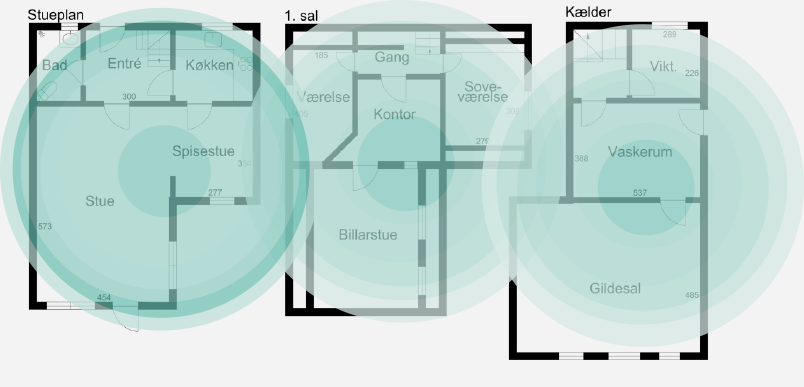
Non-obvious insight: Mesh routers need overlapping coverage. If coverage circles barely touch, you get weak spots.
Key Factors To Consider Before Placing Mesh Routers
1. Home Layout
Homes have different shapes: single-story, multi-story, open-plan, or with many rooms. Wi-Fi behaves differently in each layout.
- Single-story homes: Place nodes so signals overlap in main living areas.
- Multi-story homes: Place nodes on each floor, usually above or below each other, to reach upper/lower rooms.
- Long homes: Space nodes evenly along the length.
2. Building Materials
Some materials block Wi-Fi more than others. For example:
- Concrete, brick, stone: Strong blockers. Avoid placing nodes behind these.
- Wood, drywall: Easier for signals to pass through.
- Glass: Medium blocker, but less than concrete.
Non-obvious insight: Even mirrors and large metal objects (fridges, ovens) can reflect or absorb Wi-Fi. Avoid placing nodes near these.
3. Interference Sources
Electronics like microwaves, cordless phones, and Bluetooth devices can cause interference. Try to keep mesh nodes away from these.
4. Power Outlets
Mesh nodes need power. Make sure you have outlets in the spots you want.
5. Wired Backhaul (optional)
Some mesh systems allow you to connect nodes with Ethernet cables. This is called wired backhaul and improves speed and reliability. If you can use cables, place nodes near Ethernet ports.
Best Practices For Mesh Router Placement
1. Start With The Main Router
Place the primary node close to the modem, usually in a central location. If your modem is in a corner or basement, this is not ideal. If possible, move it to a central area.
2. Place Satellite Nodes Strategically
- Distance: Place each node about halfway between the main router and the area you want to cover. Typical range is 30–50 feet (9–15 meters) for most mesh systems.
- Line of Sight: Try to have a clear path between nodes, avoiding thick walls and large objects.
- Overlap: The coverage circles should overlap by 20–30%. This ensures strong handoff between nodes.
3. Avoid Common Mistakes
- Don’t place nodes in dead zones. They need a strong signal to work.
- Don’t stack nodes vertically without coverage on each floor.
- Don’t hide nodes in cabinets or behind TVs.
4. Use The Manufacturer’s App
Most mesh routers have apps that help you check signal strength and guide placement. Follow their advice, but adjust based on your home’s unique layout.

Credit: www.cnet.com
Typical Mesh Router Placement Scenarios
Scenario 1: Small Apartment (1–2 Bedrooms)
- Main router: Living room, near modem
- Node 2: Bedroom or hallway
For small apartments, you may only need two nodes. Place the second node where Wi-Fi is weak, but not too far from the main router. Often, the hallway is best.
Scenario 2: Large Multi-story House
- Main router: Central area, ground floor
- Node 2: Upstairs hallway, above main router
- Node 3: Downstairs den or basement
Spread nodes across floors. Try to align them vertically if possible. This helps signals reach upstairs/downstairs rooms.
Scenario 3: Long, Narrow House
- Main router: One end (near modem)
- Node 2: Middle of house
- Node 3: Other end
Space nodes evenly along the length. Don’t place two nodes too close together.
Scenario 4: Open Plan House
- Main router: Central area
- Node 2: Far corner (kitchen, office, etc.)
- Node 3: Another corner
Open layouts allow signals to travel further. Place nodes to cover main activity areas.
How To Use Data And Tools For Placement
Wi-fi Signal Strength
Many apps or devices let you measure Wi-Fi strength in each room. Look for:
- -30 to -50 dBm: Excellent signal
- -51 to -70 dBm: Good to fair signal
- -71 to -90 dBm: Weak to unusable signal
Test before and after placing mesh nodes.
Heatmaps
Some mesh router apps create heatmaps showing coverage. Use these to spot weak areas.
Speed Tests
Run speed tests in different rooms. Compare speeds before and after mesh installation.
Comparison Table: Signal Strength Before And After Mesh
Here’s a sample comparison for a 3-bedroom home:
| Room | Before Mesh (dBm) | After Mesh (dBm) | Improvement (%) |
|---|---|---|---|
| Living Room | -60 | -40 | 33% |
| Bedroom | -75 | -50 | 40% |
| Kitchen | -80 | -55 | 44% |
Credit: dkthome.dk
Special Placement Tips For Challenging Homes
Multi-story Homes
Wi-Fi signals move both horizontally and vertically. For strong coverage:
- Place nodes directly above or below each other when possible.
- Avoid placing all nodes on one floor.
- If you have thick floors (concrete), consider using wired backhaul.
Homes With Many Walls
If your home has many rooms and walls:
- Place nodes in hallways or open spaces between rooms.
- Avoid placing nodes inside rooms with closed doors.
- Test signal strength in each room.
Outdoor Coverage
If you want Wi-Fi outside:
- Place a node near a window or door leading outside.
- Weatherproof nodes are needed for outdoor use.
Non-obvious insight: Wi-Fi signals weaken quickly outdoors, especially if passing through walls. You may need a special outdoor mesh node.
How Many Mesh Nodes Do You Need?
The number of nodes depends on:
- Home size
- Layout and materials
- Desired coverage
Most homes need 2–3 nodes. Large homes may need 4–5. Here’s a comparison:
| Home Size | Recommended Nodes | Coverage (sq ft) |
|---|---|---|
| Small apartment | 2 | Up to 1,500 |
| Medium house | 3 | 1,500–3,000 |
| Large house | 4–5 | 3,000–5,000+ |
Wired Vs Wireless Backhaul: Which Is Better?
Wireless backhaul means nodes communicate through Wi-Fi. This is easier to set up but can be affected by walls and interference.
Wired backhaul means nodes connect with Ethernet cables. This gives faster, more reliable connections, especially for homes with thick walls.
| Backhaul Type | Speed | Reliability | Setup Difficulty |
|---|---|---|---|
| Wireless | Medium | Medium | Easy |
| Wired | High | High | Harder |
If you can use wires, do it for main nodes. If not, place nodes carefully to get strong wireless connections.
Common Placement Mistakes To Avoid
- Too far apart: If nodes are too far, they cannot connect well.
- Hidden in cabinets: Wi-Fi signals are blocked by furniture.
- Placed in dead zones: Nodes need to be in strong signal areas.
- Too close together: Overlap is good, but not too much. If nodes are 5 feet apart, they compete.
- Near interference sources: Avoid placing nodes near microwaves, cordless phones, or Bluetooth speakers.
- Ignoring multi-floor coverage: Don’t put all nodes on one floor.
- No testing: Always test signal strength after placement.

Credit: reolink.com
How To Optimize Mesh Router Placement After Setup
1. Test Coverage
Walk around your home with a phone or laptop and check signal strength in every room.
2. Adjust Node Locations
If you find weak spots, move nodes a few feet and retest. Small changes can make a big difference.
3. Use The App’s Recommendations
Many mesh apps give placement tips. Use their advice, but also trust your own testing.
4. Reboot And Re-sync
After moving nodes, reboot them and let the system re-sync. This helps fix problems.
5. Update Firmware
Make sure your mesh router software is updated for best performance.
6. Add More Nodes If Needed
If you still have dead zones, consider adding another node.
Real-world Examples: Mesh Router Placement Success Stories
Example 1: Busy Family Home
A family with a three-story house had weak Wi-Fi upstairs and in the basement. They placed the main router on the ground floor, a node in the upstairs hallway, and another in the basement. They used wired backhaul for the basement node.
Now, every room has strong Wi-Fi.
Example 2: Apartment With Thick Walls
An apartment with concrete walls had poor Wi-Fi in the bedroom. The owner placed the main router in the living room and a node in the hallway just outside the bedroom. This overcame the wall barrier. Wired backhaul was not possible, but careful placement solved the problem.
Example 3: Home Office Setup
A remote worker needed strong Wi-Fi in their office, which was far from the main router. They placed a node halfway between the router and office. They measured signal strength and adjusted placement until the office had excellent speeds.
Mesh Router Placement For Smart Devices
Smart devices (phones, TVs, security cameras, thermostats) need strong Wi-Fi. Place mesh nodes near clusters of smart devices, but not too close. For example:
- Place a node near the living room for smart TVs and speakers.
- Place a node near the front door for security cameras.
Non-obvious insight: Some smart devices only connect to 2.4 GHz Wi-Fi. Make sure mesh nodes support both 2.4 and 5 GHz bands.
Advanced Tips For Maximum Coverage
1. Use Ethernet Where Possible
If you can run cables, use wired backhaul for main nodes. This is especially helpful in homes with thick walls or many devices.
2. Place Nodes At Eye Level
Wi-Fi signals spread best at about 3–4 feet (1–1.2 meters) above the floor. Avoid placing nodes on the ground or high shelves.
3. Avoid Corners And Closets
Corners and closets block signals. Place nodes in open spaces.
4. Experiment With Placement
Move nodes and test. Every home is different.
5. Use Guest Network Features
Some mesh routers offer guest networks. Place a node near the area where guests usually stay.
6. Separate Work And Play
If you work from home, place a node near your office for stable video calls.
Mesh Router Placement For Apartment Buildings
If you live in an apartment building:
- Be aware of neighbor’s Wi-Fi. Choose channels with less interference.
- Place nodes away from shared walls to avoid interference.
- Use mesh system’s app to check for busy channels.
Mesh Router Placement For Business Or Office
For small offices:
- Place main router near the center of the office.
- Place nodes near conference rooms or workstations.
- Use wired backhaul if possible.
- Test for coverage in meeting rooms and break areas.
When Should You Reposition Mesh Routers?
- After adding new devices (TVs, computers)
- After moving furniture or walls
- If you notice slower speeds or dead zones
- When upgrading internet speed
How Mesh Router Placement Affects Speed And Latency
Good placement:
- Increases speed in every room
- Reduces latency for video calls and gaming
- Makes handoff between nodes smoother
Poor placement:
- Causes drops and buffering
- Creates dead zones and slow areas
Mesh Router Placement Vs Traditional Extenders
Mesh routers are better than traditional extenders because:
- They create a single Wi-Fi network (no switching between networks)
- Handoff between nodes is automatic
- Coverage is smoother and more reliable
Extenders often create separate networks and may cause confusion or slower speeds.
Using Mesh Router Apps And Tools
Most mesh systems (e.g., Google Nest, Netgear Orbi, Eero) have apps to help you:
- Check signal strength
- See connected devices
- Run speed tests
- Update firmware
Use these tools for placement and troubleshooting.
Mesh Router Placement For Specific Brands
Some brands have unique features. For example:
- Google Nest WiFi: Offers coverage maps and placement advice.
- Netgear Orbi: Supports wired backhaul and easy setup.
- Eero: Simple app with placement suggestions.
Check your brand’s website for tips. For more technical placement advice, visit CNET’s mesh router placement guide.
Frequently Asked Questions
How Close Should Mesh Nodes Be To Each Other?
Mesh nodes should be 30–50 feet (9–15 meters) apart, with some coverage overlap. If nodes are too far, signal weakens. If too close, coverage is wasted.
Can I Place Mesh Routers In Closed Rooms?
It’s better to place nodes in open spaces like hallways or living rooms. Closed rooms block signals, especially with thick walls or doors.
Do Mesh Routers Work Without A Wired Connection?
Yes, most mesh routers use wireless backhaul. However, wired backhaul gives faster and more reliable connections, especially in large homes.
What’s The Best Height For Placing Mesh Routers?
Place mesh nodes at eye level (about 3–4 feet above the floor). Avoid placing them on the ground or high shelves.
How Many Mesh Nodes Do I Need For My Home?
Most apartments need 2 nodes. Medium houses need 3 nodes. Large homes may need 4–5 nodes. The number depends on size, layout, and materials.
Choosing the right spot for your mesh routers can transform your Wi-Fi experience. With careful placement, testing, and adjustment, you can enjoy fast, stable Wi-Fi in every room, even in challenging homes. Remember, every home is different, so experiment and use the tools provided by your mesh system.
Smart placement is the secret to strong, reliable internet everywhere.