
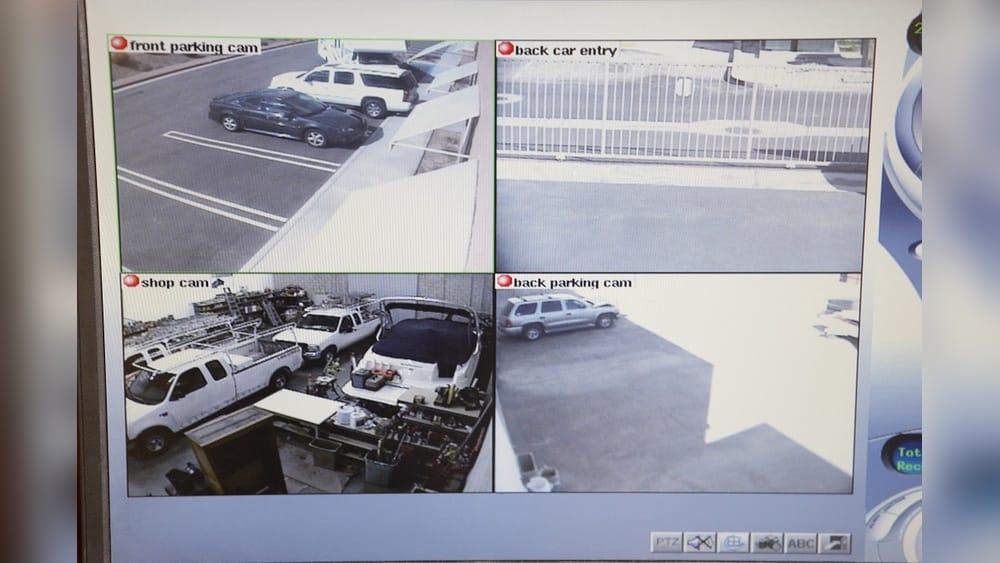
Security cameras are everywhere—on streets, in stores, at homes, and even in schools. But you might notice something strange: many security camera videos look blurry, grainy, and often miss key details. Why are security cameras so low quality, even when technology in phones and TVs has improved so much? This question isn’t just about frustration; it matters for safety, crime prevention, and evidence. Let’s look deeper into the reasons, technical limits, industry choices, and hidden factors behind the quality of security cameras, and what you can do about it.
How Security Cameras Work: A Quick Overview
To understand why security camera footage often disappoints, it helps to know how these devices capture images. Most security cameras use digital sensors to record video. The camera lens directs light onto the sensor, which then converts this light into a digital signal. The footage is then stored locally (in a DVR/NVR) or sent to the cloud.
Key steps:
- Light enters through the lens.
- Sensor captures the light as electrical signals.
- Processor converts signals to digital video.
- Video is saved or transmitted.
The same basic process happens in a smartphone or DSLR camera, but the final video quality depends on several factors: sensor size, resolution, compression, lighting, and storage.
Key Reasons Security Cameras Are Often Low Quality
Many people expect security cameras to record clear, sharp video like their phones. But several important factors make security camera footage look poor:
1. Cost Constraints
Security cameras are often installed in bulk—sometimes hundreds in a single location. To keep costs low, manufacturers use cheaper components:
- Small sensors: Less light, more noise.
- Low-resolution lenses: Can’t capture fine details.
- Cheap processors: Limited ability to handle high-quality video.
Compare this to smartphones, where manufacturers can spend more on a single camera. Most security cameras are designed to be affordable, not to produce cinematic video.
2. Sensor Size And Resolution
The sensor inside a camera is a key factor for image quality. Larger sensors collect more light, which means clearer images with less noise. But security cameras usually have small sensors to save money.
| Device | Sensor Size | Typical Resolution |
|---|---|---|
| Smartphone | 1/2.55″ | 12-48 MP |
| Security Camera | 1/4″ or smaller | 1-8 MP |
| DSLR Camera | APS-C or Full Frame | 18-50 MP |
Small sensors produce grainy images, especially in low light. Also, many cameras have low megapixel counts, making faces and license plates hard to identify.
3. Compression And Storage Limits
Security cameras often record for days or weeks. High-resolution video takes up a lot of space. To manage storage, cameras use video compression (like H.264 or H.265). This reduces file size, but also removes detail.
- More compression = smaller files, lower quality.
- Less compression = larger files, higher quality.
Most systems choose high compression to save space. This makes footage blocky, pixelated, and sometimes misses key details. Many users don’t realize how much quality is lost during compression.
4. Wide Coverage Needs
Security cameras are designed to cover large areas—parking lots, hallways, lobbies. This means one camera tries to watch everything. The wider the angle, the less detail you get.
- Wide-angle lens = larger area, smaller objects.
- Narrow lens = smaller area, more detail.
A camera focused on a doorway can show faces well. But a camera covering a whole parking lot will show only blobs.
5. Lighting Conditions
Security cameras operate in many lighting conditions—day, night, indoors, outdoors. Poor lighting is one of the biggest reasons for bad quality.
- Low light = noisy, blurry images.
- Bright light = overexposed, washed out footage.
Even with infrared (IR) LEDs for night vision, many cameras only show black-and-white, low-detail video. Most security cameras don’t handle changing light as well as consumer cameras.
6. Network Bandwidth Limits
Many modern security cameras are IP cameras that send footage over the internet or local network. High-quality video needs lots of bandwidth, but network traffic can be expensive or limited.
- Low bandwidth = lower frame rate, lower resolution.
- High bandwidth = smoother, clearer video.
To avoid network overload, many cameras send lower quality video. This is especially true for remote monitoring.
7. Installation Choices
How a camera is installed affects quality. If a camera is placed too high, faces are hard to see. If it’s facing bright windows, footage will be washed out. Many installers focus on coverage, not image detail.
8. Weather And Environmental Factors
Outdoor cameras face rain, fog, dust, and temperature changes. All these can reduce image quality. Even lens dirt and water drops can make footage blurry.
9. Software And Firmware Limitations
The software inside a camera controls how it processes and records video. Cheap cameras often have poor software, leading to slow focusing, bad color, or poor motion detection.
10. Outdated Technology And Maintenance
Many security cameras stay in use for years. Technology improves quickly, but old cameras may still operate with outdated hardware. Also, lack of maintenance leads to dirty lenses and worse performance.
Industry Choices: Why Manufacturers Stick To Low Quality
You might wonder why companies don’t simply make better cameras. There are several reasons:
- Price competition: Most buyers want affordable systems. High-quality cameras are expensive and hard to sell in bulk.
- “Good enough” philosophy: For many users, footage is only needed to detect movement or prove someone was in an area, not for identification.
- Legal requirements: Some places only require basic coverage, not detailed video.
- Storage costs: High-definition video means bigger hard drives and more network costs.
- Ease of installation: Lower quality cameras are smaller and easier to install.
Manufacturers build what the market wants. Unless buyers demand higher quality, most will stick to “good enough. ”
Comparing Security Camera Quality: Security Vs. Consumer Devices
Many people notice that their phone takes much better video than a $200 security camera. Why is there such a big gap?
| Feature | Security Camera | Smartphone |
|---|---|---|
| Sensor Size | Small (1/4″) | Medium (1/2.55″) |
| Resolution | 1–8 MP | 12–48 MP |
| Frame Rate | 15–30 fps | 30–60 fps |
| Compression | Heavy (H.264/5) | Light (HEVC/RAW) |
| Lens Quality | Basic | Advanced |
| Lighting Adaptation | Limited | Dynamic |
| Coverage | Wide area | Focused |
Phones are designed for quality and user experience. Security cameras are designed for coverage and cost savings.
Common Misconceptions About Security Camera Quality
Some people believe that security cameras are low quality because they are old or broken. But even new cameras, especially budget models, have similar limits.
- Resolution isn’t everything: A 4K camera with a small sensor still produces grainy images.
- Night vision isn’t always clear: IR LEDs help, but details are lost in darkness.
- More cameras don’t mean better quality: Installing more low-quality cameras doesn’t improve detail; it just covers more area.
Real-world Examples And Data
Let’s look at real statistics and incidents where camera quality mattered:
- In 2019, the FBI reported that only 30% of security footage submitted for criminal cases was clear enough for identification.
- A study by the UK Home Office found that in London, 80% of street cameras produced video too poor for facial recognition.
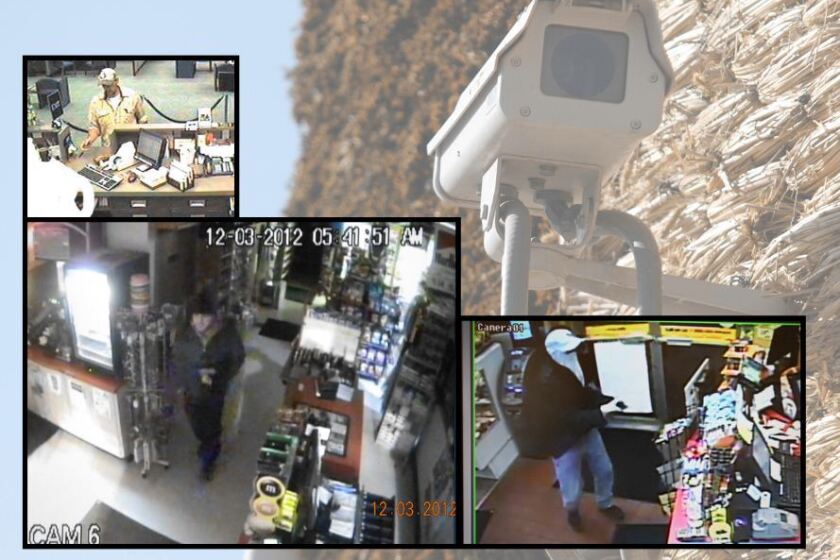
- In a 2022 convenience store robbery, security footage showed only blurry figures, making prosecution difficult.
Many cities and businesses rely on cameras for safety, but often don’t realize how poor the footage is until a crime occurs.
Hidden Insights: What Most Beginners Miss
When people think about improving camera quality, they often focus on resolution. But two key points are often missed:
- Bitrate is critical: The amount of data used per second (bitrate) affects quality more than resolution. High-resolution with low bitrate = blurry video.
- Lens matters more than you think: A good lens can make a cheap sensor look much better. Dirty or low-quality lenses ruin footage.
Another overlooked factor is the frame rate. Many cameras shoot at 15 fps to save space, but this makes motion look choppy and blurry.
Technical Limits: Why Security Cameras Can’t Always Improve
Even if manufacturers wanted to make high-quality security cameras, there are limits:
- Heat and power: High-quality sensors generate more heat and use more power. Security cameras often run 24/7.
- Form factor: Larger sensors and lenses mean bigger cameras, which can be harder to install discreetly.
- Data transfer: High-resolution video needs fast, reliable networks. Many buildings have limited network capacity.
- Software: Advanced image processing needs better chips, which increases cost and complexity.
What Can Be Done: Improving Security Camera Quality
If you want better video from your security system, there are steps you can take:
Choose Cameras With Larger Sensors
Look for cameras with larger sensors (1/2.7″ or bigger). These collect more light and produce clearer images.
Select Higher Bitrate And Lower Compression
Adjust camera settings to use higher bitrate and less compression. This will use more storage, but greatly improves quality.
Focus On Placement
Install cameras where lighting is good, and where they can focus on key areas (doors, entrances). Avoid covering too much area with one camera.
Regular Maintenance
Clean camera lenses regularly. Check for dust, spider webs, or water spots.
Upgrade Older Cameras
Replace outdated cameras with newer models. Technology improves every few years.
Use Better Storage Solutions
Invest in larger hard drives or cloud storage to allow higher quality video.
Adjust Frame Rate
Set cameras to record at 25–30 fps. Motion will look smoother, and details will be easier to see.
Use Cameras With Better Lenses
Spend a bit more for cameras with higher quality glass lenses. This can make a big difference in clarity.
Consider Lighting Upgrades
Add motion-activated lights or floodlights in dark areas. Good lighting improves every camera.
Check Network Bandwidth
If using IP cameras, ensure your network can handle high-quality video.
Future Trends: Are Security Cameras Getting Better?
Camera technology is improving, but slowly in the security industry. Here are some trends:
- 4K and 8K cameras: These are becoming more common, but require big storage and fast networks.
- AI and analytics: Some cameras use AI to enhance video, detect faces, and improve motion detection.
- Cloud storage: Allows for higher bitrate and quality, since storage is not limited.
- Better night vision: New models use advanced IR and low-light sensors.
However, cost and network limits still slow adoption. Most businesses still choose affordable, “good enough” cameras.
Practical Tips For Choosing Security Cameras
If you’re shopping for security cameras, keep these tips in mind:
- Look for sensor size, not just resolution: Bigger sensors mean better quality.
- Check lens specs: Glass lenses perform better than plastic.
- Ask about bitrate: Higher bitrate = clearer video.
- Test in real-world conditions: Try the camera in actual lighting and placement.
- Consider weatherproofing: Outdoor cameras need protection from rain and dust.
- Review storage needs: Make sure you can store high-quality video.
- Avoid ultra-wide angles for identification: Use narrow lenses for key areas.
Many buyers make the mistake of picking the cheapest camera or focusing only on megapixels. But other specs matter more.
Security Camera Quality Vs. Evidence
When footage is needed for evidence, clarity is critical. Courts need clear images to identify suspects. Poor quality footage can lead to:
- Missed prosecutions
- Wrongful accusations
- Insurance claim problems
It’s important to test your cameras and check their footage regularly. Don’t wait until an incident happens to discover poor quality.

Credit: www.cbc.ca
Security Camera Quality Standards
Some countries and industries have standards for security camera quality:
- Resolution: Minimum 720p or 1080p for public areas.
- Frame rate: At least 15–25 fps.
- Retention period: Footage must be kept for 30–90 days.
- Night vision: IR capability for 24/7 coverage.
But these are minimum standards. Actual quality depends on all the factors above.
How To Spot A Low-quality Security Camera
Here are signs a camera is likely low quality:
- Small size and lightweight build
- Vague or missing lens specs
- Only shows grainy or blurry video in demo
- Low price compared to similar models
- No mention of bitrate or frame rate in specs
Always ask to see real sample footage before buying.
Case Studies: When Camera Quality Made A Difference
Retail Store Theft
A retail store installed budget cameras covering the whole entrance. When a theft occurred, footage showed only a blurry figure. Police could not identify the suspect.
Parking Lot Incident
A parking lot used high-resolution cameras with larger sensors. When a car accident happened, footage clearly showed license plates and faces. Insurance claims were settled quickly.
School Security Upgrade
A school upgraded from old analog cameras to new IP cameras with better lenses. Incidents like bullying and vandalism were caught clearly, leading to safer outcomes.
Security Camera Brands And Quality Differences
Different brands offer different quality levels. Some brands focus on budget cameras, while others offer advanced models.
| Brand | Main Focus | Typical Quality |
|---|---|---|
| Hikvision | Bulk, affordable | Basic to mid-range |
| Dahua | Mid-range | Mid-range |
| Axis | High-end, advanced features | High quality |
| Arlo | Consumer, wireless | Mid-range |
| Nest | Smart home | Mid-range |
Higher-end brands often offer better sensors, lenses, and software—but at a higher price.
Credit: www.mitchellrepublic.com
Security Cameras In Different Environments
Camera needs change based on where they are used:
- Homes: Usually focus on entrances, need clear face detail.
- Businesses: Cover large areas, need wide coverage and clear footage.
- Public spaces: Need robust, weatherproof cameras with high resolution.
- Banks and jewelry stores: Need highest quality for evidence.
Choosing the right camera for your environment is key. Don’t use a parking lot camera for a front door.
Alternatives To Standard Security Cameras
Some people use other devices for security:
- Smartphones as cameras: Higher quality, but not designed for 24/7 use.
- Action cameras: Good quality, but expensive and limited battery.
- Webcams: Cheap, but poor quality and limited coverage.
Security cameras are specialized for coverage, but quality is often sacrificed.
Why Security Camera Footage Goes Viral (despite Low Quality)
Many viral videos from security cameras are blurry or grainy, but still spread online. Why?
- Surprise factor: Unexpected incidents caught on camera.
- Relatability: Common situations (slips, accidents) are easy to share.
- Curiosity: People wonder what happened.
Even low-quality footage can be valuable, but for safety and evidence, clarity is much more important.
Frequently Asked Questions
Why Do Security Cameras Seem Worse Than Phones Or Tvs?
Security cameras use smaller sensors, lower resolution, and heavy compression to save cost and storage. Phones and TVs are designed for user experience and high quality, while security cameras focus on coverage and affordability.
Can I Improve My Existing Security Camera Quality?
Yes, you can:
- Clean lenses regularly.
- Adjust bitrate and compression settings.
- Improve lighting around cameras.
- Upgrade to newer models with better sensors and lenses.
What Resolution Is Best For Security Cameras?
For most situations, 1080p (2MP) is a minimum. For large areas or identification, 4MP–8MP is better. However, sensor size and lens quality matter just as much as resolution.
Do Wireless Security Cameras Have Lower Quality?
Often, yes. Wireless cameras use more compression to send video over Wi-Fi, leading to lower quality. Wired cameras can send higher quality video, but require installation.
Where Can I Find More Technical Details On Security Cameras?
For in-depth info, visit the Wikipedia Security Camera page. It covers camera types, technology, and industry standards.
Credit: www.premierwellbeing.ie
Final Thoughts
Security cameras are vital for safety, but their video quality is often lower than expected. This is due to cost, sensor limits, compression, and installation choices. Understanding these factors can help you choose better cameras, improve your system, and ensure clear footage when it matters most. With careful selection and regular maintenance, you can get much better results from your security cameras—even without spending a fortune. Always check real footage before buying, and remember: clear video is not just about technology, but about smart decisions.